Send document comments to nexus7k-docfeedback@cisco.com
5-15
Cisco Nexus 7000 Series Hardware Installation and Reference Guide
OL-23069-06
Chapter 5 Installing Power Supply Units
Connecting a DC Power Supply Unit to DC Power Sources
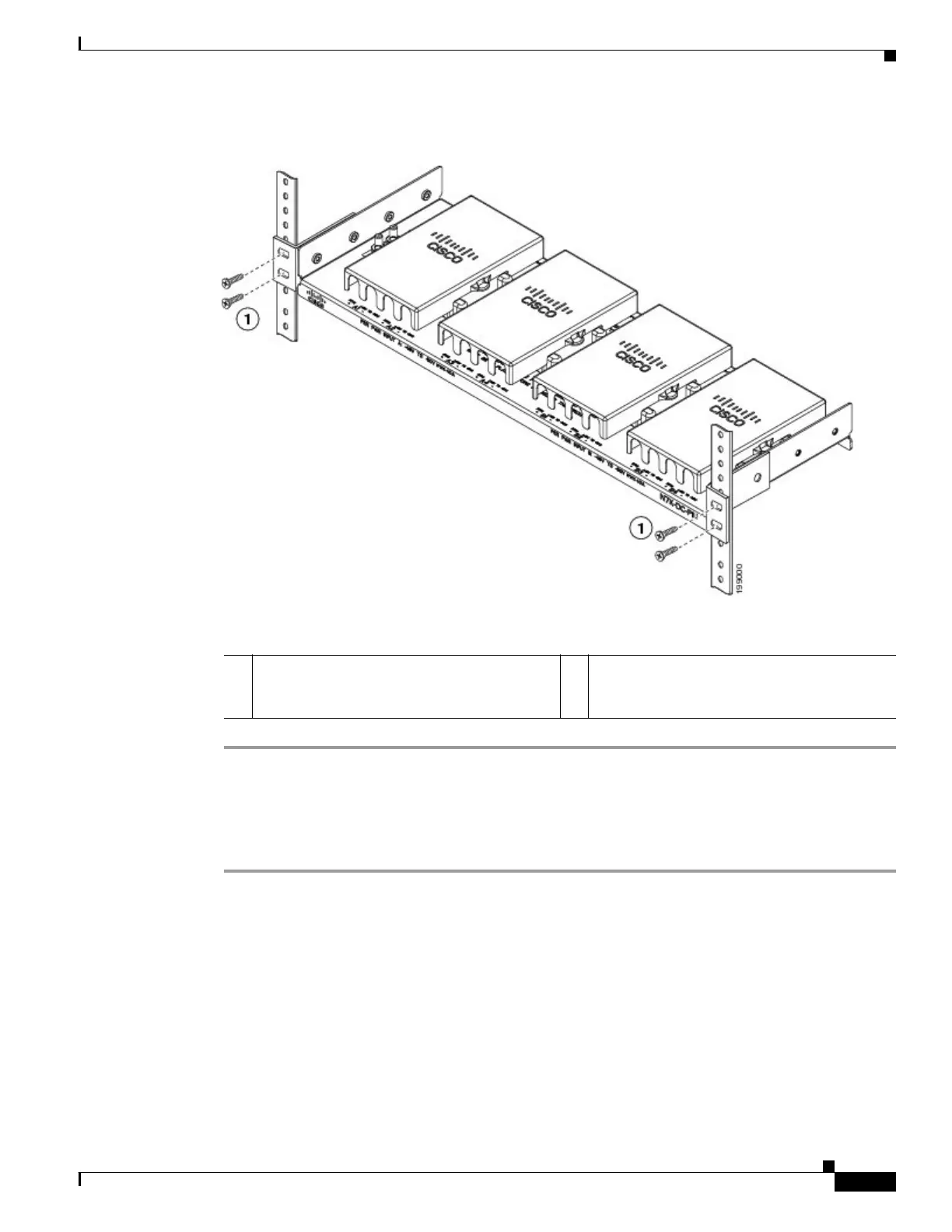
Figure 5-10 Fastening the PIU to a Rack
Grounding the PIU
To ground the PIU, follow these steps:
Step 1 Unscrew the two M6 nuts that hold the grounding lug to the PIU and remove the grounding lug from the
PIU.
Step 2 Use a wire-stripping tool to remove approximately 0.75 inch (19 mm) of the insulation from the end of
the 6 AWG grounding wire that you provide.
Step 3 Insert the stripped end of the grounding wire into the open end of the grounding lug as shown in
Figure 5-1 on page 5-6.
Step 4 Use the crimping tool to crimp the lug to the 6 AWG grounding wire. Verify that the grounding wire is
securely attached to the grounding lug by attempting to pull the wire out of the crimped lug.
Step 5 Secure the grounding lug to the grounding pad threaded studs with the two M6 nuts and tighten them to
40 in-lb (4.5 N·m). Figure 5-11 shows the location of the grounding pads on the PIU. Ensure that the
grounding lug and the grounding wire do not interfere with other PIU equipment.
1 On each side, fasten two M6 x 19 mm or two
12-24 x 3/4 inch screws (total of four screws
for the PIU) and tighten to 40 in-lb (4.5 N·m).










 To Next Page