Send document comments to nexus7k-docfeedback@cisco.com
9-51
Cisco Nexus 7000 Series Hardware Installation and Reference Guide
OL-23069-06
Chapter 9 Replacement Procedures
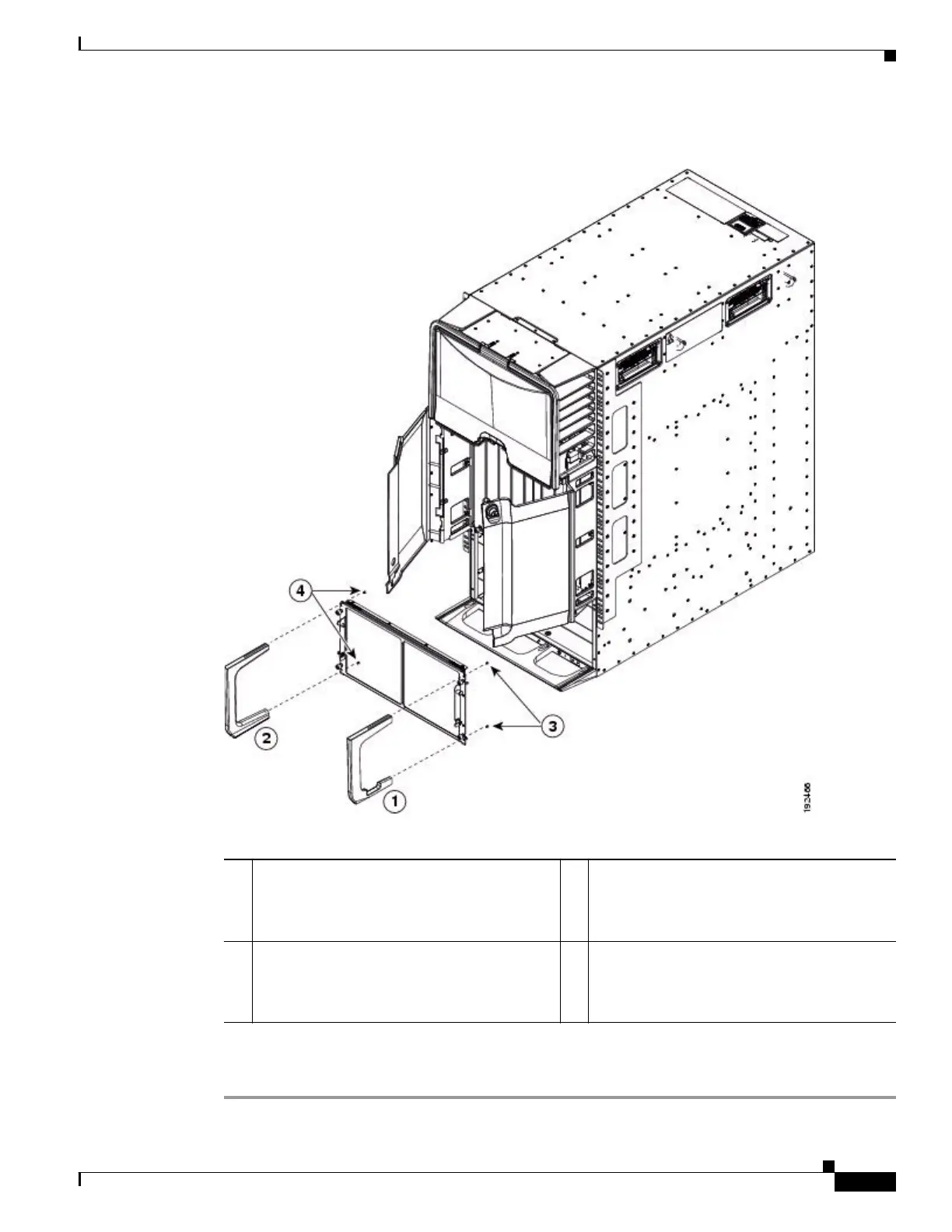
Replacing the Front Doors and Frame Assembly on the Cisco Nexus 7010 Chassis
Figure 9-24 Attaching the Side Frame Assemblies to the EMI Panel
Step 7 Realign the EMI panel to the air intake area on the chassis, screw its four captive screws to the chassis,
and tighten the captive screws to 8 in-lb (0.9 N·m).
1 Right side frame. 3 Use two 6-32 x 1/2-inch flat-head screws to
attach the right side frame to the right side of the
EMI panel. Tighten the screws to 8 in-lb (0.9
N·m).
2 Left side frame. 4 Use two 6-32 x 1/2-inch flat-head screws to
attach the left side frame to the left side of the
EMI panel. Tighten the screws to 8 in-lb (0.9
N·m).










 To Next Page