EasyManua.ls Logo

CITROEN BERLINGO - First Steps

CITROEN BERLINGO
238 pages
Print Icon
To Next Page IconTo Next Page
To Previous Page IconTo Previous Page
Loading...
9
.4
01
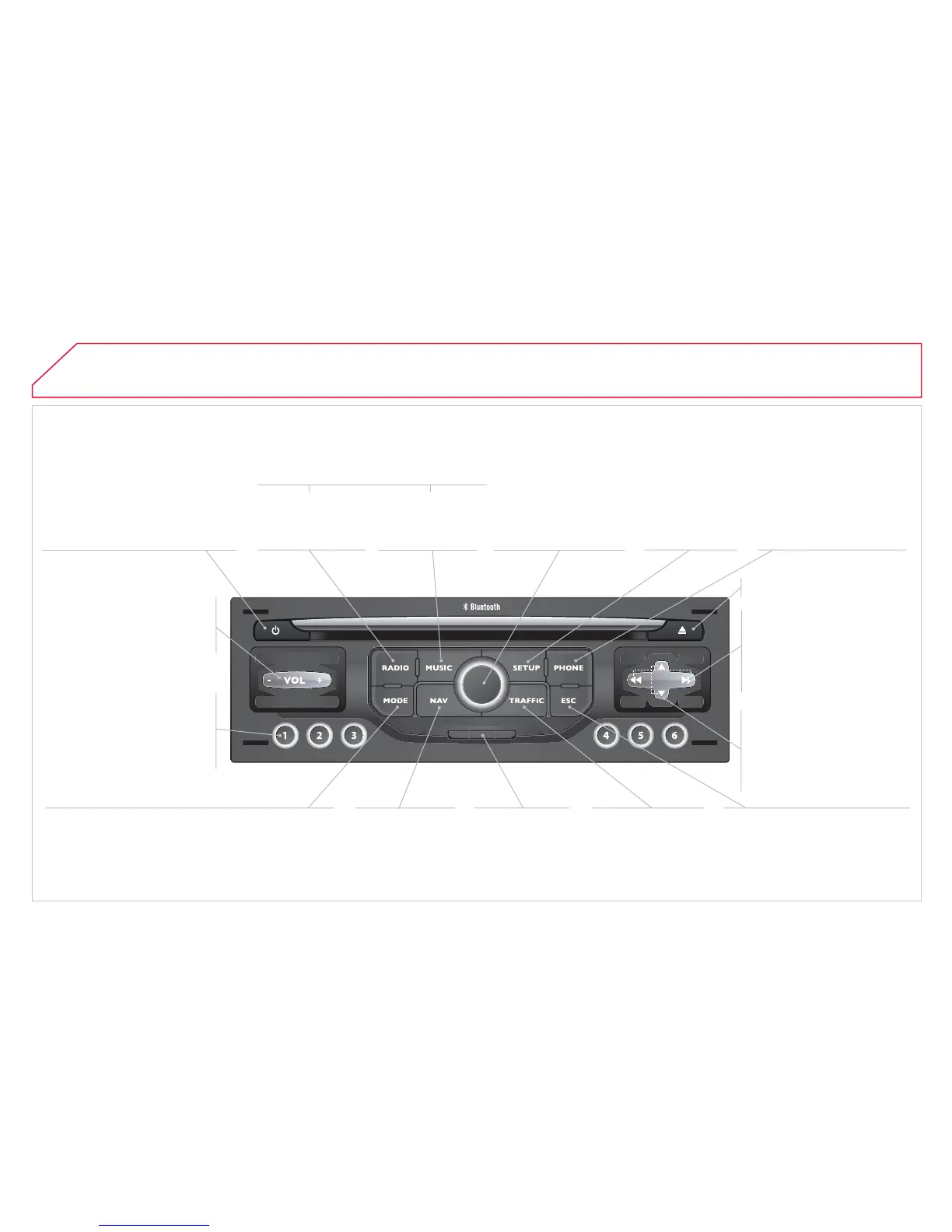
FIRST STEPS
E
n
gi
ne not runn
i
n
g
:
-
S
hort press: on
/
o
ff
.
- Long press: pause with
C
D
p
la
y
, mute
f
or radio.
E
n
g
ine runnin
g
:
- Short
p
ress:
p
ause with CD
p
la
y
, mute for radio.
-
L
on
g
press: re
i
n
i
t
i
a
li
se t
h
e
sy
stem.
Access
t
o
th
e
R
ad
i
o
M
e
n
u
.
D
ispla
y
the list o
f
s
t
a
t
io
n
s
.
Access
t
o
th
e
Music
Me
n
u
.
Di
sp
l
a
y
trac
k
s.
Lon
g
press: audio settin
g
s: front/rear
f
ader, le
f
t
/
ri
g
ht balance, bass
/
treble,
mus
i
ca
l
am
bi
ence,
l
ou
d
ness, automat
i
c
volume, reinitialise settings.
S
election dial
f
or the
screen displa
y
and
a
ccordin
g
to the menu.
S
hort
p
ress: contextual
m
e
n
u
o
r
co
nfi rm.
L
on
g
press: contextual
menu specifi c to the list
di
sp
l
a
y
e
d
.
A
ccess
t
o
th
e
"
S
ET
U
P" menu.
Lon
g
press: GPS
c
overa
g
e and
de
m
o
n
s
tr
a
t
io
n
m
ode
.
Access
t
o
th
e
Ph
o
n
e
M
enu. Displa
y
the list of
calls
.
E
j
ect CD.
S
elect previous
/
next radio
s
t
a
ti
o
n.
S
elect previous
C
D or MP3
tr
ac
k.
S
elect
p
revious/next line in
a
li
s
t.
Select
p
revious/next radio
s
t
a
ti
o
n in th
e
li
s
t.
S
elect previous/next MP3
f
o
l
de
r.
S
elect previous
/
next pa
g
e in
a
lis
t.
E
SC
: abandon current operation.
Access
t
o
th
e
Tr
a
ffi
c
M
e
n
u
.
D
ispla
y
the current
tr
a
ffi
c
a
l
e
rt
s
.
R
eade
r
fo
r
n
avi
g
ation SD
c
ard onl
y
.
A
ccess
t
o
th
e
Navi
g
ation
M
enu. Displa
y
r
ece
nt
des
t
i
n
a
t
io
n
s
.
A
ccess
t
o
th
e
"M
O
DE" m
e
n
u
.
S
elect successive displa
y
of:
R
adio, Map, NAV
(
if navi
g
ation in pro
g
ress
)
,
Telephone
(
if conversation in pro
g
ress
)
, Trip
c
omputer.
L
on
g
press: Black screen
(
DARK
)
.
Buttons 1 to
6
:
S
elect a pre-set radio
s
t
a
t
io
n.
L
ong press: pre-set t
h
e
cu
rr
e
nt
s
t
a
ti
o
n.
Ad
j
ust volume
(
each source
is independent, includin
g
nav
ig
at
i
on messa
g
es an
d
a
lerts
)
.

Table of Contents