EasyManua.ls Logo

CITROEN BERLINGO - Adding a Stopover

CITROEN BERLINGO
238 pages
Print Icon
To Next Page IconTo Next Page
To Previous Page IconTo Previous Page
Loading...
9
.1
3
04
7
6
5
4
3
2
1
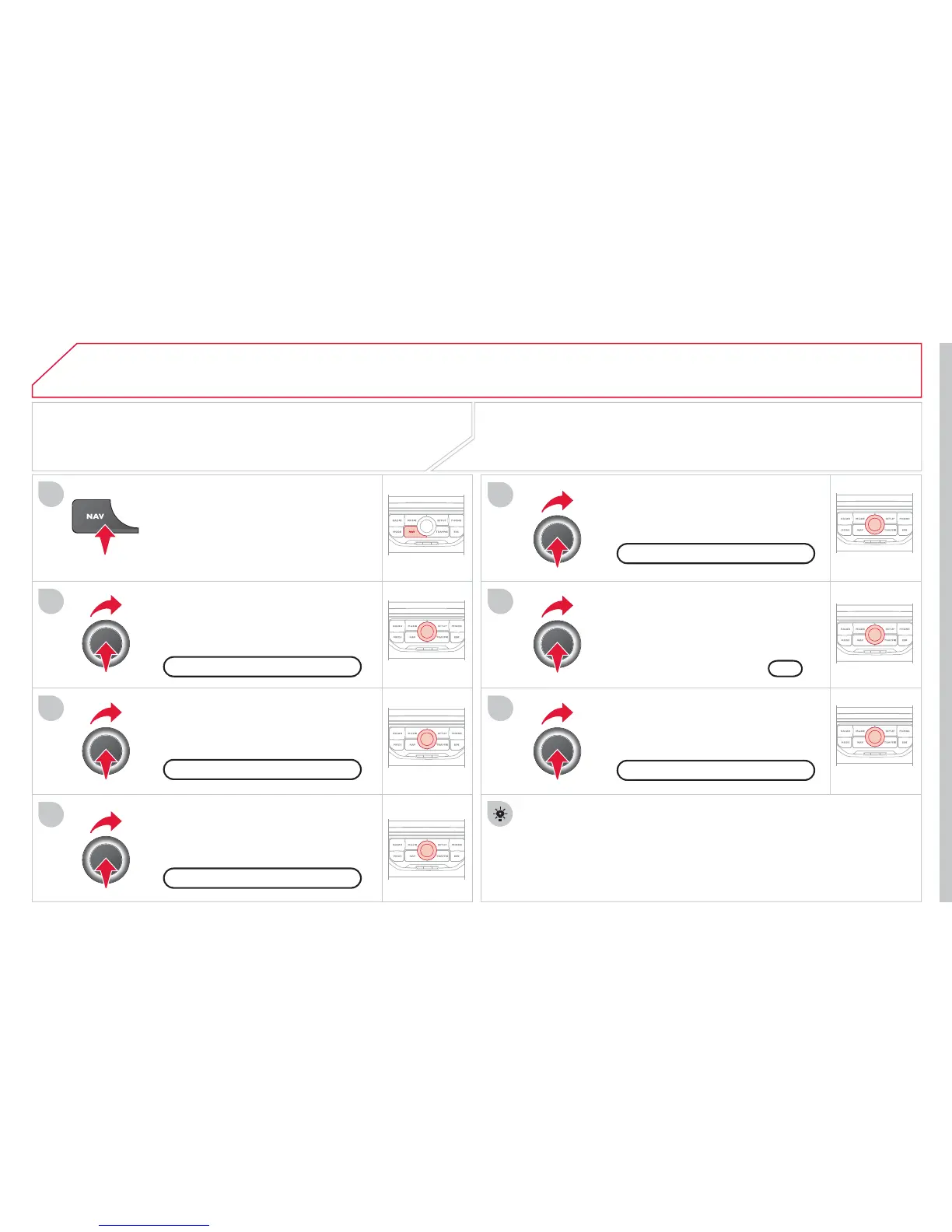
ADDING A STOPOVER
Enter a new address,
f
or example.
O
nce the new address has been
e
ntered, select
O
K and press the dial
t
o
co
n
rm.
S
elect "Recalculate" and press the
d
i
a
l t
o
co
n
rm.
Pr
ess
th
e
NAV
bu
tt
o
n.
Press the NAV button again or select
the Navi
g
ation Menu
f
unction and
press the dial to con
rm.
S
elect the "Add stopover"
f
unction
(
5 stopovers maximum
)
and press
th
e
d
i
a
l t
o
co
n rm.
S
elect the "
S
topovers"
f
unction and
press the dial to con
rm.
OK
Address in
p
u
t
A
dd sto
p
over
Sto
p
overs
Navi
g
ation Menu
R
eca
l
cu
l
at
e
The sto
p
over must be com
p
leted or deleted in order for the
g
uidance to continue to the next destination.
O
therwise,
t
h
e
MyW
a
y
w
ill
a
l
wa
y
s return
y
ou to t
h
e prev
i
ous stopover.
S
topovers can be added to the route once the destination has been
selec
t
ed
.
NAVIGATION - GUIDANCE

Table of Contents