EasyManua.ls Logo

CITROEN BERLINGO - Using the External Input (Aux)

CITROEN BERLINGO
238 pages
Print Icon
To Next Page IconTo Next Page
To Previous Page IconTo Previous Page
Loading...
9
.2
2
07
4
3
1
2
MUSIC MEDIA PLAYERS
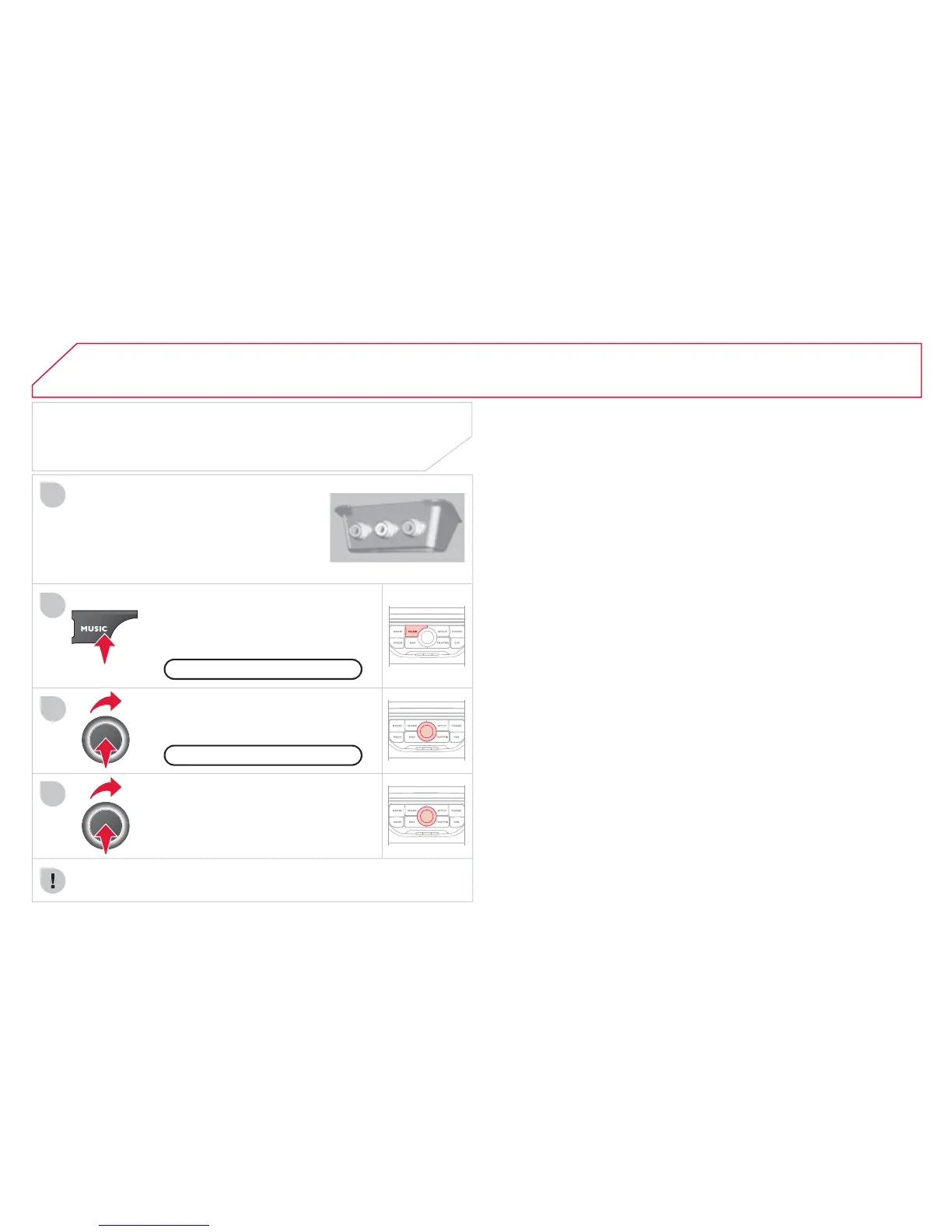
Connect the portable device
(
MP3/
WMA pla
y
er…
)
to the RCA audio
s
ockets
(
white and red
)
usin
g
a
J
A
C
K
/
R
C
A audio cable.
Press the M
US
I
C
button then
press
i
t a
g
a
i
n or se
l
ect t
h
e
M
us
i
c
M
enu
f
unction and press the dial
t
o
co
n
rm.
Se
l
ec
t th
e
A
U
X m
us
i
c
sou
r
ce
a
n
d
press the dial to con rm. Pla
y
be
g
ins
a
utomaticall
y
.
S
elect the "External device" function
a
n
d
press t
h
e
di
a
l
to act
i
vate
i
t.
E
xternal devic
e
USING THE EXTERNAL INPUT (AUX)
M
us
i
c
M
enu
A
UDIO JACK-RCA CABLE NOT SUPPLIED
The displa
y
and mana
g
ement of the controls is on the portable
de
vi
ce
.

Table of Contents

Other manuals for CITROEN BERLINGO

Related product manuals