EasyManua.ls Logo

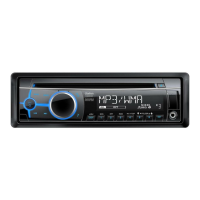
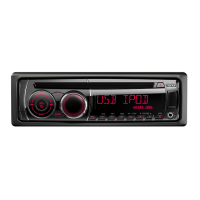
Clarion CZ209 - User Manual

Clarion CZ209
23 pages
Print Icon
To Next Page IconTo Next Page
Loading...
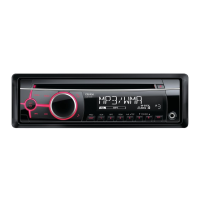
CD/USB/MP3/WMA RECEIVER
AUTORADIO CD/USB/MP3/WMA
RECEPTOR CD/USB/MP3/WMA
CZ209
Owner’s manual
Mode d’emploi
Manual de instrucciones

Other manuals for Clarion CZ209

Questions and Answers

  • J
    James VillarrealAug 20, 2025
    What to do if my Clarion Car Receiver power does not turn on and there is no sound?
    • E
      Elizabeth FosterAug 20, 2025
      If your Clarion Car Receiver's power does not turn on and there is no sound, it could be due to a blown fuse. Replace it with a fuse of the same amperage. If the fuse blows again, consult your dealer. Another possible cause is incorrect wiring, in which case you should also consult your dealer.
  • G
    Gregory BerryAug 21, 2025
    Why does my Clarion Car Receiver sound skip or is noisy?
    • E
      Elizabeth Chavez PhDAug 22, 2025
      If the sound skips or is noisy in your Clarion Car Receiver, the CD might be dirty; clean it with a soft cloth. Alternatively, the CD may be heavily scratched or warped; replace it with a CD without scratches.
  • S
    Sylvia MatthewsAug 25, 2025
    What to do if nothing happens when I press buttons on my Clarion Car Receiver?
    • J
      Jack RowlandAug 25, 2025
      If nothing happens when you press the buttons on your Clarion Car Receiver and the display is not accurate, it could be due to a microprocessor malfunction caused by noise. To resolve this, turn off the power, then press the Reset button [RELEASE] button and remove the DCP. Use a thin rod to hold reset button depressed (2 sec.). If the reset button is pressed when a disc is loaded, please eject the disc and load it once again before attempting to play it. Alternatively, the DCP or main unit connectors might be dirty; wipe them off with a soft cloth dampened with cleaning alcohol.
  • J
    Jay RivasAug 26, 2025
    Why is the sound interrupted or has noise on my Clarion CZ209 Car Receiver?
    • K
      Keith ThompsonAug 27, 2025
      If the sound is interrupted or has noise on your Clarion Car Receiver, it is possible that the MP3/WMA files are not encoded properly. To resolve this, use properly encoded MP3/WMA files.
  • P
    Patrick CervantesAug 28, 2025
    Why is the sound poor when my Clarion CZ209 Car Receiver is first turned on?
    • J
      Jennifer AtkinsonAug 28, 2025
      If the sound is poor when your Clarion Car Receiver is first turned on, condensation may have formed on the internal lens because the car was parked in a humid place. Let it dry for about 1 hour with the power on.
  • D
    David MartinezAug 30, 2025
    What to do if my Clarion CZ209 Car Receiver has no sound when operating with amplifiers or power antenna attached?
    • J
      Joshua StephensAug 30, 2025
      If your Clarion Car Receiver has no sound when operating the unit with amplifiers or power antenna attached, the power antenna lead may be short-circuited, or excessive current may be required for remotely powering on the amplifiers or power antenna. Here's what to do: 1. Turn the unit off. 2. Remove all wires attached to the power antenna lead and check each wire for possible short circuits using an ohm meter. 3. Turn the unit back on. 4. Reconnect each amplifier remote wire to the power antenna lead one by one. If the amplifiers turn off before all wires are attached, use an external relay to provide remote power-on voltage (excessive current required).
  • N
    Nicole MedinaAug 31, 2025
    Why does my Clarion Car Receiver have no sound?
    • M
      Michael JenkinsSep 1, 2025
      If there is no sound from your Clarion Car Receiver, it could be due to several reasons related to MP3/WMA files: * MP3/WMA files are absent on the disc: Write MP3/WMA files onto the disc properly. * Files are not recognized as MP3/WMA files: Use properly encoded MP3/WMA files. * The file system is not correct: Use ISO9660 level 1, 2 or JOLIET or Romeo file system.
  • L
    Lori ButlerSep 3, 2025
    Why does the sound cut out or skip or noise is generated/noise is mixed with sound on my Clarion CZ209 Car Receiver?
    • P
      Paul RobertsSep 3, 2025
      If the sound cuts out or skips or noise is generated/noise is mixed with sound on your Clarion Car Receiver, it is possible that the MP3/WMA files are not encoded properly. Use properly encoded MP3/WMA files.
  • J
    Jessica ThomasSep 5, 2025
    Why is there no sound from my Clarion Car Receiver?
    • B
      Barry HarperSep 5, 2025
      The fuse might be blown. Replace it with a fuse of the same amperage. Also, check for incorrect wiring and refer to the 'Installation/Wire connection Guide' to ensure proper connections.
  • M
    Mr. Michael GordonSep 7, 2025
    What to do if my Clarion CZ209 has no sound?
    • J
      Julie GarciaSep 7, 2025
      The speaker protection circuit may be operating. Try turning down the sound volume. If that doesn't work, turn the power off and on again. Note that the speaker volume is automatically reduced when the protection circuit is active.

Summary

Clarion CZ209 Key Features

Safety and Handling Precautions

Compact Disc Handling Guidelines

Advice on handling compact discs to prevent damage and ensure playability.

Display Screen Cold Weather Behavior

Information on expected screen behavior in extreme cold conditions.

Clarion CZ209 Controls Overview

Unit Button and Function Guide

Details the main functions of buttons on the main unit for operation.

Detachable Control Panel (DCP) Operation

DCP Removal and Attachment Steps

Step-by-step instructions for safely detaching and attaching the control panel.

Wireless Remote Control Usage

Remote Control Button Functions

Explains the functions of buttons on the wireless remote control unit.

Remote Control Battery Installation

Guide on how to properly insert the battery into the remote control.

Clarion CZ209 Operating Modes

Basic Unit Operations

Covers power, volume adjustment, and display switching.

Radio Operation Guide

Instructions for listening to broadcasts, tuning, and preset stations.

CD, MP3, WMA Playback

Details on playing CD, MP3, and WMA files, including precautions.

Common Mode Settings

Settings for clock, screen saver, title scroll, and speaker output.

USB Device Operation

Guide to connecting and operating USB memory devices.

Apple iPod Connectivity

Instructions for connecting and operating Apple iPods via USB.

Clarion CZ209 Accessories

Troubleshooting Common Issues

General Troubleshooting

Solutions for general power, wiring, and button operation problems.

CD;MP3;WMA Playback Issues

Addresses issues related to disc playback and file recognition.

USB and iPod Connection Problems

Solutions for sound interruption, device recognition, and connection issues.

Error Message Explanations

CD;MP3;WMA Error Codes

Explanation of error codes related to CD, MP3, and WMA playback.

iPod and USB Error Codes

Details on error messages for iPod connectivity and USB device issues.

Clarion CZ209 Technical Specifications

Tuner Specifications (FM;AM)

Details frequency range, sensitivity, and selectivity for radio tuners.

CD Player Performance

Technical data for the compact disc playback system.

Audio and Amplifier Details

Information on power output, frequency response, and signal-to-noise ratio.

General Unit Dimensions and Power

Covers power supply, current consumption, dimensions, and weight.

Clarion CZ209 Specifications

General IconGeneral
BrandClarion
ModelCZ209
CategoryCar Receiver
LanguageEnglish

Related product manuals