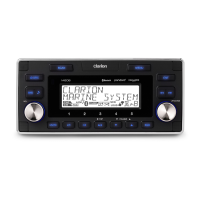
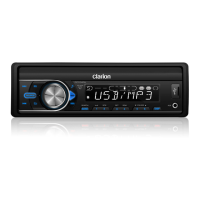
FZ104P
AE
3
[SOURCE] Button
•
Press SOURCE b
utton to toggle the audio
source
[EQ] Button
•
Press to select the preset Equaliz
er setting:
EQ OFF->CLASSIC->POP->ROCK
[
/ MUTE] Button
•
Press this b
utton to turn power On or Off.
•
Press this b
utton to mute the audio output,
press it again to unmute the audio output.
•
Press to confir
m the selection.
[
] Button
•
Press
to adjust the sound effect setting:
BAS(bass)->TRE(treble)->BAL(balance)->
FAD(fader)
[MENU] Button
•
Press access into the system men
u mode.
[
/ ] Button
•
Use these b
uttons for tuning up and down in
Tuner mode, USB mode.
•
Press and hold momentar
ily to Fast Forward/
Backward in USB mode.
[
] Button
•
Press this b
utton to quick return to previous
menu or mode.
[VOLUME] Button
•
Rotate to adjust the v
olume level.
[XBS] Button
•
Press to tur
n On or Off the X-BASS booster
function.
[BAND/SEARCH] Button
•
Press to select tuner band in
Tuner mode.
•
Press to activ
ate the MP3 file searching mode,
then use the volume to select / search by file
number in USB mode.
[1~6] Buttons
•
[1] Button:
Play / Pause / Preset station 1
•
[2] Button:
Scan play / Preset station 2
•
[3] Button:
Repeat play / Preset station 3
•
[4] Button:
Random play / Preset station 4
•
[5] Button:
Previous folder / Preset station 5
•
[6] Button:
Next folder / Preset station 6
[DISP] Button
•
Press to change the displa
y indication.
4.
CONTROLS
Operational P
anel
Name of Buttons and their Functions
[SOURCE]
[EQ]
[VOLUME] [BAND/SEARCH]
[XBS] [1~6] [DISP] AUX Input
[
/ MUTE]
[ / ]
[MENU]
USB P
ort
[ ]
[
]
English
Owner’
s Manual


 To Next Page