EasyManua.ls Logo

Clarion PU-9907A - Page 2

Clarion PU-9907A
17 pages
Print Icon
To Next Page IconTo Next Page
To Previous Page IconTo Previous Page
Loading...
HICATS
(Computer
Anti-Theft
System)
ROS
ON
oO
123
os
Mec
PTY
TP
«tA
CON
BF
Ah
ees)
ERG
NSR8
5
mw
CATS
The
following
operations
are
necessary
in
order
for
your
stereo
radio
cassette
to
start
functioning.
Follow
the
operation
below
to
start
your
set..
e
Start
your
set
(Release
CATS)
1.
Press
the
Power
switch
(1)
to
turn
the
power
on.
2.
“CODE
IN”
appears
on
the
display.
3.
Input
the
code
number,
printed
on
your
Customer
Card,
using
the
Preset
buttons
33°.
The
code
number
you
have
input
appears
on
the
display.
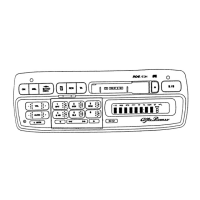
RADIO
OPERATION
ROS/EON
=r
DP
123
eos mee
pty
TP
of.
fon
BF
RN
BSEGREORE
(
Power
Switch
(ON)
Press
once
to
turn
the
power
on
and
once
again
to
turn
the
power
off.
(2)
Audio
MODE
Button
This
button
is
used
to
select
the
Bass,
Treble
Balance
or
Fader
adjustment
mode.
The
mode
changes
in
the
following
order
each
time
the
button
is
pressed
for
under
2
seconds:
Bass
Treble
Balance
>
Fader
Bass...
The
mode
is
indicated
on
the
display.
@
Volume
Control
(VOL)
(5)
Band
Switch
(BND)
©
Tuning
Button
@
Tuning
Button
(SEEK)
M
Using
the
Radio
Data
System
(RDS)
RDS
Button
Set
the
RDS
mode
by
pressing
the
RDS
button
@0,
so
the
“RDS”
indi-
cator
lights
up.
When
you
press
the
button
again,
this
mode
is
released.
1.
When
an
RDS
station
is
received,
the
programme
name
is
dis-
Played.
(PS:
Programme
Service
Name)
PU-—9907A
Example:
code
number
1234
Display
Press
buttons
1,2,
3
and
4,
in
that
order.
4.
If
the
input
code
number
is
correct,
the
radio
turns
on.
A
radio
frequency
appears
on
the
display.
5.
lf
the
input
code
number
is
incorrect,
the
number
remains
on
the
display.
6.
To
input
the
code
number
again,
press
the
BND
switch
©@)
for
at
least
3
seconds.
“CODE
IN”
re-appears
on
the
display.
Input
the
correct
code
number.
7.
If
you
input
an
incorrect
code
number
three
times
in
succession,
it
becomes
impossible
to
leave
from
Anti-Theft
Mode
for
one
hour,
even
if
the
BND
switch
is
pressed
for
over
3
seconds
and
you
input
correct
code.
If
you
again
input
an
incorrect
code
number,
you
will
have
to
wait
another
hour,
and
so
on.
2.
If
an
emergency
broadcast
is
received
while
an
RDS
station
is
being
received,
“ALARM”
is
displayed.
The
volume
of
the
emer-
gency
broadcast
is
automatically
set
at
the
pre-set
value.
3.
If
good
reception
of
the
RDS
broadcast
becomes
impossible
in
your
preset
location,
the
“RDS”
indicator
starts
blinking.
4.
When
seek
tuning
is
carried
out
in
the
RDS
mode,
only
stations
broadcasting
an
RDS
signal
will
be
received.
5.
e
Preset
San
in
RDS
Mode
When
you
press
the
PS
button
9),
Preset
Scan
will
be
carried
out
only
on
the
RDS
stations
among
the
preset
stations.
*
Auto
Store
in
RDS
Mode
.
When
you
press
the
AS
button
9
for
more
than
2
seconds,
only
RDS
stations
will
be
stored
on
the
Preset
buttons.
Same-Programme
Search
(PI:
Programme
Identification)
Press
the
Preset
button
(@)
on
which
an
RDS
station
has
been
stored,
and
if
this
Station
is
not
received
(the
“RDS”
indicator
is
blink-
ing),
press
the
same
Preset
button
again.
“SEARCH”
will
be
dis-
played
and
a
station
broadcasting
the
same
programme
will
be
received.
(The
PI
code
will
be
displayed
for
about
5
seconds
if
you
hold
down
the
RDS
button
(0
and
press
function
button
1
(@)
at
the
same
time.)
w
Regional
Programme
Function
(REG)
REG
ON
(REG
indicator
lit):
Only
local
(regional)
radio
broadcasts
in
the
local
area
will
be
sought.
REG
OFF
(REG
indicator
off):
If
you
are
receiving
a
regional
station
in
a
certain
area
and
you
enter
a
different
area,
the
regional
station
for
that
area
will
be
received.
In
the
RDS
mode,
the
REG
function
will
turn
on/off
each
time
you
press
the
TA
button
41
for
more
than
2
seconds.
w
RDS
EON
(Enhanced
Other
Networks
Information)
When
EON
data
is
received
for
an
RDS
broadcast,
the
“EON”
indica-
tor
will
light
up.
1.
If
you
are
waiting
to
receive
traffic
information,
and
the
“EON"
indi-
cator
lights
up,
traffic
information
will
be
broadcast
when
the
traffic
information
begins,
even
if
it
is
on
a
different
station
to
the
one
you
are
currently
receiving.
2.
When
the
“EON?”
indicator
is
lit,
if
you
press
a
Preset
button
@),
the
station
with
the
best
signal
in
that
area
will
be
received
instantly.
*
Certain
countries
and
certain
stations
do
not
transmit
EON
data.

Related product manuals