EasyManua.ls Logo

Clarion PU-9907A - Page 4

Clarion PU-9907A
17 pages
Print Icon
To Next Page IconTo Next Page
To Previous Page IconTo Previous Page
Loading...
~
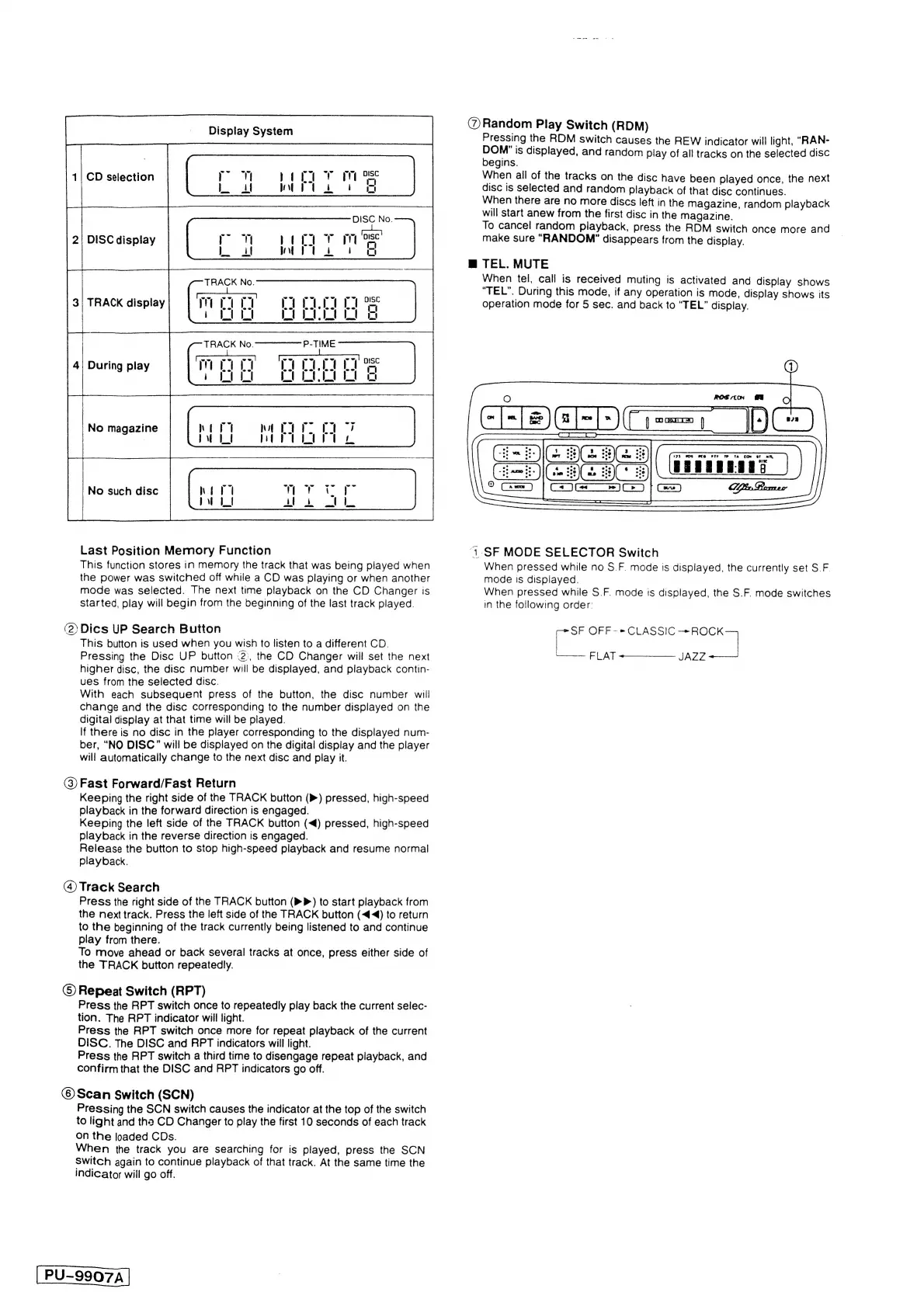
Display
System
ie
ie
a
A
1|
CD
selection
:
DISC
display
3|
TRACK
display
During
play
tenon
ste
Last
Position
Memory
Function
This
function
stores
in
memory
the
track
that
was
being
played
when
the
power
was
switched
off
while
a
CD
was
playing
or
when
another
mode
was
selected.
The
next
time
playback
on
the
CD
Changer
is
started,
play
will
begin
from
the
beginning
of
the
last
track
played.
DISC
No.
T
mr
DISC
A
oF
oo
(2)Dics
UP
Search
Button
This
button
is
used
when
you
wish
to
listen
to
a
different
CD.
Pressing
the
Disc
UP
button
2),
the
CD
Changer
will
set
the
next
higher
disc,
the
disc
number
will
be
displayed,
and
playback
contin-
ues
from
the
selected
disc.
With
each
subsequent
press
of
the
button,
the
disc
number
will
change
and
the
disc
corresponding
to
the
number
displayed
on
the
digital
display
at
that
time
will
be
played.
If
there
is
no
disc
in
the
player
corresponding
to
the
displayed
num-
ber,
“NO
DISC”
will
be
displayed
on
the
digital
display
and
the
player
will
automatically
change
to
the
next
disc
and
play
it.
(3)
Fast
Forward/Fast
Return
Keeping
the
right
side
of
the
TRACK
button
(P)
pressed,
high-speed
playback
in
the
forward
direction
is
engaged.
Keeping
the
left
side
of
the
TRACK
button
(<)
pressed,
high-speed
playback
in
the
reverse
direction
is
engaged.
Release
the
button
to
stop
high-speed
playback
and
resume
normal
playback.
(4)
Track
Search
Press
the
right
side
of
the
TRACK
button
(»P)
to
start
playback
from
the
next
track.
Press
the
left
side
of
the
TRACK
button
(<4)
to
return
to
the
beginning
of
the
track
currently
being
listened
to
and
continue
play
from
there.
To
move
ahead
or
back
several
tracks
at
once,
press
either
side
of
the
TRACK
button
repeatedly.
©
Repeat
Switch
(RPT)
Press
the
RPT
switch
once
to
repeatedly
play
back
the
current
selec-
tion.
The
RPT
indicator
will
light.
Press
the
RPT
switch
once
more
for
repeat
playback
of
the
current
DISC.
The
DISC
and
RPT
indicators
will
light.
Press
the
RPT
switch
a
third
time
to
disengage
repeat
playback,
and
confirm
that
the
DISC
and
RPT
indicators
go
off.
©
Scan
Switch
(SCN)
Pressing
the
SCN
switch
causes
the
indicator
at
the
top
of
the
switch
to
light
and
the
CD
Changer
to
play
the
first
10
seconds
of
each
track
on
the
loaded
CDs.
When
the
track
you
are
searching
for
is
played,
press
the
SCN
Switch
again
to
continue
playback
of
that
track.
At
the
same
time
the
indicator
will
go
off.
PU-9907A
@
Random
Play
Switch
(RDM)
Pressing
the
RDM
switch
causes
the
REW
indicator
will
light,
“RAN-
oe
is
displayed,
and
random
play
of
all
tracks
on
the
selected
disc
egins.
When
ail
of
the
tracks
on
the
disc
have
been
played
once,
the
next
disc
is
selected
and
random
playback
of
that
disc
continues.
When
there
are
no
more
discs
left
in
the
magazine,
random
playback
will
start
anew
from
the
first
disc
in
the
magazine.
To
cancel
random
playback,
press
the
RDM
switch
once
more
and
make
sure
“RANDOM”
disappears
from
the
display.
mM
TEL.
MUTE
When
tel,
call
is
received
muting
is
activated
and
display
shows
“TEL”.
During
this
mode,
if
any
operation
is
mode,
display
shows
its
operation
mode
for
5
sec.
and
back
to
“TEL”
display.
173)
8OB
MEG
PTT
«6TP
UTA
CfON
St
Oh
PRE
ER
EE
“1.
SF
MODE
SELECTOR
Switch
When
pressed
while
no
S.F.
mode
is
displayed,
the
currently
set
S.F.
mode
Is
displayed.
When
pressed
while
S.F.
mode
is
displayed,
the
S.F.
mode
switches
in
the
following
order:
filial
OFF-»*CLASSIC
cee
=
FLAT
SS
JAZZ
oe

Related product manuals