Need help?
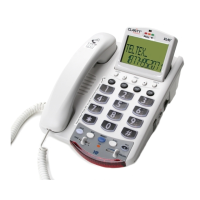
Do you have a question about the Clarity XL45 and is the answer not in the manual?
Highlights the phone's maximum amplification capability of up to 50 decibels for enhanced listening.
Explains the use of digital technology to improve volume and clarity of conversations.
Provides step-by-step instructions for connecting the telephone line, handset, and power adapter.
Explains how the BOOST button enhances receiver loudness and activates tone settings for amplified sound.
Describes the Boost Override switch on the bottom of the phone for automatic boost activation.
Introduces the four tone settings designed to customize audio for user needs and improve conversation clarity.
Details Tone Setting 1, which emphasizes low frequencies, aiding users with difficulty hearing lower-pitched sounds.
Describes Tone Setting 2, providing flat amplification for all sounds, suitable for users with digital hearing aids.
Explains Tone Setting 3, focusing on higher frequencies and speech intelligibility, acting as a middle ground between settings 2 and 4.
Details Tone Setting 4, which emphasizes speech intelligibility using Multi-Band Compression to amplify voice and reduce noise.

 To Next Page

 General