Need help?
Do you have a question about the Clarity XLC7BT and is the answer not in the manual?
Guidelines for safe handling, disposal, and charging of batteries.
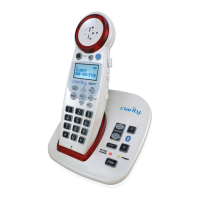
Lists all items included in the XLC7BT package.
Step-by-step instructions for setting up the XLC7BT phone.
Procedures for mounting the XLC7BT base on a wall.
Explains the functions of the base unit's buttons and lights.
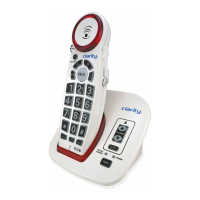
Details the functions of the handset's buttons and display.
Information on handset battery life, type, and replacement.
Information on base backup battery functionality and installation.
Steps to pair and connect a Bluetooth-enabled cellphone.
Steps to pair and connect a Bluetooth headset.
Instructions for making outgoing phone calls.
Instructions for receiving and answering incoming calls.
How to use the amplification boost for louder sound.
Adjusting call volume level.
Adjusting audio tone settings for clarity.
Information on viewing incoming call details.
How to program and use the one-touch dial button.
How to access and manage phonebook entries.
Explanation of symbols displayed on the handset screen.
Accessing and configuring Bluetooth related settings.
Managing caller lists, phonebook, and one-time dialing.
Adjusting phone setup, ringers, display, and date/time.
Procedure to register a new XLC7HS handset to the base.
Steps to register a new, unregistered handset.
How to re-register a handset to the same or different base.
Solutions for failure to connect cell phone or headset.
Troubleshooting incorrect PIN entry and poor reception.
Steps to resolve issues like no dial tone or unit failure.
Details on frequency, amplification, power supply, and accessories.
Identifies Clarity Products LLC as the responsible party.
Compliance details related to FCC Part 68.
Instructions and addresses for returning the product for service.
 General
| Bluetooth | Yes |
|---|---|
| Amplification | Up to 50dB |
| Volume Control | Yes |
| Speakerphone | Yes |
| Hearing Aid Compatible | Yes |
| Caller ID | Yes |
| DECT 6.0 Technology | Yes |
| Frequency | 1.9 GHz |
| Call Waiting | Yes |
| Intercom | Yes |
| Expandable | Yes, up to 5 handsets |
| Answering Machine | Yes |
| Headset Jack | 2.5mm |
| Display | Backlit LCD |
| Type | Cordless |
| Power Source | AC adapter and rechargeable battery |

 To Next Page