EN
ENGLISH
Clarke
®
American Sanders Operator's Manual (EN) - CE7 Pro, SE7 Pro, CE7 Pro+, SE7 Pro+ - 11 -
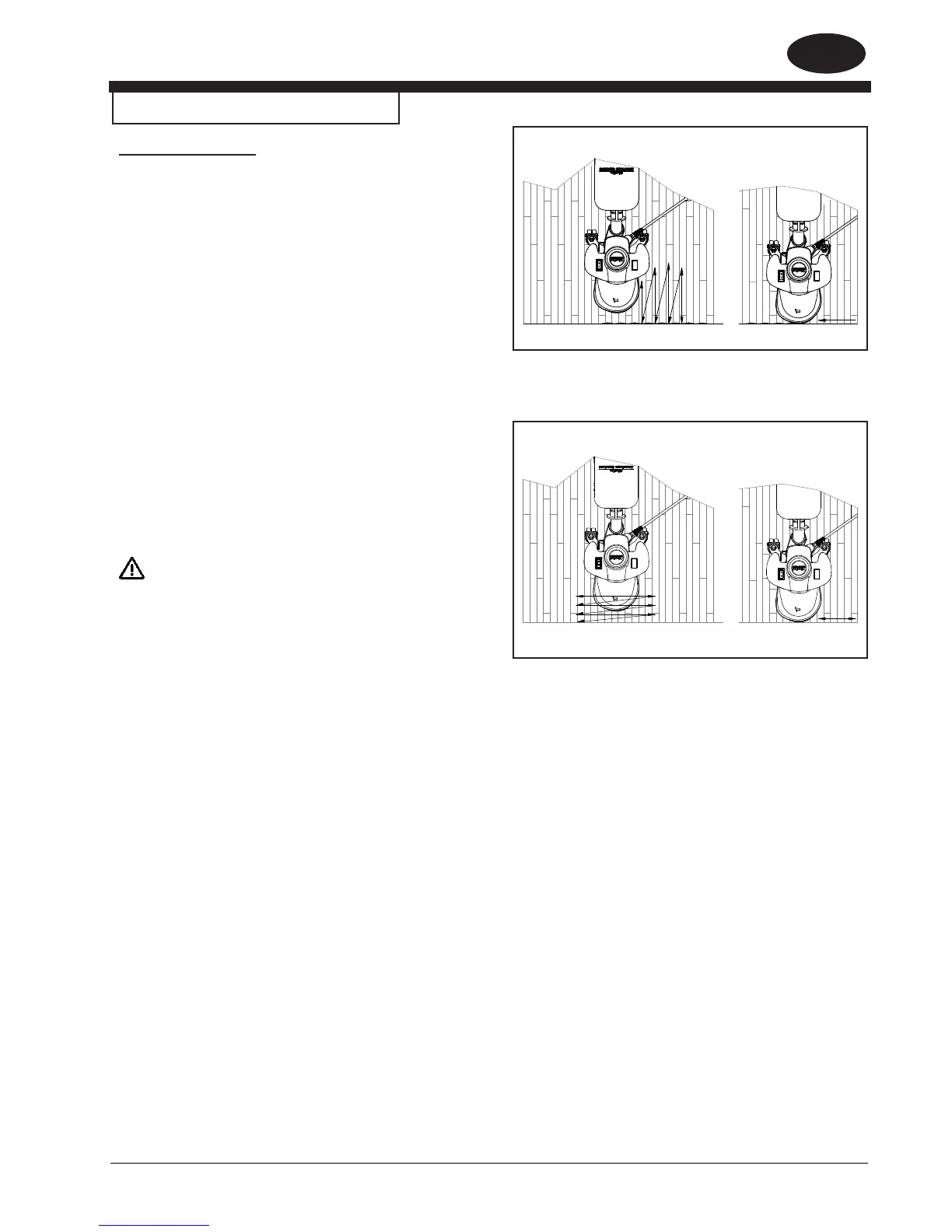
Figure 7.1
Figure 7.2
How to Operate the Machine
Operating Instructions
1. Install the abrasive disc.
2. Connect the dust management system.
3. Connect the extension cord to a wall outlet and then to the
machine.
4. Raise the sanding disc from the surface then activate the
master control switch.
5. Lower the sanding disc to the surface and begin sanding.
Do not press down on the handle while sanding. Doing so
will promote objectionable scratches and an uneven nish.
Depending on technique and desired results, use one or a
combination of the two methods shown in gures 7.1 and 7.2.
6. For optimum dust management performance when using the
included dust bag (53544C), empty frequently. Do not overll.
Empty when dust reaches full line.
WARNING!
Follow all instructions found in this manual and on the dust bag
pertaining to the safe storage and handling of sanding dust.


 To Next Page