17
Parts & Service: 020 8988 7400 / E-mail: Parts@clarkeinternational.com or Service@clarkeinternational.com
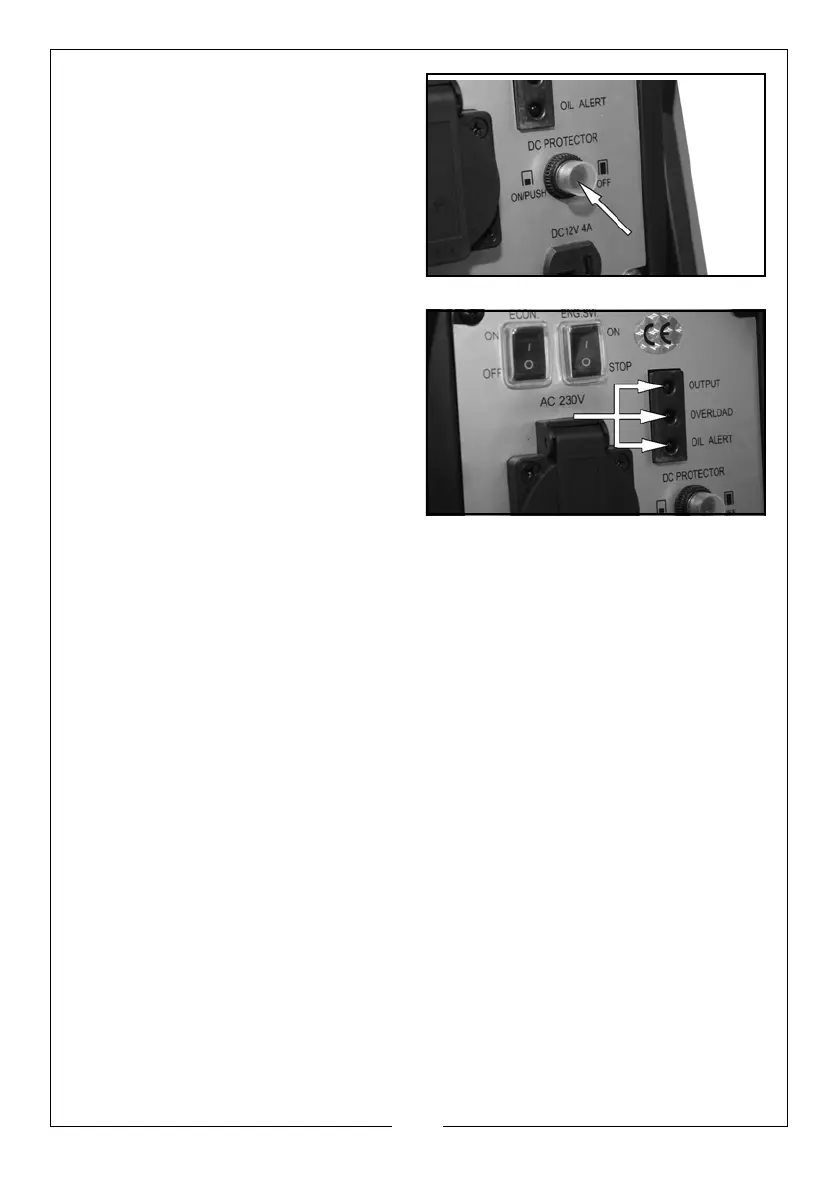
DC OVER LOAD PROTECTOR
If the DC overload protector
activates,
wait for a few minutes and
then press the reset button shown on
the right.
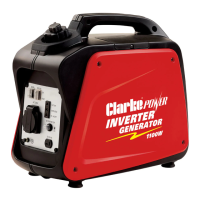
INDICATOR LIGHTS
OUTPUT
The output indicator (Green) will
remain on during nor
mal operation.
OVERLOAD
The overload indicator (Red) will light
up if there is an overload or a short
circuit in the connected appliance.
If this happens, proceed as follows:
1. Turn off any connected electrical
devices
and stop the engine.
2. Reduce the total wattage of connected elec
tric devices to within the
rated output of the generator.
3. Check air inlet and around the control unit. If any blockages
are found,
remove them.
4. After checking, restart the engine.
OIL ALERT
The oil alert indicator (Red) will light up
when the oil level is low.
• To add oil, follow the instructions on page 11


 To Next Page