-10-
BYPASS OPERATION INSTRUCTIONS
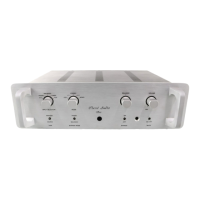
1. Turn "Selector Switch" to the desired input function position.
2. Move "Bypass Mode Switch" also to the desired input function position.
3. Turn "Bypass On/Off Switch" to the "On" position.
Possible bypass choices are:
PHONO Model: "Phono" or "BAL" inputs;
LINE Model: "Balanced In" or "CD" inputs.
NOTES: The input "Selector Switch" must be turned to the desired input bypass function, as all
other positions not chosen are shorted to ground for superior sonic and grounding reasons. (However,
the "Signal Path" does not travel through the selector switch; you are just choosing which input does not
get shorted to ground.)
Bypass operation removes "Signal Path" from Selector, Tape, and Mode Switches.
BALANCE CONTROL
The custom BALANCE control permits equal output of each channel in the centre (detented)
position without additional loading to the signal. When shifted to the left or right, it merely attenuates
the opposite channel. With optional remote control feature the BALANCE control can be operated from
remote using the hand held remote control unit (See fig.1, 2 page 12) or manually turning the control
knob at the prea
VOLUME CONTROL
The VOLUME control varies the level of both channels simultaneously. With optional remote
control feature the VOLUME control can be operated from remote using the hand held remote control
unit (See fig.1, 2 page 12) or manually turning the control knob at the prea




 To Next Page