10
28(E0) Fantasia-Impromptu 39(D1#) Reverie 50(D2) Impromptu in Gb
29(F0) Chanson De L’ Adieu 40(E1) Sonata #20 51(D2#) Waltz in Ab
30(F0#) Scherzo in Bbm 41(F1) Traumerei 52(E2) Sonata Pathetique, 2
nd
, mvt.
31(G0) Military Polonaise 42(F1#) Pour Elise 53(F2) Golliwog’s Cake Walk
32(G0#) Prelude 7 # 43(G1) Moments Musicaux 54(F2#) Marche Militaire
33(A0) Spring song 44(G1#) Arabesque #1 21(A-1) DEMO OFF
1. Start the play of the practicing song.
Holding press the VOICE button while pressing the appointed key (B-1—F2#)) to start the play of the
selected song.
----The demonstration light is off and 32 songs begin to play. You can also select other songs during the
play.
2. Stop the play of piano songs
Holding press the VOICE button while pressing the appointed key (A-1) to STOP the play of the selected
song.
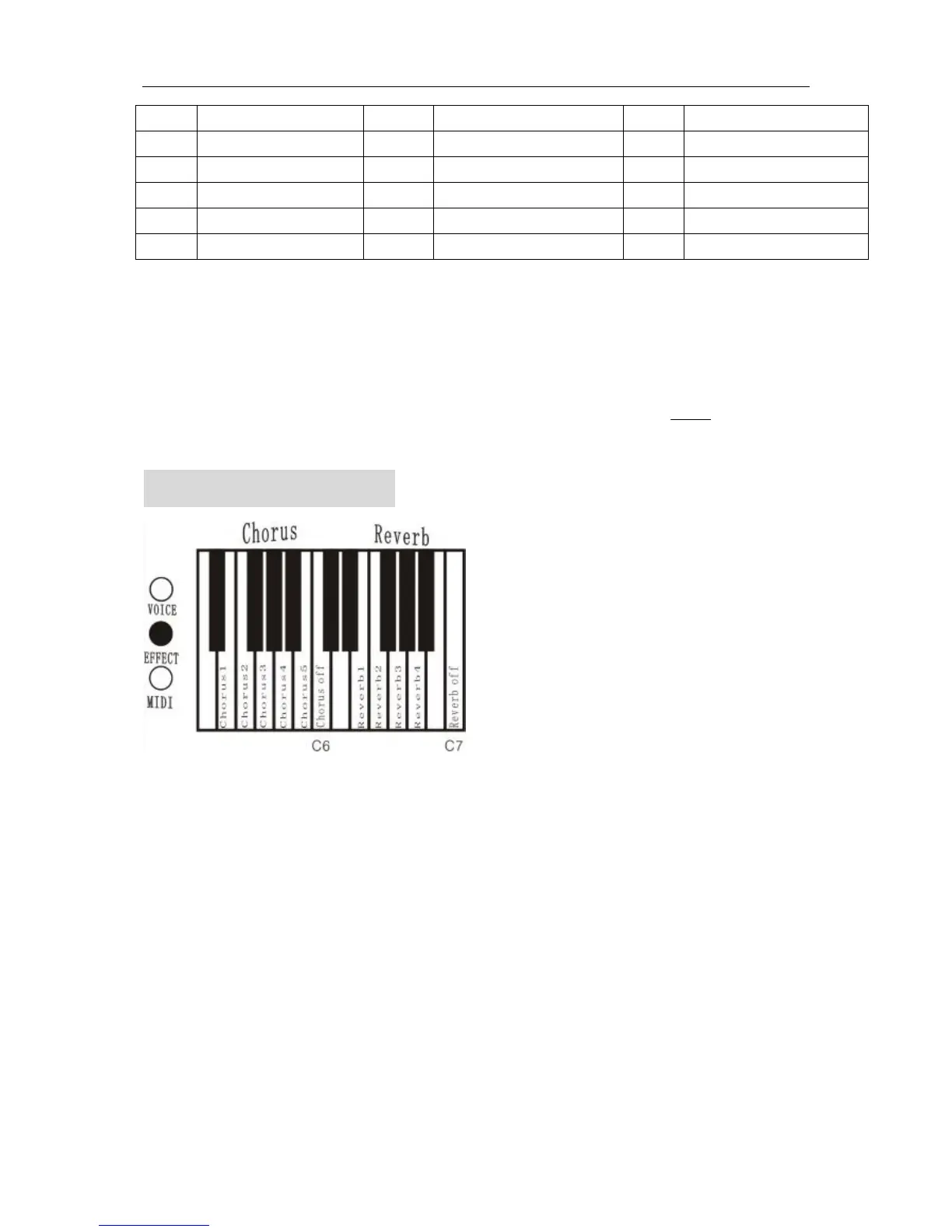
EFFECT OF TONE
1. Effect of reverb
Produces a lingering echo that emulates the acoustics of a large concert hall
A. Select reverb
Holding press EFFECT button and press the keyboard’s key(E6-A6), corresponding effect of reverb is
made.
B. Close reverb
Holding press EFFECT button and press the keyboard’s key(C7),close reverb..
It is 4 kinds of reverb effects.
2. Effect of chorus
Make resonance, and the sound becomes chorus.
A. Make chorus
Holding press EFFECT button and press the keyboard’s key(E5-B5), corresponding effect of chorus is
made.
B. Close chorus.
Holding press EFFECT button and press the keyboard’s key(C6), close chorus .


 To Next Page