Need help?
Do you have a question about the Clavia Nord Drum 3P and is the answer not in the manual?
Essential guidelines for safe operation, including warnings about electric shock and proper usage.
Provides further safety guidelines regarding environmental conditions, proper usage, and product care.
Expresses gratitude for purchasing the Nord Drum 3P and provides a brief overview of its capabilities.
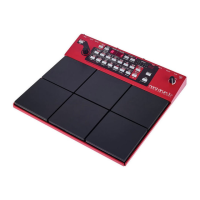
Details the physical layout and key control elements on the Nord Drum 3P's front panel.
Describes specific controls like Parameter Buttons, Dial, Shift/Exit, Master Level, and displays.
Explains the six-channel architecture and the signal path for sound creation.
Covers fundamental tasks like selecting drum kits, saving sounds, and managing memory.
Details channel operations like Mono Group, Edit All Ch, Solo Part, Panic, and Lower Parameter access.
Explains parameters controlling the Noise part, including Resonance, Filter Type, Frequency, Decay, and Mode.
Details specific noise filter controls like Dynamic Filter, Decay, and Mode, and introduces Tone Parameters.
Covers parameters for shaping the 'body' of the sound, including Wave, Spectra, and Frequency.
Details Tone parameters like Spectra, Wave, Frequency, Decay, Mode, Bend, Time, Pitch, and Scale Presets.
Explains Click, Mix, EQ, Distortion parameters and their settings for sound manipulation.
Details Reverb Amount and Delay Amount parameters for applying spatial and time-based effects.
Covers Delay, Reverb Type, Color, and Global settings like Copy, Paste, Swap, and Memory Protect.
Explains MIDI setup, Pad Mode, Threshold, and Sensitivity for trigger response and control.
Details MIDI channel assignments, Pad Layouts, and guides on updating the operating system.
Covers recording MIDI notes and parameter changes via Global and Individual MIDI channels.
Explains sending and receiving Drum Kit data via Sys Ex for backups and sharing.
Lists MIDI CC numbers, covers receiving Sys Ex dumps, and using the Nord Beat App.
Details audio output connections, Kick input, MIDI IN/OUT, and power connection.
Covers the power switch operation and instructions for attaching the stand holder.
Explains how to use the Nord Drum 3 Manager application to transfer Drum Kits and Banks.
Provides FCC compliance information, important notices, and warnings regarding modification and interference.
 General
| Type | Drum Synthesizer |
|---|---|
| Polyphony | 6 voices |
| Pads | 6 velocity-sensitive pads |
| MIDI | In, Out, Thru |
| Audio Outputs | 2 x 1/4\" line outputs (L/R) |
| Headphone Output | 1 x 1/4\" |
| Control Pedal Input | 1 (1/4\" TRS) |
| Effects | Reverb, Delay |
| Power Supply | DC 12V |
| External Trigger Inputs | 6 (1/4" TS) |
| Weight | 4.4 lbs (2 kg) |

 To Next Page