Need help?
Do you have a question about the Clavia ddrum4 SE and is the answer not in the manual?
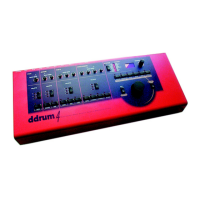
Describes the ddrum4 SE as a 10-channel percussion system with proprietary sound engine.
Highlights multi-sampled sounds by famous drummers for realistic acoustic simulation.
Explains the left side of the front panel with channel slots, buttons, and knobs.
Describes the right side of the front panel with edit controls, display, and master level.
Details the rear panel connections, including trigger inputs, outputs, and MIDI.
Instructs on making connections before powering on and connecting pads and sound system.
Guides on setting up input channels and default trigger types for different pads.
Explains how to select the trigger input type for each channel.
Details how to adjust input sensitivity knobs for optimal trigger response.
Explains how to adjust the threshold value to prevent accidental triggering.
Describes the default Palette mode and how to select sounds.
Explains Kit mode, available kits (P1-P26, F27-F99), and editing limitations.
Provides a step-by-step guide on how to select and change sounds for each channel.
Explains how to manually save edited kits to memory locations.
Discusses the importance of a good sound system for optimal ddrum4 SE performance.
Advises on choosing high sensitivity headphones.
Explains how to access and edit system functions using buttons and the rotary dial.
Details the different Trig Input types available for each trigger channel.
Explains the threshold parameter for preventing unwanted triggering.
Describes how to adjust the dynamic response curve for each channel.
Explains how to set the stereo panning for channels to outputs A1 and A2.
Details panning a channel to alternate outputs B3-B6 for flexible routing.
Explains how to set MIDI Note numbers for transmission and reception.
Describes setting the "note position" for sounds triggered by pad position sensing.
Explains how to set overall MIDI Volume for external control.
Details setting velocity for CHANNEL buttons to trigger sounds without pads.
Covers various MIDI modes for transmission and reception.
Explains selecting MIDI channels for transmission and reception.
Explains receiving and transmitting MIDI Aftertouch messages.
Covers initiating MIDI System Exclusive dumps for settings and kits.
Introduces functions for editing sound behavior and characteristics.
Explains how to select and assign sounds to channels.
Describes using variations to tweak sounds with additional programming or effects.
Details how to tune sounds using the pitch parameter.
Explains setting the decay of sounds to shorten or lengthen their duration.
Sets the output level for the selected sound on main outputs A1/A2 and headphones.
Sets the output level for the selected sound on alternate outputs B3-B6.
Introduces functions accessed by holding the SHIFT button for memory management.
Allows selection of single sounds or groups for memory check or Sysex dump.
Shows the size of selected sounds in Blocks, useful for managing memory.
Indicates the total unused sound memory in Blocks, including sounds marked for removal.
Plays the selected sound through outputs A1/A2 and headphones.
Marks sounds or groups for removal, with a warning if they are in use.
Deletes sounds marked for removal, an irreversible operation.
Transmits marked sounds as MIDI System Exclusive data.
Explains the proprietary ddrum4 sound format, editing, compression, and variations.
Guides users to download new sounds from the Clavia web site in zipped MIDI files.
Details the process of receiving sounds via MIDI, including connections and transmission.
Lists and explains error codes encountered during sound loading ('FuL', 'duP').
Explains how ddrum4 SE interprets MIDI Program Change messages for kit/palette selection.
Provides a chart detailing MIDI functions, transmitted/recognized messages, and remarks.
Lists the multi-sampled sounds made by famous drummers, including their origin and characteristics.
 General
| Brand | Clavia |
|---|---|
| Model | ddrum4 SE |
| Category | Synthesizer |
| Language | English |

 To Next Page