Need help?
Do you have a question about the Clavia nord lead and is the answer not in the manual?
Essential precautions for safe operation and electrical safety, including warnings.
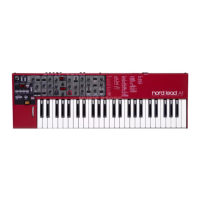
Greeting the user and introducing the Nord Lead synthesizer.
Explains the manual's purpose, structure, and how to use it effectively.
Information on accessing Clavia's website for sounds and product updates.
General rules and best practices for making audio and MIDI connections.
How to connect sustain and expression pedals to the instrument.
Guide to using the built-in demo songs for showcasing product features.
Configuring MIDI channels for integration with a MIDI keyboard.
Navigating and choosing preset sounds from memory.
Choosing and playing drum sounds from the percussion kits.
Utilizing program slots for quick switching and layering of sounds.
Combining multiple programs simultaneously for complex sounds.
Modifying individual sounds within a layered setup.
Loading and managing complete setups of four programs.
Understanding play modes like Poly, Mono, and Legato.
Configuring stereo or mono sound output.
Using pitch bend and modulation controls for musical expression.
Procedure for tuning the instrument to external devices.
Connecting and configuring sustain and expression pedals.
How to access secondary functions using the Shift button.
Resets stuck notes and parameters to default values.
Modifying sound parameters using front panel controls.
Creating sounds from scratch using panel settings.
Saving custom configurations for Manual Mode.
Saving edited or new sound programs to memory.
Utilizing memory cards for saving and loading data.
Making filter response sensitive to playing force.
Assigning velocity control to any continuous parameter.
Procedures to remove velocity assignments from parameters.
Creating continuous sound transitions using the modulation wheel.
How to choose and trigger drum sounds.
Modifying individual sounds within a percussion kit.
Moving or extracting percussion sounds between kits.
Storing custom percussion kit configurations.
Transmitting and receiving percussion kit data via MIDI.
Integrating percussion kits into performance setups.
Understanding performances as collections of programs.
Loading a complete performance setup.
Modifying programs within a performance.
Saving individual sounds from performances as programs.
Storing edited performance configurations.
Detailed explanation of the first oscillator section.
Detailed explanation of the second oscillator section.
Parameters affecting both oscillators, like FM, Sync, and Mix.
Control for Frequency Modulation depth and modulation.
Oscillator synchronization and pulse waveform width adjustment.
Controls for volume shaping via the amplifier envelope.
Introduction to the filter's role in shaping sound timbre.
Selection of different filter characteristics (LP, HP, BP, Notch).
Controls the cutoff point for the filter.
Controls enhancing cutoff frequencies and envelope modulation.
Parameters defining the filter envelope's shape over time.
How playing dynamics and key position affect filter cutoff.
Controls for the first Low Frequency Oscillator.
Controls for the second LFO and built-in arpeggiator.
AD-type envelope for modulating other parameters.
Assigning effects to the modulation wheel.
Explains play modes and the Unison effect for thicker sounds.
Controls for pitch sliding and octave range adjustment.
How to access secondary functions using the Shift button.
Overview table of all available shift functions.
Differentiates global vs. slot-specific settings.
Procedure for tuning the instrument to external devices.
Configuring output modes and front panel control via MIDI.
Settings for MIDI messages and channel assignments.
Setting the master MIDI channel for performance changes.
Introduction to advanced MIDI functions.
Synchronizing LFO 1 to an external MIDI clock.
Synchronizing LFO 2 and arpeggiator to MIDI clock.
Triggering filter envelopes via external MIDI notes.
Practical demonstration of MIDI filter envelope triggering.
Triggering amplifier envelopes via external MIDI notes.
Applying velocity control via MIDI for sound morphing.
Demonstrating velocity-based morphing via MIDI.
Global settings for pedal, pitch bend, and unison detuning.
Overview of MIDI capabilities and message types.
Handling of MIDI notes and pitch bend messages.
Mapping front panel controls to MIDI controller numbers.
Assigning parameters for control via aftertouch messages.
How program changes are transmitted and received via MIDI.
Further details on controller messages.
Managing banks and SysEx data via MIDI.
Connecting and controlling the Nord Lead with a sequencer.
Managing direct control and channel assignments.
Handling program changes and controller messages.
Notes on controller messages and sequencer synchronization.
Transmitting and receiving all data via MIDI Sys Ex.
Overview of subtractive synthesis and the Nord Lead's role.
Core components of subtractive synthesis: Oscillator, Filter, Amplifier.
Fundamental qualities of oscillators and waveforms.
Explains harmonic content and timbre based on waveform shape.
Detailed explanation of the pulse waveform and its variations.
Explains non-harmonic spectra and oscillator synchronization.
Introduction to the filter's role in shaping sound timbre.
Explains different filter models like Lowpass and Highpass.
Details on bandpass, notch filters and roll-off characteristics.
Controls filter cutoff and its response to keyboard pitch.
Role of the amplifier in controlling volume and sound shape.
Introduction to ADSR envelopes for shaping sound over time.
Details on Attack, Decay, Sustain, and Release envelope stages.
Introduction to Low Frequency Oscillators for modulation.
Mapping front panel controls to MIDI controller numbers.
MIDI mapping for modulation envelope controls.
Format and structure of SysEx messages.
Transmitting and receiving individual patch data.
Requesting patch data transmission from the Nord Lead.
Transmitting and receiving percussion kit data.
Transmitting and receiving complete performance data.
Requesting performance data transmission.
Requesting all controller values for a specified slot.
Structure of data bytes for patch and performance dumps.
Details on the structure of performance data bytes.
List of default programs stored in RAM and ROM.
List of default percussion kits available.
List of default performance setups.
Details on organ sound emulation techniques.
Explanation of drawbar controls and their function in organ sounds.
Details on recreated sounds from the Prophet 5 synthesizer.
How to reload factory programs from ROM performances.
Summary of MIDI functions, transmission, and recognition.
 General
| Oscillators | 2 per voice |
|---|---|
| Arpeggiator | Yes |
| Type | Virtual Analog |
| Waveforms | Sawtooth, Square, Pulse, Triangle, Noise |
| LFO | 1 |
| Keyboard | 49-key, velocity sensitive |
| MIDI | In/Out/Thru |
| Outputs | Stereo outputs, headphone output |

 To Next Page