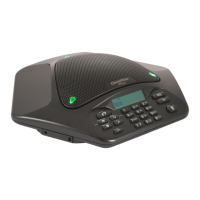
To Store a Number In the Phonebook
1. Enter the phone number you want to store while conferencing POD is in standby mode.
2. Press and hold the PHONEBOOK/EDIT key until the phonebook and program icons appear on the LCD
screen (as shown below).
The Phonebook and Program icons.
Adding Phonebook Entries
Assign a phonebook location (0–9) by pressing the corresponding number key.
Press PHONEBOOK again to save the entry. You will hear a confirmation tone.
Press CLEAR to exit phonebook edit mode before saving the entry.
NOTE: Press and hold the 1 numeric key to enter a hyphen or the “*” key to enter a space in the
number. Press CLEAR to delete the old number before entering a new number.
To Access a Speed Dial Number
• Press the SPEED DIAL key. This feature must be programmed before use. See Programming Features for
additional information.
To Access Your Service Center
• While in standby mode, press and hold the “0” key for 2 seconds. This feature must be programmed before
use. See Programming Features for additional information.
1.
2.
3.
Chapter 2 : Getting Started 7


 To Next Page