4 Technical Services: 800-283-5936
CONNECTING MAX EX TO AN ANALOG PHONE LINE
Connecting MAX EX
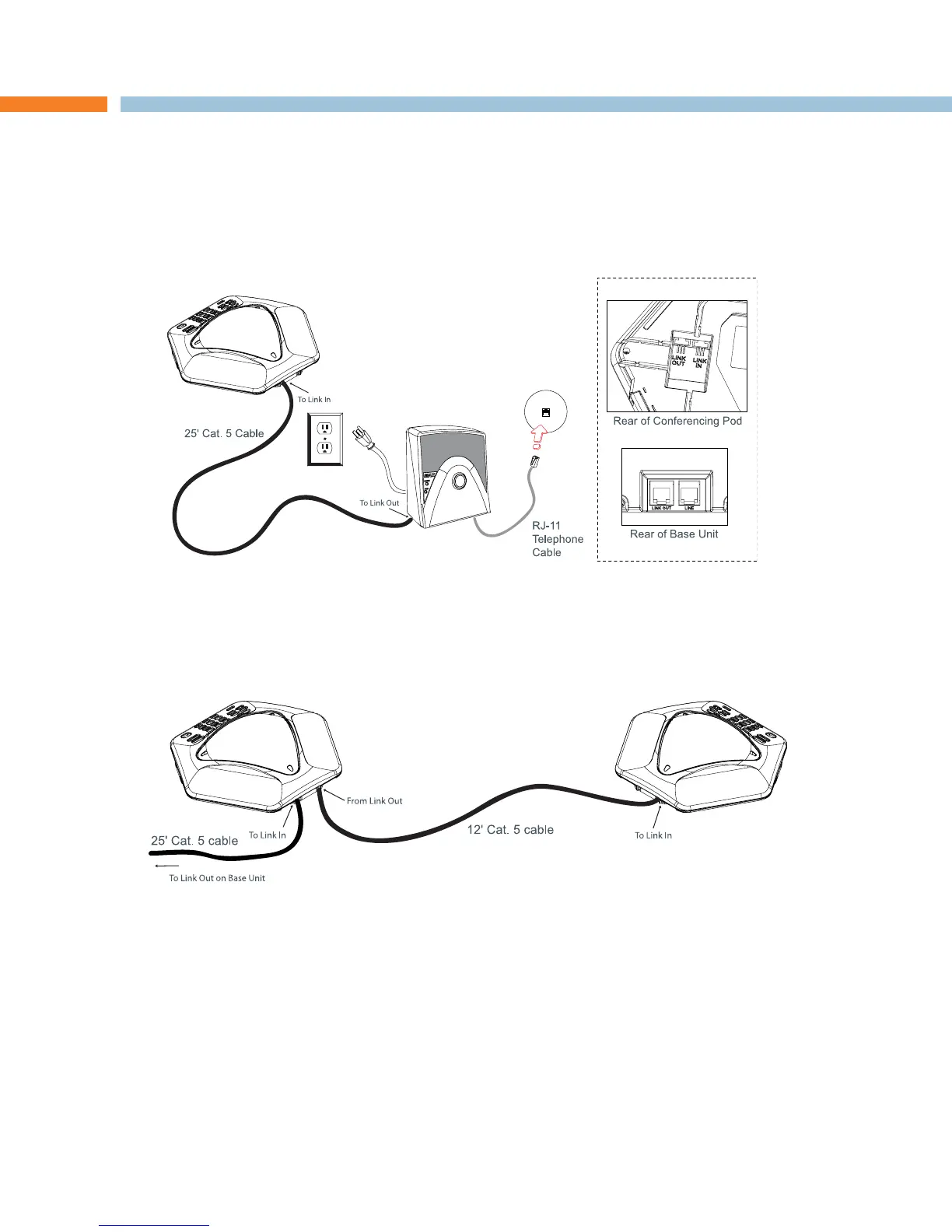
Connect the Link Out jack on the base unit to the Link In jack on the conferencing pod using the CAT-5
cable.
Connect the base unit to the telephone jack using the RJ-11 telephone cable.
Connect the power cord to the base unit and plug it directly into an electrical outlet.
Connecting MAX EX Expansion Pods
Connect the 12' Cat. 5 cable to the Link Out jack on the first phone and the Link In jack on the second
phone.
Continue linking up to three additional MAX EX phones in the same fashion. A total of four units may be
connected.
1.
2.
3.
1.
2.
CHAPTER 2 : GETTING STARTED


 To Next Page