To Restore Factory Defaults
Press and hold the REDIAL/PROG key until the program icon appears on the LCD screen.
Press and hold the 9 numeric key. The number 8 appears across the LCD screen.
Press REDIAL/PROG to confirm the selection.
Press CLEAR to exit programming mode.
To Program Automatic Gain Control (AGC) and Automatic Level Control (ALC)
Press and hold the REDIAL/PROG key until the program icon appears on the LCD screen.
Press and hold the 8 numeric key. The current AGC setting number appears on the LCD screen.
Press REDIAL/PROG. The current setting number flashes.
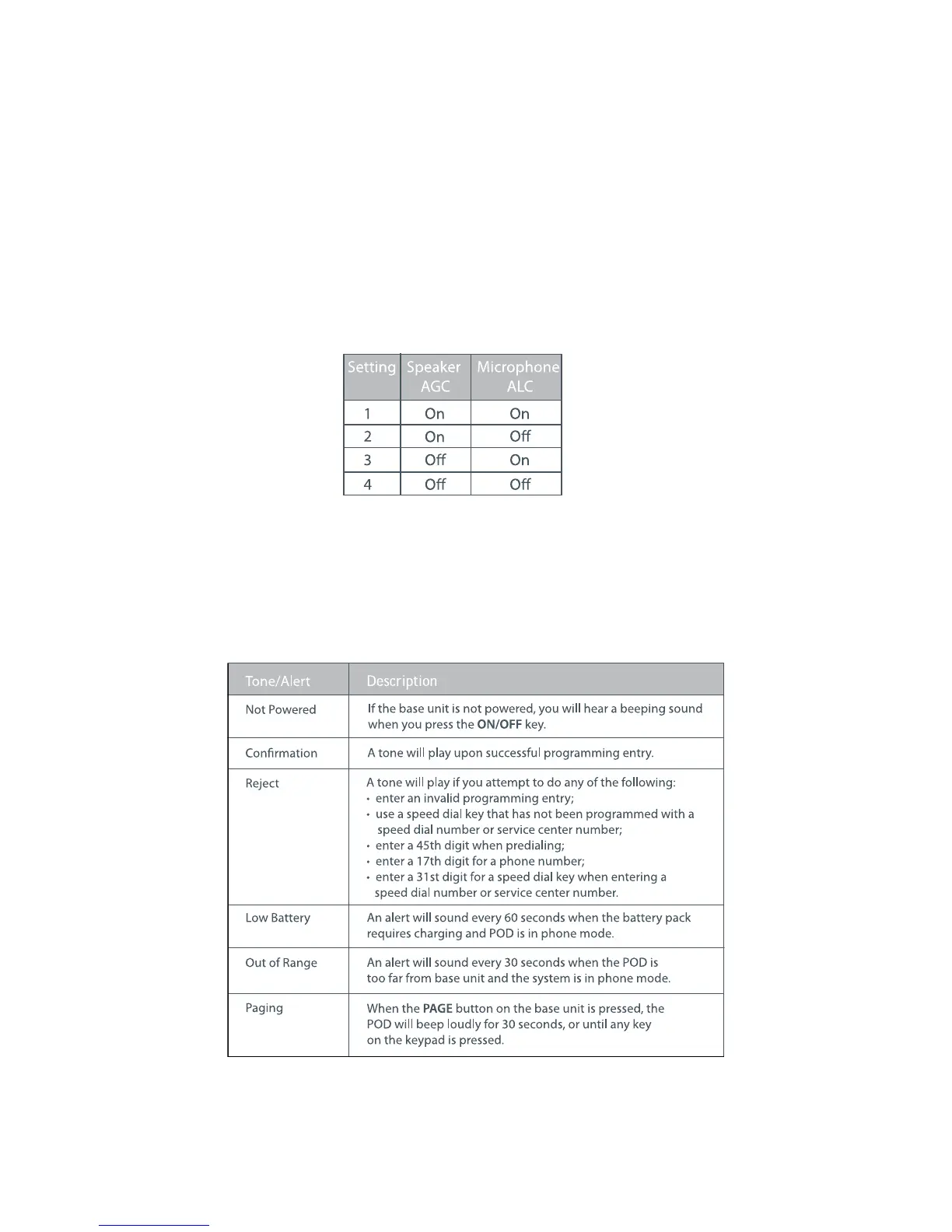
Enter a new setting number using the AGC/ALC table shown below.
Press REDIAL/PROG to confirm selection.
Press CLEAR to exit programming mode.
ALERT TONES
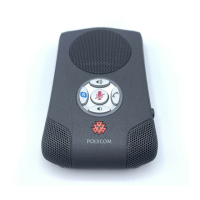
The table below describes alert tones used by MAX EX.
1.
2.
3.
4.
1.
2.
3.
4.
5.
6.
Chapter 3 : User Options 11


 To Next Page