33
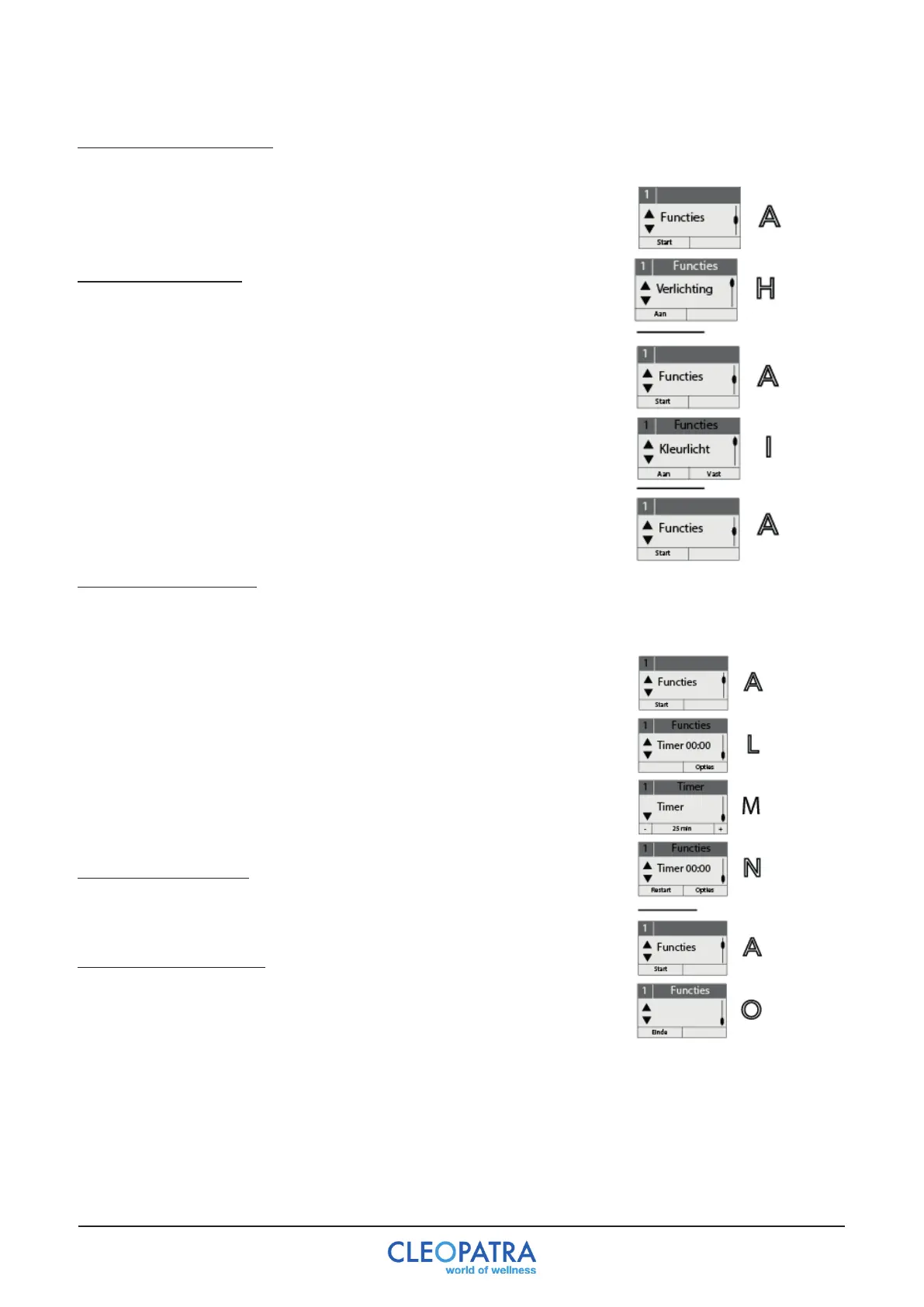
9.4.f Menu“Lighting“(H)
Pressbutton3/4 toselectthe“Lighting”menu.
-Halogenlightingon/off.Bypressingbutton1thelightingcan
be turned on and off.
Menu“Colorlight”(I)
Pressbutton3/4 tochoosemenu‘Colorli g ht ’.
- Color light on / off
By pressing button 1 the color light function can be switched on
or off.
- Keep / change color light
By pressing button 2 the color of the color light can be fixed or
switched to color change.
9.4.g Menu“Timer”(L)
Usebutton3/4 toselectthe“Timer”menu.
- Timer settings (L)
Select“Set”(M)withbutton2.Bypressingbutton1/2 thetimecanbe
changed (1 - maximum 40 minutes) or the Timer can be switched off
(N).
To activate the timer, the timer must always be set first. The function
can be selected immediately afterwards. If you return to menu level 1
fromthe“Functions”menu,thetimerisautomaticallyresettothebasic
setting of 20 minutes!
Timing time ended (N)
By controlling button 1 the whirlpool function can be continued with
the previously set values.
Back to the menu-level 1
Press button 3/4 to go to the empty Menu Window (O) with button 1
Select“ En d”.


 To Next Page