34
9.4.i Menu“Service“
The installer can call up the settings of the whirlpool control in
the service menu.
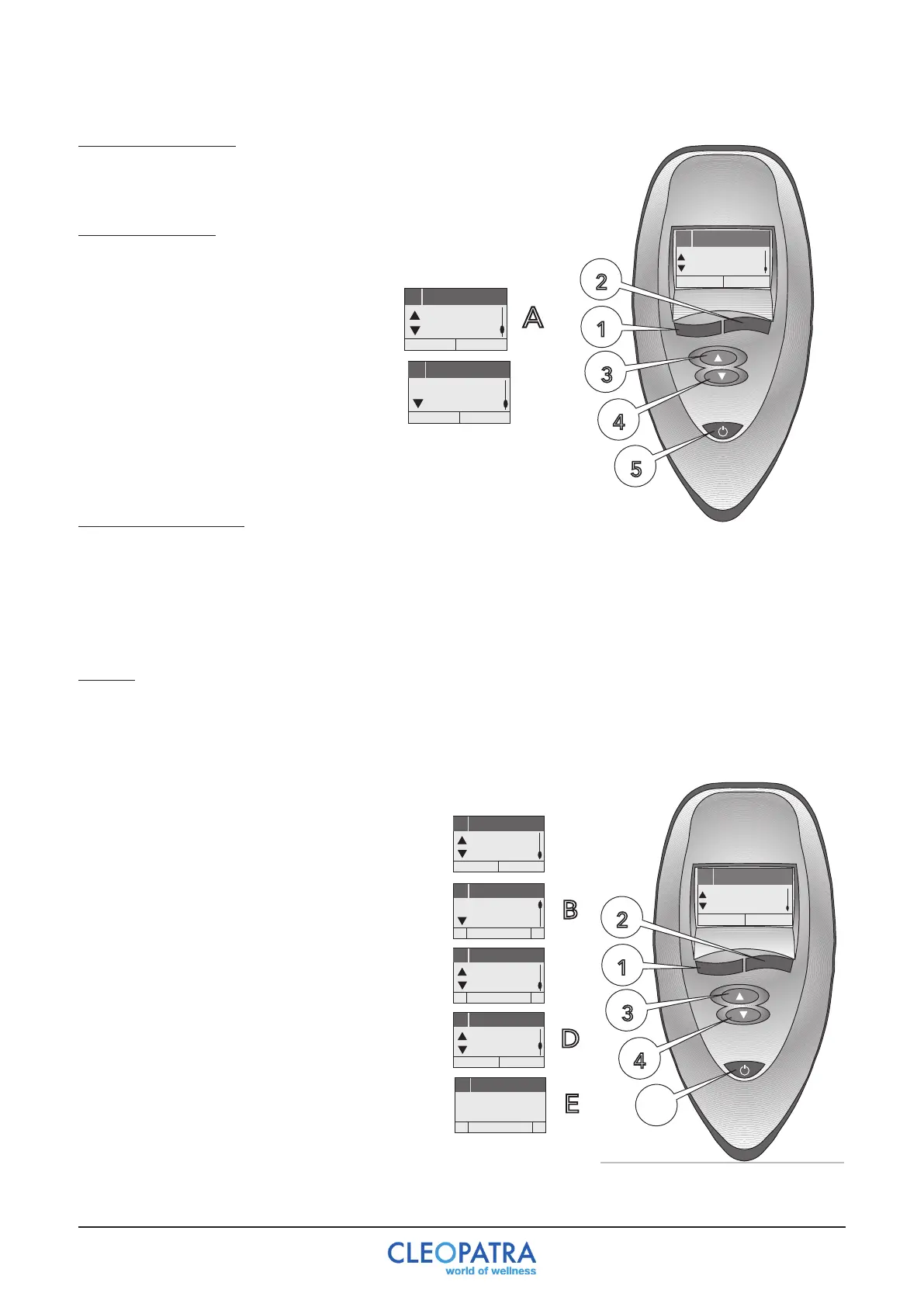
Control (image A)
Call‘Service’inmenulevel1withbutton3/4.
-ServiceInfo(A).Theinformationcanbe
called by pressing button 2.
53
English
Language
10 Settings
-+
Service
6
Settings
Deutsch
6
Service
Einst.
6
Service
Installateur
Info
English
6
Service
Settings
6
Service
Plumber
Info
Nederlands
6
Service
Opties
6
Service
Installateur
Info
B
9.4.j Menu“Settings“
Thelanguageoftheusercanbeselectedinmenu“settings”.Menufunctionsforthesettingsin
functionsandthe“User1”-“User4”switchedon/offandthecontrolisreconfigured.German,
English,Italian,Spanish,FrenchandDutchareavailablelanguages.Inordertoswitchmenu
functions on or off or to configure the control again, a protected area must be entered via a PIN
code.
55
English
Language
10 Settings
-+
Settings
7
Settings
5
Deutsch
7
Einstellung
Sprache
-
Deutsch
+
7
Einstellung
Einst.
7
Einstellung
System
Einst.
7
Einstellung
Pincode
-
1
+
7
Einstellungen
-
Auswahl
+
User 1
English
7
Settings
Language
-
English
+
7
Settings
Einst.
7
Settings
System
Settings
7
Settings
Pincode
-
1
+
7
Settings
-
Choice
+
User 1
Nederlands
7
Instellingen
Taal
-
Dutch
+
7
Instellingen
Opties
7
Instellingen
Systeem
Opties
7
Instellingen
Pincode
A
7
Instellingen
-
Keuze
+
User 1
C
English
Language
10 Settings
Service
6
Settings
Deutsch
6
Service
Einst.
6
Service
Installateur
Info
English
6
Service
Settings
6
Service
Plumber
Info
Nederlands
6
Service
Opties
6
Service
Installateur
Info
B
English
Language
10 Settings
Settings
7
Settings
5
Deutsch
7
Einstellung
Sprache
-
Deutsch
+
7
Einstellung
Einst.
7
Einstellung
System
Einst.
7
Einstellung
Pincode
-
1
+
7
Einstellungen
-
Auswahl
+
User 1
English
7
Settings
Language
-
English
+
7
Settings
Einst.
7
Settings
System
Settings
7
Settings
Pincode
-
1
+
7
Settings
-
Choice
+
User 1
Nederlands
7
Instellingen
Taal
-
Dutch
+
7
Instellingen
Opties
7
Instellingen
Systeem
Opties
7
Instellingen
Pincode
-
1
+
A
7
Instellingen
-
Keuze
+
User 1
C
Control
Callup“Settings”inMenulevel1withbutton
3/4 (A).-Setlanguage(A)Select“Set”(B)
with button 2. The language can be selected
by pressing button (B) 1/2. With button 4 you
can return to menu level 1 (A).
- Defining user names
Select“settings”(B)withbutton2andselect
user 1, user 2, user 3 or user 4 with button
4. Use button 1/2 to position the cursor and
select the letters or numbers with button 3/4.
End the selection by pressing button 1/2 until
the cursor is no longer displayed. You can
then return to menu level 1 with button 3/4
(A).
- Enter into the protected mode. Use button 2
toselect“Options”(A)andswitchto“System”
withbutton4(D).“Options”Selectwithbutton
2 (E) and with button 1/2 set PIN code to 1,
with button 3 confirm the PIN code.


 To Next Page