HEATER
HEATER
365 FREEZEGUARD WIFI CONNECT
INFLATE
AIR JETS
INFLATE
AIR JETS
FILTERFILTER
TEMP UP
TEMP UP
SET TEMP/
LOCK
SET TEMP/
LOCK
TEMP DOWN
TEMP DOWN
13
OPERATING YOUR CLEVERSPA®
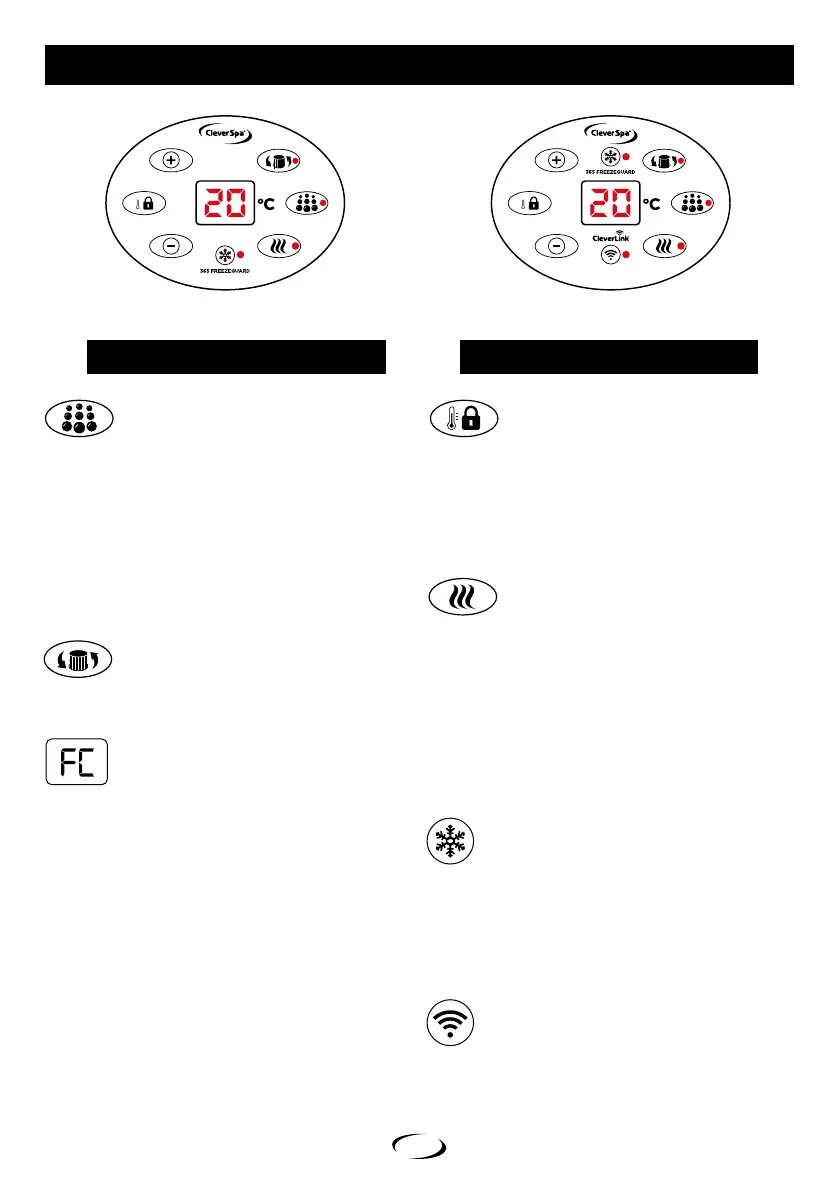
CONTROL PANEL CONTROL PANEL WITH CLEVERLINK®
Press SET TEMP/LOCK and the numbers on display screen
will start to flash. Increase/decrease temperature by pressing
TEMP UP or TEMP DOWN.
Choose desired temperature, press SET TEMP/LOCK again to
confirm. Temperatures can be set between the range of
20°C - 40°C.
See safety precautions for recommended operating temperatures.
Press INFLATE/AIR JETS to start the bubbles - a light will appear.
Press again and air jets will stop and the light will go out.
INFLATE FUNCTION:
Do not overinflate. Do not leave unattended.
Air Jet Function:
Air jets will stop automatically after 20 minutes of continuous use,
to avoid internal pump overheating. They can be started again
after 10 minutes (indicated by beep). Air jets can be stopped or
started again at any time during their 20 minute cycle.
SETTING THE TEMPERATURE
Press HEATER, light will appear. Press HEATER
again and heating system will stop, light will go out.
When heater system is on, filter system will switch on
automatically to circulate water.
When temperature has reached 1°C above pre-set
temperature, heating system will stop working,
but light will remain on. Filter pump will continue
to operate even when heater is not functioning.
When water falls 1°C below pre-set temperature, heating
system will automatically heat water back to 1°C above
selected temperature. Once achieved, heater will stop
to allow temperature to settle at pre-set value.
HEATER
INFLATE/AIR JETS
FILTER CHANGE
FILTER
Press FILTER, light will appear, pump will start to work.
Press FILTER again to stop pump, light will go out.
After approx. 168 hours, FC code will appear on display screen.
It reminds users to check/replace their filter.
NOTE: The filter should be cleaned after every use.
See ‘Cleaning filter tips’ on page 15.
Light will be lit on FILTER. Pump and heating system will
continue to operate as normal and lights will be on.
To clear the FC code, press FILTER. the FC on display screen
will disappear and the water temperature will be displayed.
All functions will return to normal.
IMPORTANT! FILTER CYCLE
After the pump and heater is turned o, the filter will
continue to run for a couple of minutes to avoid overheating.
The filter light will flash during this time.
DO NOT REMOVE THE FILTER UNTIL THE CYCLE HAS
COMPLETED TO AVOID DEBRIS GETTING INTO THE
SYSTEM, CAUSING POTENTIAL DAMAGE.
For instructions on how to connect you CleverLink® App
see page 11.
When switched on, 365 FREEZEGUARD will activate the
filter and heater and maintain the water temperature at
5°C to help prevent the water freezing at low temperatures.
Press 365 FREEZEGUARD, light will appear, filter and heater
will be activated & lights will appear. Controls will be disabled.
Press 365 FREEZEGUARD again, lights will go out, filter and
heater will be deactivated, all control will be re-enabled.
365 FREEZEGUARD
CLEVERLINK®


 To Next Page