14
IP Installer Software - Windows PC
Note:
Google Chrome, Safari & Firefox do not support recorded video playback. Some options/
controls may also be limited to these browsers.
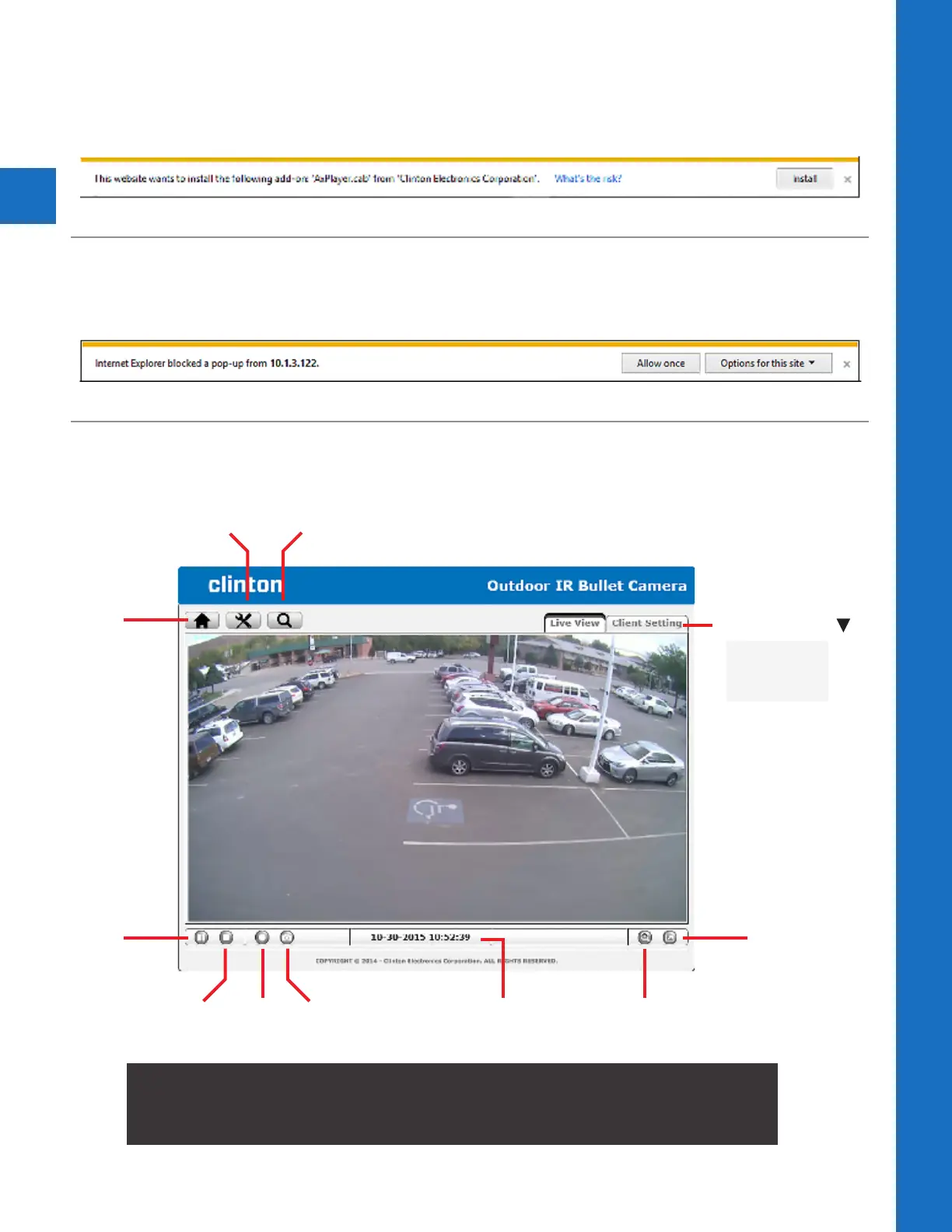
PAUSE
STOP SNAPSHOTRECORD
FULL SCREEN
CLIENT SETTING
• Prole
• View Size
• Protocol
• Video Buer
ZOOMDATE & TIME
HOME
SETTINGS INFO
4. Install ActiveX Control
When accessing the IP Camera for the first time, a yellow information bar appears below the address
bar: This website wants to install the following add-on: ‘AxvideoView.cab’ and/or ‘AxPlayer.cab’ from
‘Clinton Electronics’. Click Install.
5. Allow IP Camera Pop-Up’s
Depending on your computer’s Privacy settings, an information bar may appear alerting you about
blocking a pop-up. Choose to always allow for the IP camera address.
6. Live Viewing
After successfully logging into the camera, the live image from the camera displays in the center of
the screen.



 To Next Page