18
Use
3.2 Manual operation (without remote
control)
The display panel on the indoor unit can be used to
operate the unit if the remote control has been incorrectly
positioned or has no batteries.
1 4
5
6
2
3
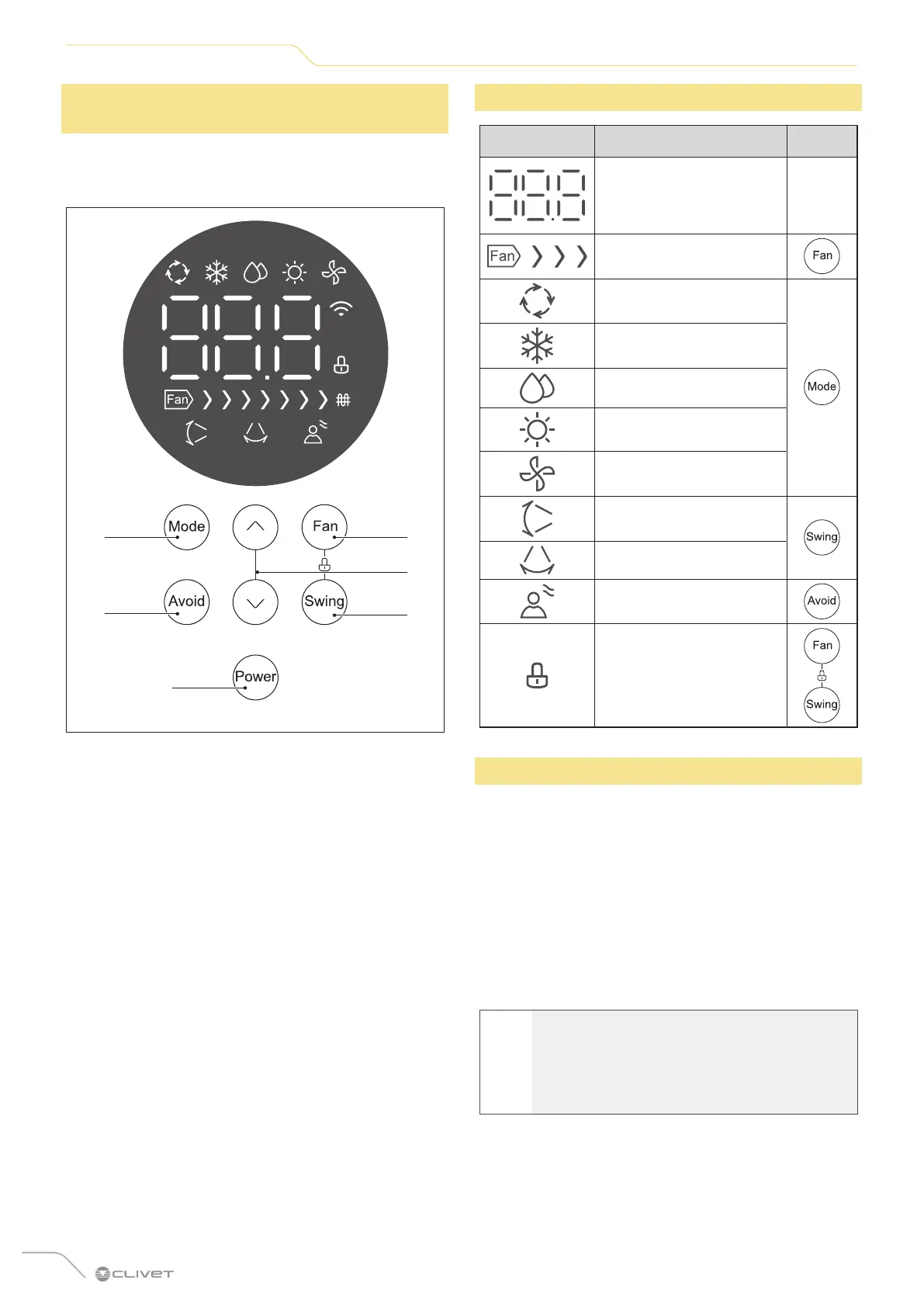
Fig. 16
1 Mode button
2 Avoid button
3 Power button
4 Fan button
5 Swing button
6 Selection buttons
3.3 Meaning of the displays
Icon Description Button
Displays:
• room temperature
• set temperature
• timer
-
Fan speed
Automatic mode
Cooling mode
Dehumidification mode
Heating mode
Ventilation mode
Vertical airflow
Horizontal airflow
Avoid direct airflow
Safety lock
3.4 Other functions
– Automatic restart
If the power supply to the unit is interrupted, the
unit will automatically restart with the last settings
when it is restored.
– Memory of the ventilation slits angle
When the unit is turned on, the ventilation slits
automatically return to the last set angle.
– Detection of refrigerant leaks
The indoor unit automatically displays "EC" when it
detects a refrigerant leak.
l
WARNING
For a detailed explanation of the unit's
advanced features (such as TURBO mode and
self-cleaning functions), refer to the Remote
Control Manual.




 To Next Page