800.338.2372 7www.cmecorp.com
Replacing Electronic Lock
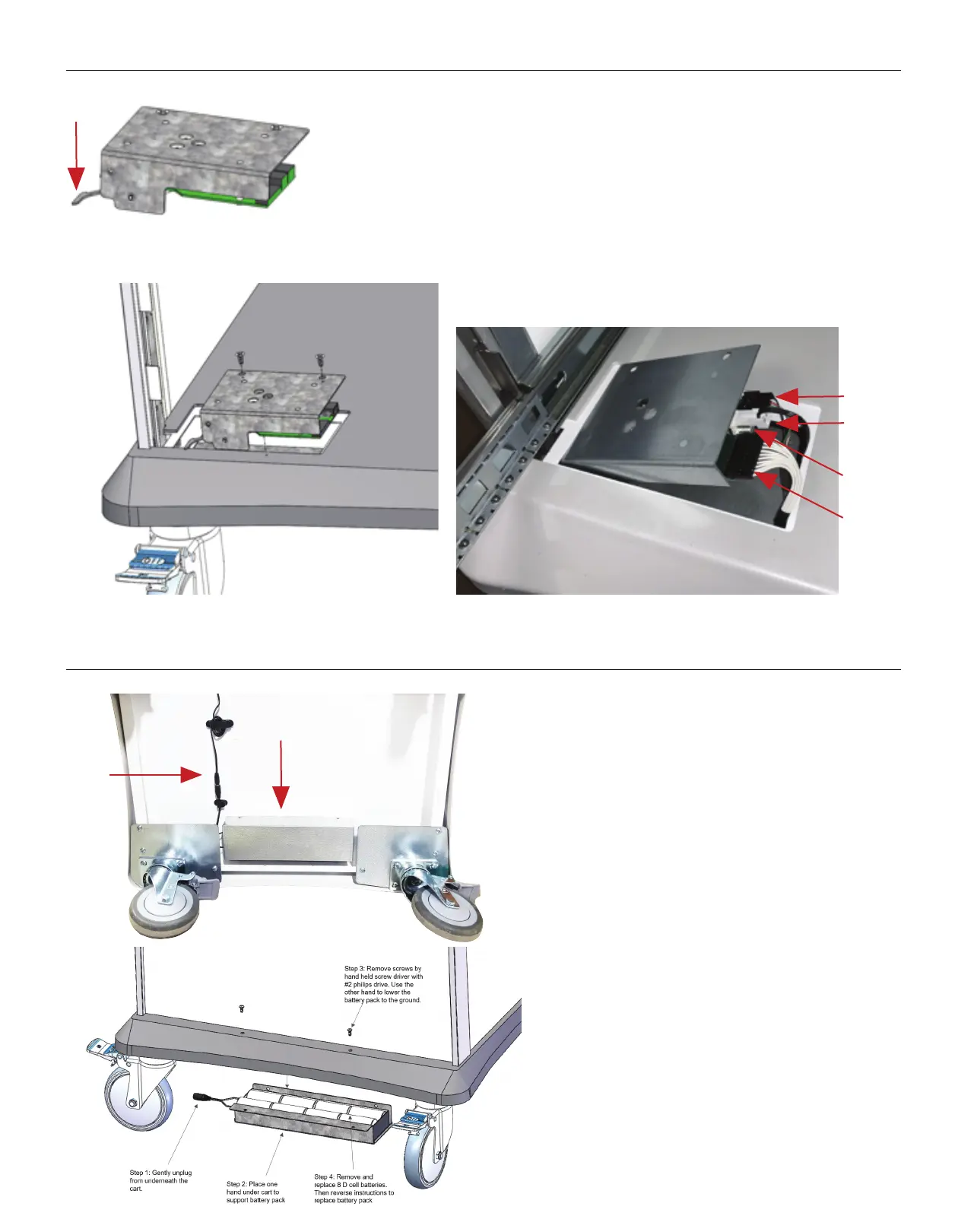
Step 1: Make sure lock arm is in the down position as shown in
Figure 1
Step 2: Make sure key lock is in the unlocked position
Step 3: Plug in cables as shown Figure 2
Step 4: Insert the lock module down and then to the left into the
recessed area. Align screw holes are use the #8 Flat head screws
to secure the lock module in place.
Battery Replacement
Step 1: Gently unplug from underneath the cart.
Step 2: Place one hand under cart to support battery
pack
Step 3: Remove screws by hand held screw driver with
#2 phillips drive. Use the other hand to lower the
battery pack to the ground.
Step 4: Remove and replace 8 D cell batteries.
Then reverse instructions to replace battery pack.
Figure 1
Prox Cable
Power cable
Empty Pin
Keypad Cable
(Tabs Up)
Down
Battery
Barrel Plug


 To Next Page
 Loading...