Need help? c-m-p.com/support 21
5. TROUBLESHOOTING & FAQS
NOTICE: Knowledge of electrical applications is required for some troubleshooting. Contact a certied electrician if you are
unsure of your ability to service the equipment. Improper servicing will void generator warranty. If any condition persists
contact CMP Technical Support
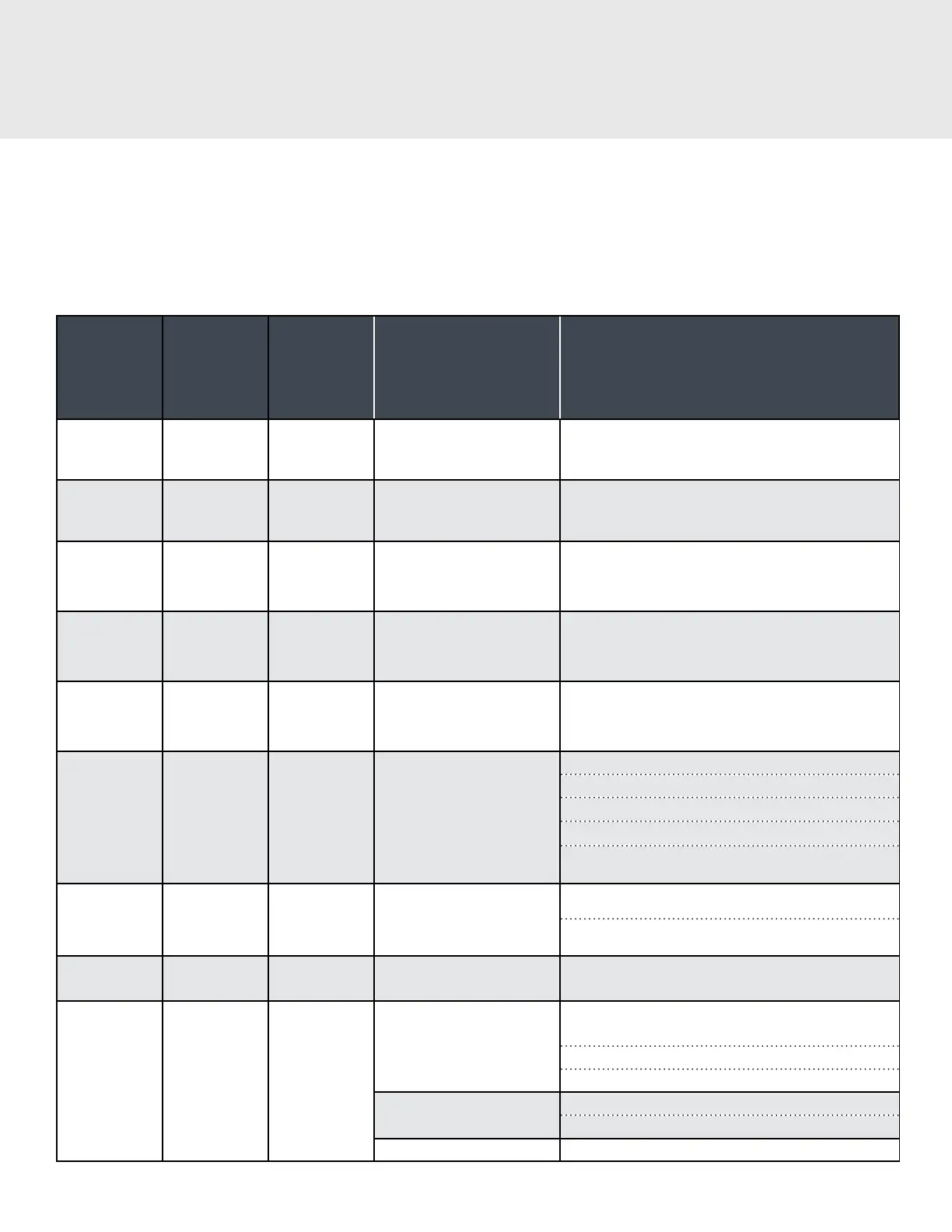
5A. SMART STATUS SYSTEM INDICATOR TROUBLESHOOTING
POWER
INDICATOR
COLOR
OZONE
INDICATOR
COLOR
UV-C
INDICATOR
COLOR
CAUSE CORRECTIVE ACTION
Green Blue Purple
All systems are operating
correctly
N/A
Green Blue Yellow
UV-C Lamps are due for
replacement
Order new UV-C Lamps. See Section 4C
Yellow Blue Red Blinking UV-C overdue for service
Replace UV-C Lamps. See Section 4C
Green Yellow Purple
Ozone Cells are due for
replacement
Order new APG2 ozone cells. See Section 4B
Yellow Red Blinking Purple Ozone overdue for service
Replace ozone cells. See Section 4B
Red Blue Red Error with UV-C system
Check lamp connections
Check connection to ballast
UV lamp failure: Replace UV lamps
Ballast failure: Contact CMP Technical Support
Incorrect wiring: conrm unit is connected to the output
side of the pool time clock
Red Red Purple
Error with ozone system
Check power connections to ozone cell.
Replace ozone cell. See Section 4B.
Red Red Blinking Red Blinking
Ozone and UV-C are both
overdue for service.
Replace ozone cells and UV-C Lamps. See Section 4.
Red Red Red
Flow problem
Insucient Flow: Verify that pump is running properly and
that lters/skimmers are clean.
Flow switch failure: Replace ow switch
Flow switch relay failure: Replace ow switch
UV Panel Switch Error
UV access door is not properly closed
Panel switch has failed.. Contact CMP Tech Support
Multiple System Failure Ozone and UV system both have failed. See Section 4



 To Next Page