ENGLISH
10
Display lighting
Battery operation
Press [ SNOOZE/LIGHT ] (21) to illuminate thedigits and symbols on
thedisplay. The lighting will automatically go off after 8 seconds.
Mains operation
Press [ SNOOZE/LIGHT ] repeatedly to choose thebrightness mode
High, Low orOff.
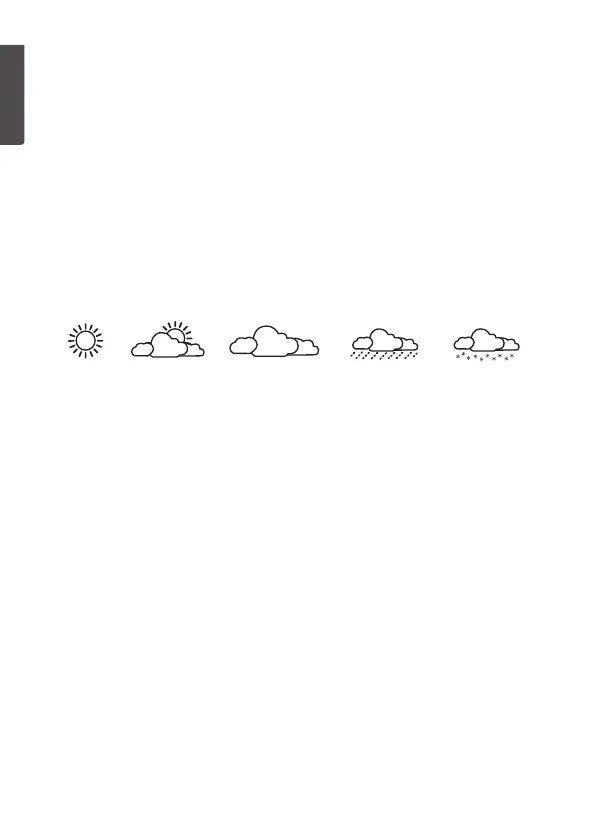
Weather forecast
The weather station will measure theatmospheric pressure and generate
aweather forecast for thecoming 12hours. Oneof thefollowing symbols
will appear depending on thecurrent atmospheric pressure trend:
Things to consider:
• We recommend that Sensor 1 be located outdoors in order
for theweather station to provide as correct aweather forecast
as possible.
• If theweather station is moved to another location, it will take
12–24 hours for it to adjust and recalculate in order to give
reliable forecasts.
• One should never expect 100 % forecast accuracy.
Forecasts have about a75 % accuracylevel.
Max and min readings
1. Press [ MEM ] to display themax readings for thetemperature
and humidity.
2. Press thebutton again to display themin readings.
3. Press thebutton once more to return to current readings.
Zeroing the saved max and min readings:
The max and min readings of theweather station are automatically
reset to zero everynight. The readings can also be zeroed manually by
holding in [ MEM ].
Sunny Sunny spells Cloudy Rain Snow


 To Next Page