ENGLISH
9
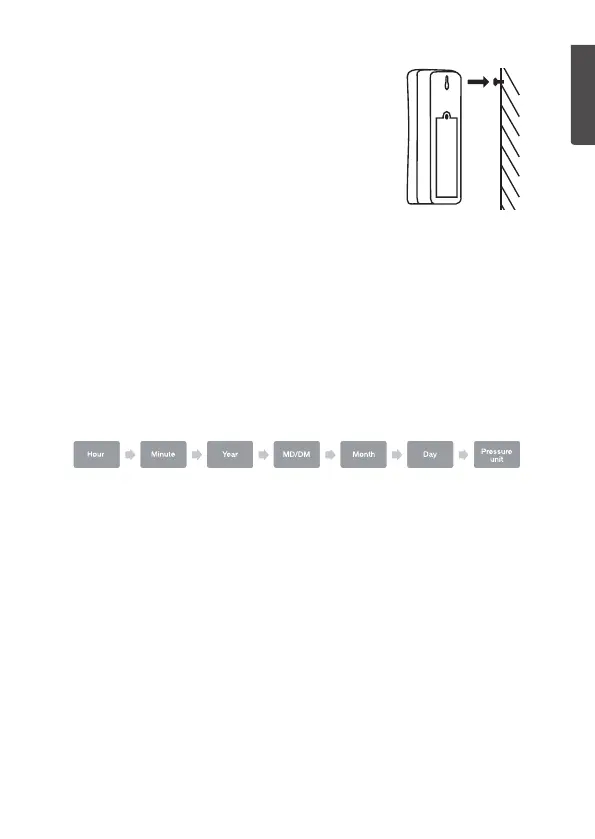
Sensor unit
• Place thesensor in alocation that is
protected from direct sunlight andrain.
• Mount thesensor at least1.5 m (5 ft)
above ground, if possible.
• Screw ascrew nearly all theway into thewall,
leaving thehead sticking out alittle and hang
thesensor using thehanging hole (27).
Instructions for use
Settings
1. In normal mode, hold in [ SET ] for 3 seconds to enter
thesettingsmode.
2. Press or hold in [ ▲ ] or [ ▼ ] to change thevalue.
Confirm each stage with [ SET ].
If none of thebuttons is pressed within 20 seconds, thesettings are
saved and theweather station reverts to normal displaymode.
Set thefollowing in sequential order:
- Hour: Hour setting
- Minute: Minute setting
- Year: Year setting
- MD/DM: Set theorder of how theday and month are displayed.
- Month: Month setting
- Day: Day setting
- Pressure unit: Set which units of measurement theatmospheric
press is displayed in (hPa/mb, mmHg or inHg)
Selecting the units of temperature
Press [ ▲ ] to toggle between units of temperature measurement in
degrees Celsius (ºC) and degrees Fahrenheit (ºF).


 To Next Page