17
6.16 Switch between GPRS and SMS Mode
Send SMS “GPRS+password+space+1” to tracker device to switch to GPRS
mode; Send SMS “GPRS+password+space+0” to tracker device disable GPRS
mode. Both will reply “GPRS,CONFIG OK”.
6.17 Check the Vehicle State
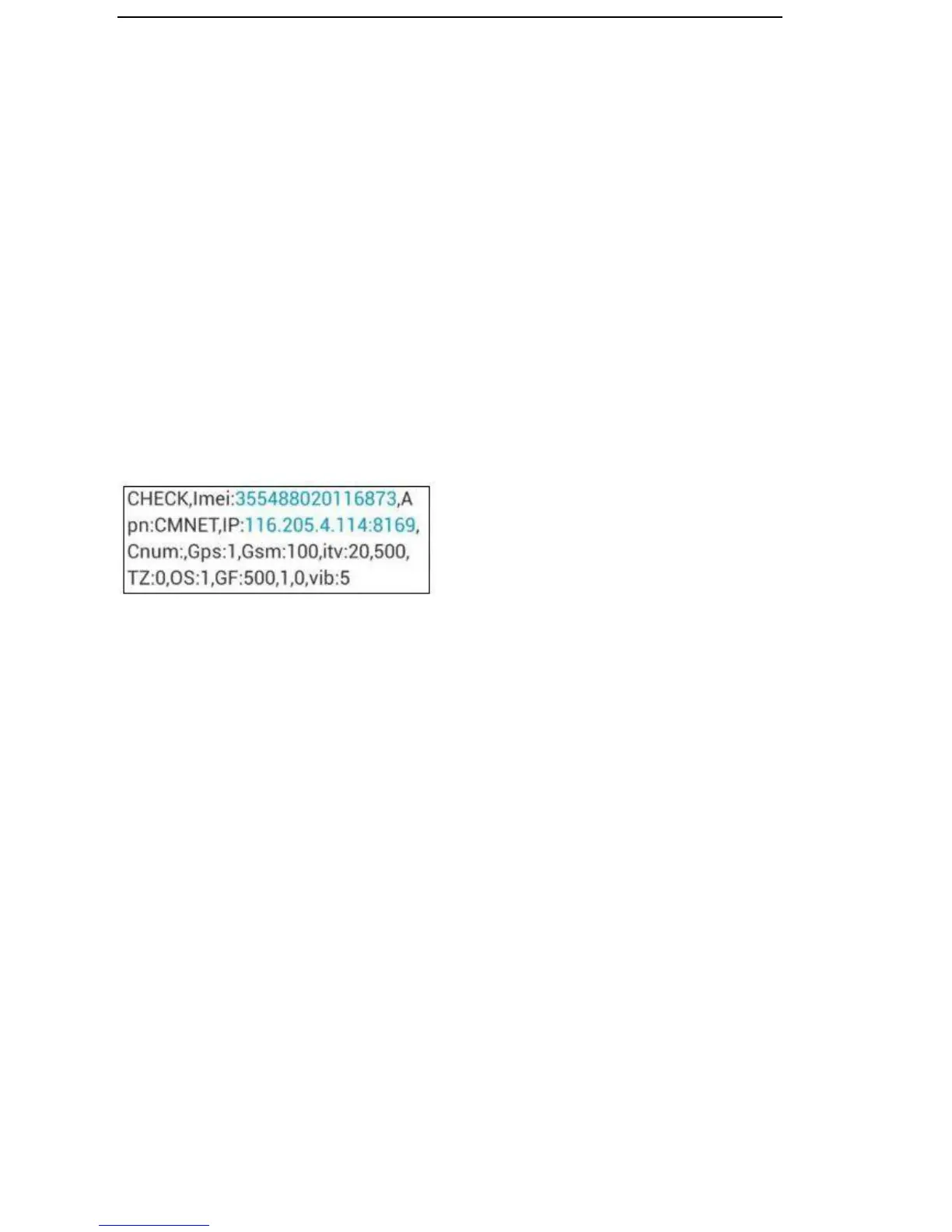
Send SMS command “check+password” to the tracker device in the vehicle, it
will reply following SMS:
imei: unique IMEI number for register intracking platform.
apn: APN info. Of SIM card.
IP: server IP and Port number.
Cnum: central number for receive alarms.
GPS: 1 means GPS working, 0 meanssearching signal, -1 means GPS sleep for lower power consumption
purpose.
GSM: 100 means GSM signal value normal.
ITV: moving time interval is default 20s,static time interval is 500s.
TZ: time zone is default GMT 0.
OS: overspeeding alarm, 0 meansdeactivate, 1 means activate.
GF: 500,1,0: Geo-fence function, 500meters, “0,1” represent enter fence alarm.(0,0 close alarm; 1,0 out fe
nce alarm; 0,1enter fence alarm; 1,1 out /enter fence alarm).
Vib: vibration level.
6.18 IMEI Checking
6.18.1 Send SMS command "getimei+password" to the unit. E.g. Send SMS
command "getimei123456" to the tracker device, an IMEI number in 15 digits
will reply to your cell phone.


 To Next Page