Chapter 4: Using the Terminal Control Unit
42 Configuration
Configuring the Glonass option
The Glonass module can be set up in several ways:
• Position data are based solely on the Glonass module
• Position data come preferably from the Glonass module
• Position data will always be those with best 3D fix
Configuration of the Glonass option lies in the SAILOR 3027. To access
these settings enter the terminal program as described in Using commands
on page 35, login as system administrator (sysadm) and type:
minic
The prompt changes to
can0:/$ (example)
To allow external navigational input
To display the current external navigational input, type:
can0:/$ cfg -pa
External nav input: 1 (Allowed)
To set preferred navigational input
To display the currently preferred navigational input, type:
can0:/$ cfg -pi
Preferred nav input: 2 (External Glonass)
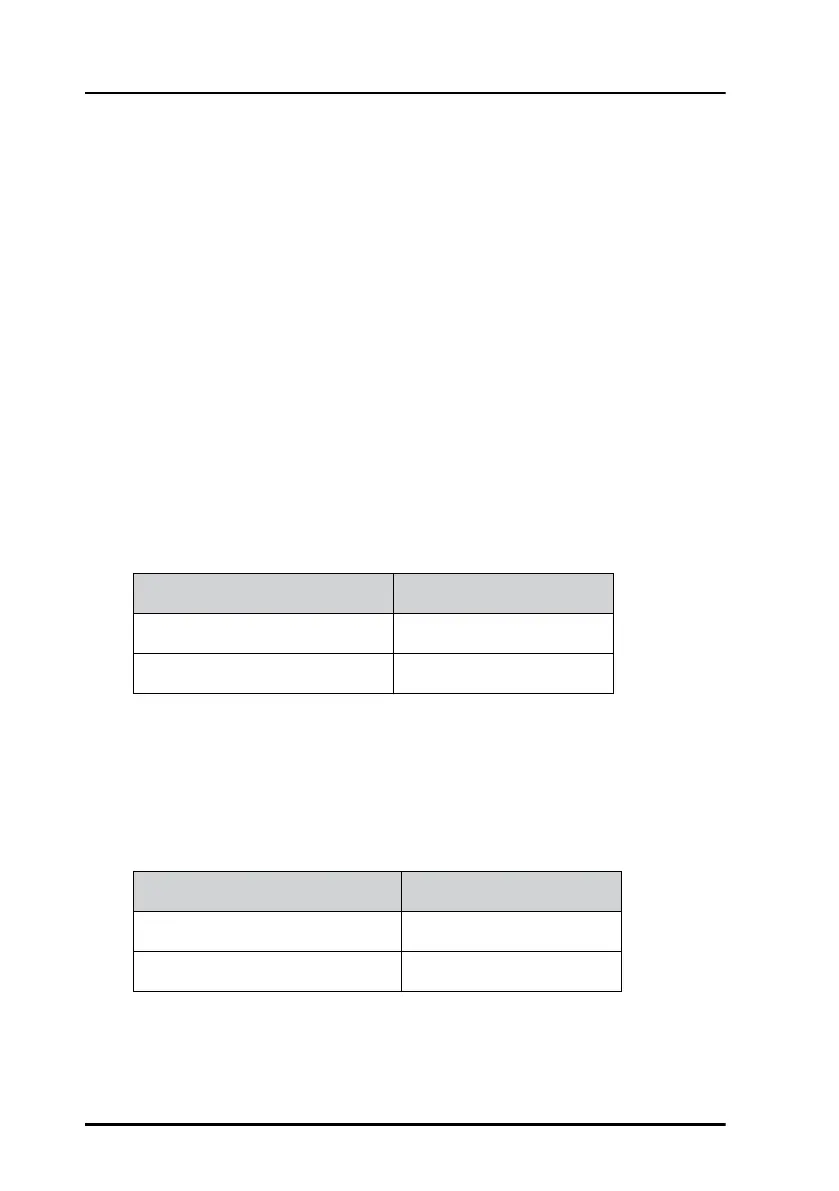
External navigational input Command
Allow
can0:/$ cfg -pa 1
Not allow can0:/$ cfg -pa 0
Preferred navigational input Command
GPS
can0:/$ cfg -pi 1
Glonass can0:/$ cfg -pi 2


 To Next Page