Chapter 2: Operation
44 Setup
Controller setup
Each of the controlling devices connected and powered has its own setting.
The available settings may vary from controllers applied.
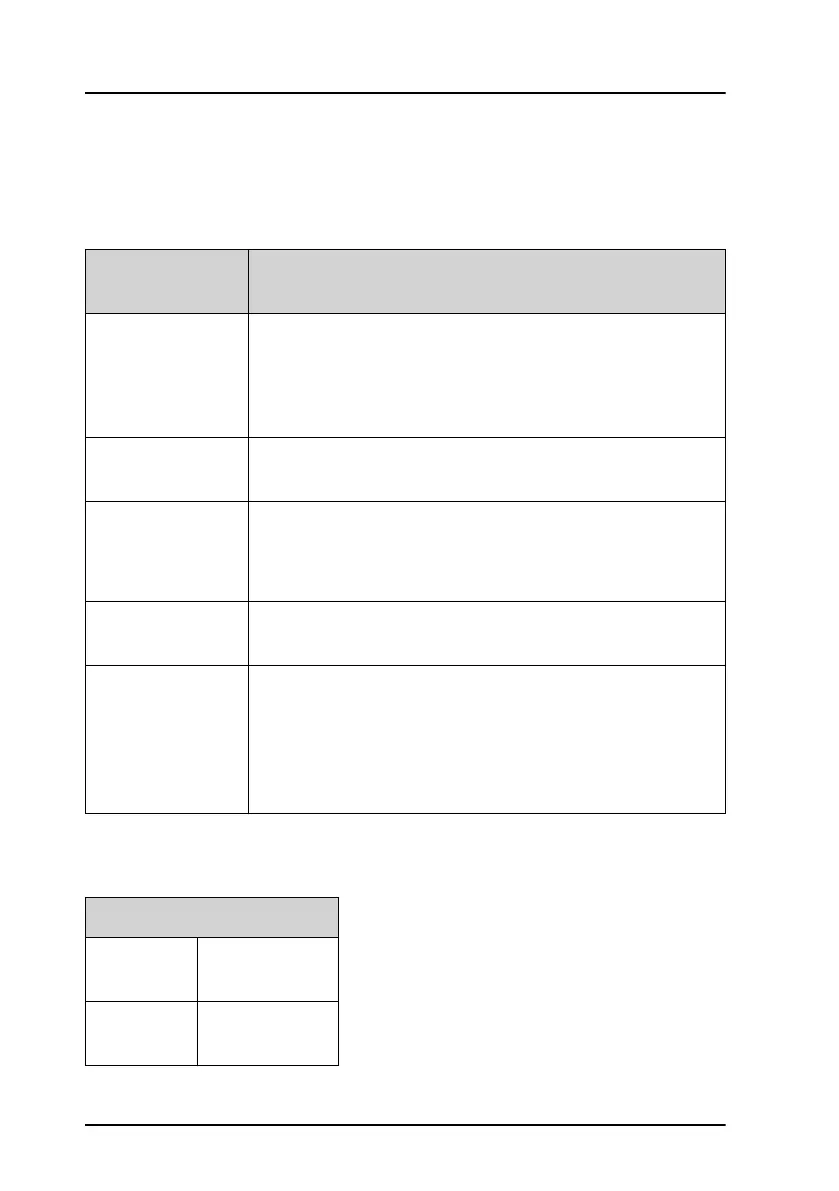
Top-level standby soft-key functions and setup pages
Controlling
device
Description
Handset 1 vol: Adjust earpiece volume for handset 1: ON, can be adjusted
from OFF to 100, in steps of 5.
Note: The handset connected to the front connector has
top priority and is configured to ON.
Handset 2 vol: Adjust earpiece volume for handset 2: ON, can be adjusted
from OFF to 100, in steps of 5.
Ext. speaker FIX: Fixed level is set for external speaker
REL: Relative level following volume adjustment of the
internal speaker
Ext. fixed vol: External speaker fixed volume:
OFF, 5 to 100 in steps of 5
Wheel lock: You can set a time interval after which the SQ, volume and
selector knobs are locked and protected against
unintentional use. Then a lock symbol is shown in the
display. Press any key to unlock the knobs.
OFF, 10s, 20s, 30s, 40s, 50s, 60s
Top-level standby
CALL EXIT
PHBOOK
ALERT EXIT
POS



 To Next Page