CONNECTIONS
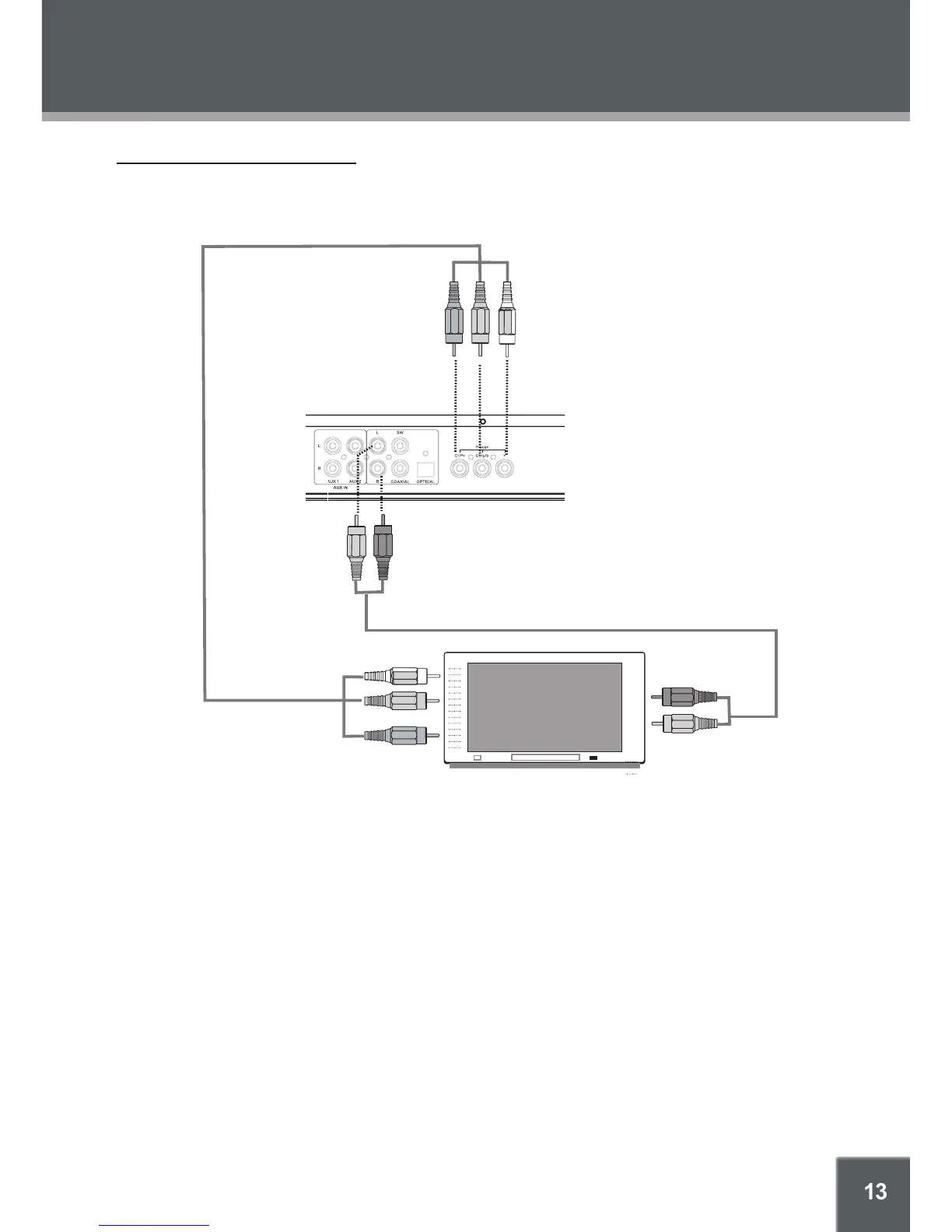
Progressive Scan Connection
Use the component video connection for progressive scan DVD video. Please refer to the Screen/
Setup section for more information on progressive scan mode.
Notes:
The player is equipped with RCA composite AV outputs located on the rear panel. Your TV must
have at least one set of AV input jacks. The AV cable supplied with the player is used to connect
the player’s AV outputs to your TV’s AV inputs.
Make sure your TV is set to the correct video mode (AV/Video Input -1, -2, etc). Typically, there is
a button on the front panel of the TV labeled “TV/AV”—press it to change video modes. Consult
your TV’s instruction manual if you need help setting the TV’s video line mode.
The player is equipped for stereo playback. To fully realize 2-channel sound, a Stereo TV or AV
receiver is necessary. However, a Mono TV may be used; connect either the left or right RCA
stereo output from the player to the Mono TV’s audio input.


 To Next Page