DVD FUNCTIONS
Display
Press the DISPLAY button once to show time information on-screen; press it twice to show
status information on-screen; press it a third time to exit the on-screen display mode.
When the player is in AV IN mode, press the DISPLAY button to toggle between TV System
modes (NTSC or PAL).
Menu / Title / Return
Press the MENU button during DVD playback to return to the DVD’s Main menu.
Press the TITLE button during DVD playback to return to the DVD’s Title menu.
Press the RETURN button during VCD playback to return to the disc’s Root menu.
Setup
Press the SETUP button to enter the player’s setup menu. Enter the Setup menu to adjust the
player’s internal settings; please see the SETUP section for more details.
Go To
Press GOTO to go directly to a desired point of a disc (eg, Title, Chapter, Time).
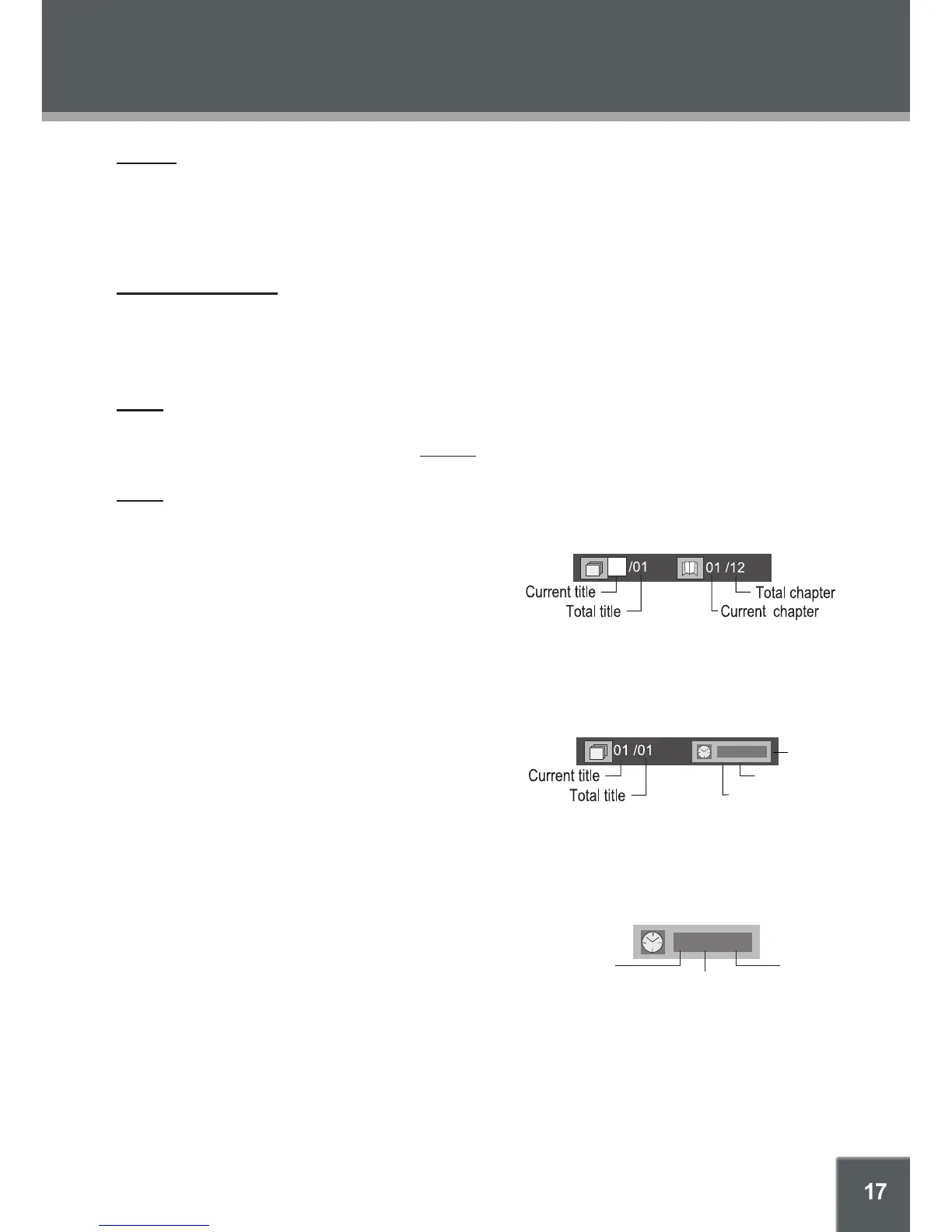
DVD Chapter/Title Search:
Press GOTO once to display the Chapter/Title
Search Bar shown to the right.
Press the left/right NAVIGATION buttons to select (highlight) an entry eld.
Use the Numeric keypad to input the desired chapter/title number, or press the up/down
NAVIGATION buttons to increase/decrease the chapter/title number.
Press ENTER to conrm and execute the search or press GOTO to exit search mode.
DVD Time Search (within a specied title):
Press GOTO twice to display the Time Search
Bar shown to the right.
Use the Numeric keypad to input the desired time (hours, minutes, seconds).
Press CLEAR to cancel any input errors.
Press ENTER to conrm and execute the search or press GOTO to exit search mode.
CD Time Search:
Press GOTO once to display the CD Time Search Bar
shown to the right.
Use the Numeric keypad to input the desired time
(hours, minutes, seconds).
Press CLEAR to cancel any input errors.
Press ENTER to conrm and execute the search or press GOTO to exit search mode.
•
•
•
•
•
•
•
•
•
•
•
•
•
•
•
•
•
Second
Minute
Hour
0 03 30
0 03 30
Second
Minute
Hour


 To Next Page