Repeat
CC
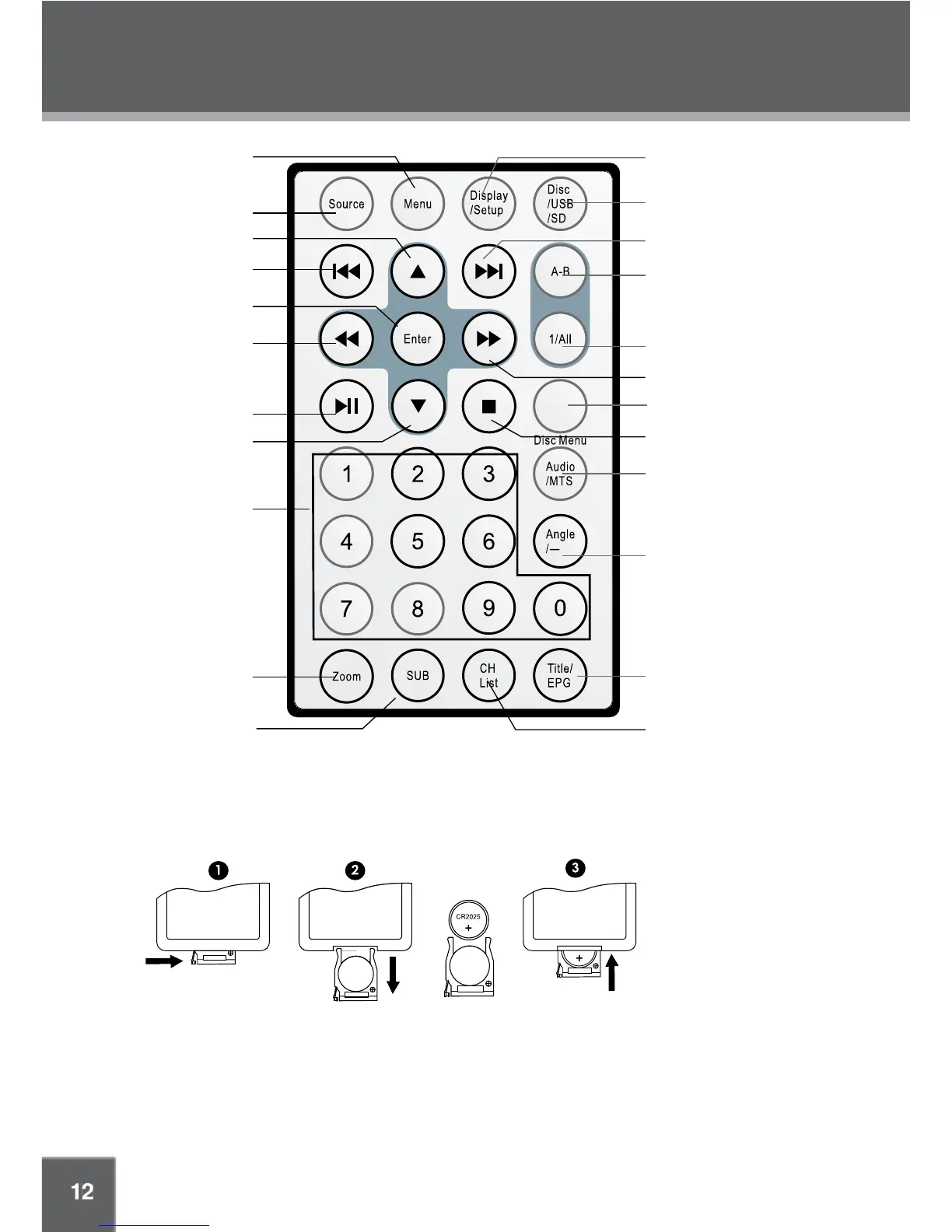
LOCATION OF CONTROLS
Reverse / LEFT
CH+ / UP
Menu
Source
Previous
Enter
Number Buttons
Zoom
Play/Pause
CH– / DOWN
Subtitle
Display / Setup
Disc / USB / SD
Next
Repeat A-B
Repeat Mode
Forward / RIGHT
Closed Caption /
Disc Menu
Audio / MTS
Angle / –
Title /
Electronic Program Guide
CH List
Stop
To load a battery in the remote:
To use the remote:
Point the remote at the remote sensor of the device at a distance of no more than 15″ and at an angle •
no greater than 60 degrees.
Batteries will last for about one year under typical usage. •
Replace batteries if the remote is no longer working.•
Do not spill water on the remote control.•
Do not use the remote control for other equipment at the same time.•
Remove the batteries if the remote control will not be used for a long period of
time.•
NOTE: Please read the “Function Buttons” section to learn more about each button.
• Push the release tab to the right and draw the battery tray out.
• Load a "CR2025" type battery into the tray. The positive side of the battery should face up.
• Replace the battery tray.



 To Next Page