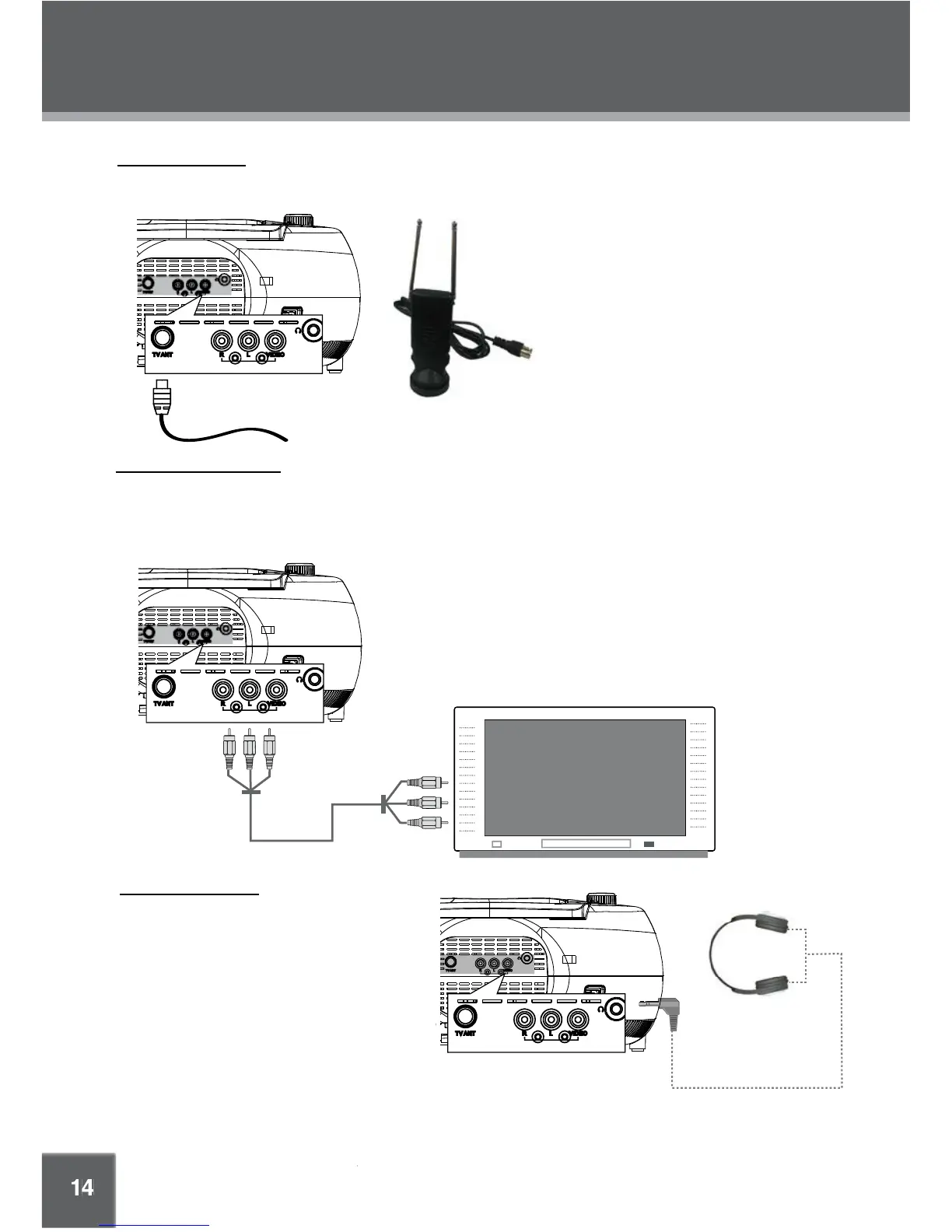
Connect TV RF sources to the Coaxial TV Antenna In jack. TV RF sources include over-the-air transmissions
and cable TV. You may use a 75 ohm coaxial cable to connect to the TV RF source.
Use the AV output jacks on the rear of the player to display DVD, SD, or USB playback on an external TV or monitor.
Use the supplied RCA cable to connect the red/white/yellow AV output jacks on the rear of the unit to the external
display. The external display must support composite video input. The red and white jacks carry the audio signals
(RIGHT and LEFT, respectively), while the yellow jack carries the video signal.
External Antenna
A portable external antenna is supplied
for your convenience.
1. Connect the antenna to the TV
Antenna In jack.
2. Extend the two telescopic rods, and
then adjust the position and
orientation of the antenna for best
reception. The base of the antenna is
magnetic and can be mounted on
metal surfaces.
Connect a pair of headphones or earphones
with a 3.5 mm plug (1/8") to the headphone
out jack on the rear of the unit for private
listening.
To prevent damage to your headphones and
your hearing, be sure to lower the volume of
the unit before connecting headphones. Then,
increase the volume gradually to a comfort-
able level.
CAUTION: Hearing experts advise against the constant use of personal stereos played
at high volume. Constant high volume use can lead to hearing loss. If you experience
ringing in the ears or hearing loss, discontinue use and seek medical advice.



 To Next Page