22
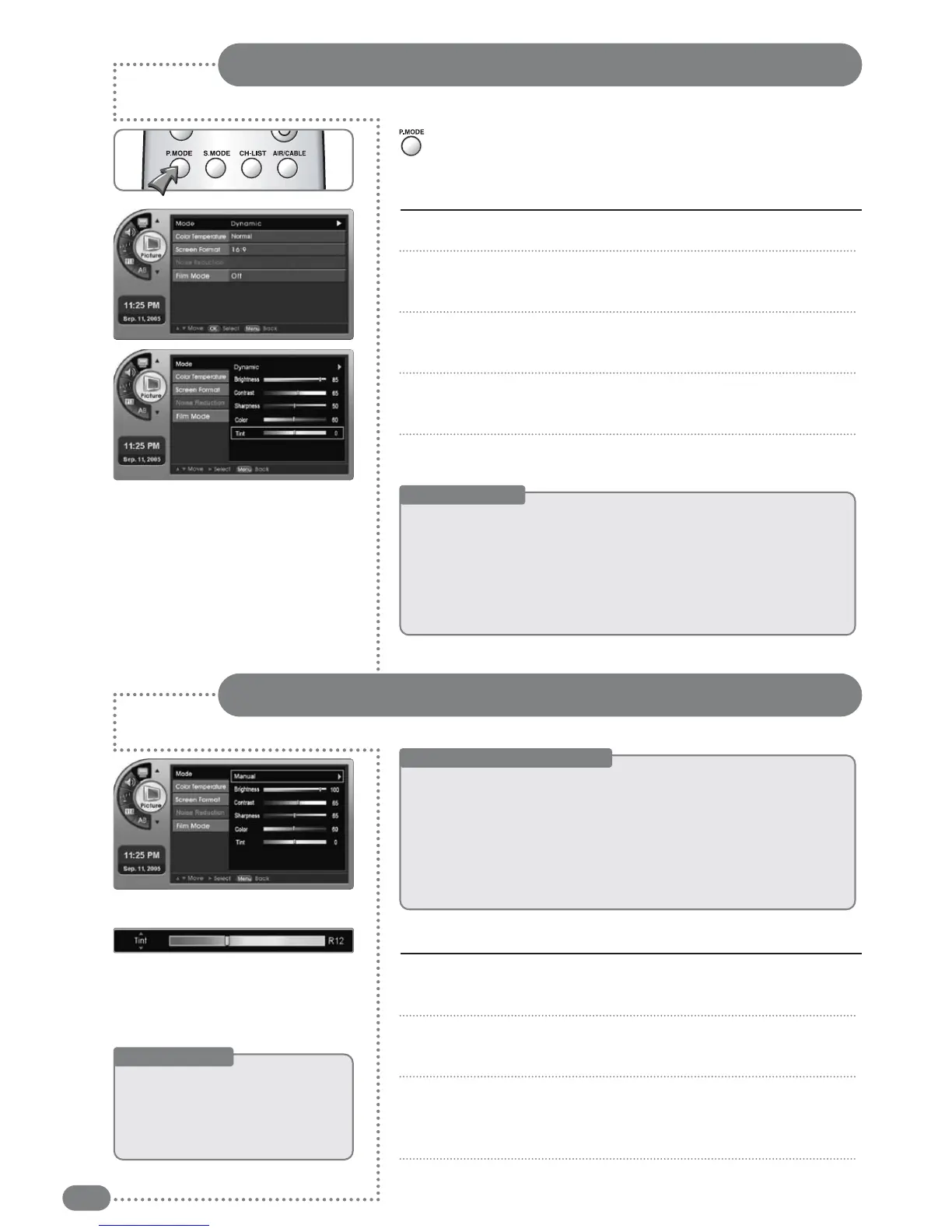
Press [P.MODE] to recall a pre-set screen type
Screen Mode Settings
Screen Custom Mode Settings
< Before Starting >
The <Mode> needs to be changed to <Manual> in the menu.
Press [
] and move to a menu, then press [OK].
-An additional adjustment bar will appear.
Press [
] and move to a location, then press [OK].
-Press [
] to move to <Brightness>, <Contrast>,
<Sharpness>, <Color> or <Tint>.
Press [EXIT] to exit the menu.
1
2
3
4
Adjusting the user screen
Press [MENU]. -The menu will appear.
Press [
] to move to <Picture>, then press [OK].
-The <Picture> Menu will appear.
Press [
] to move to <Mode>, then press [OK].
-The <Mode> Menu will appear.
Press [] to select a screen mode.
<Standard>, <Dynamic>, <Mild>, <Manual> can be selected
Press [EXIT] to exit the menu.
1
2
3
4
5
Press [P.MODE].
Each press of the button changes the picture mode from
<
Standard
>
➔
<
Dynamic
>
➔
<
Mild
>
➔
<
Manual
>
.
Screen Mode
■
Standard : The manufacturer default for the optimal conditions, status.
■
Dynamic : Select this for a brighter screen. You will be able to see the
screen more clearly.
■
Mild
:
Select this for a darker screen. It has the advantage of saving
power and making your eyes less tired.
■
Manual
: You can select your own defined screen setting conditions.
Screen Adjustment Menu
■
Brightness :
Brightens or darkens the screen.
■
Contrast
:
Adjusts the difference in brightness between objects
and the background.
■
Sharpness :
Controls blurring and transparency.
■
Color
:
Controls the color signal strength.
■
Tint
:
Adds red or green to the picture.
Useful Tips
☛
AAddjjuusstteedd
vvaalluueess
wwiillll
bbee
ssaavveedd
aass
aa
<<MMaannuuaall>>
mmooddee
vvaalluuee..
☛
Screen
mode
and
custom
value
adjustments
will
be
saved
individually
((TTVV,,
EExxtteerrnnaall
IInnppuuttss
11
aanndd
22,,
SS--VViiddeeoo,,
eettcc..))



 To Next Page