27
ENGLISH
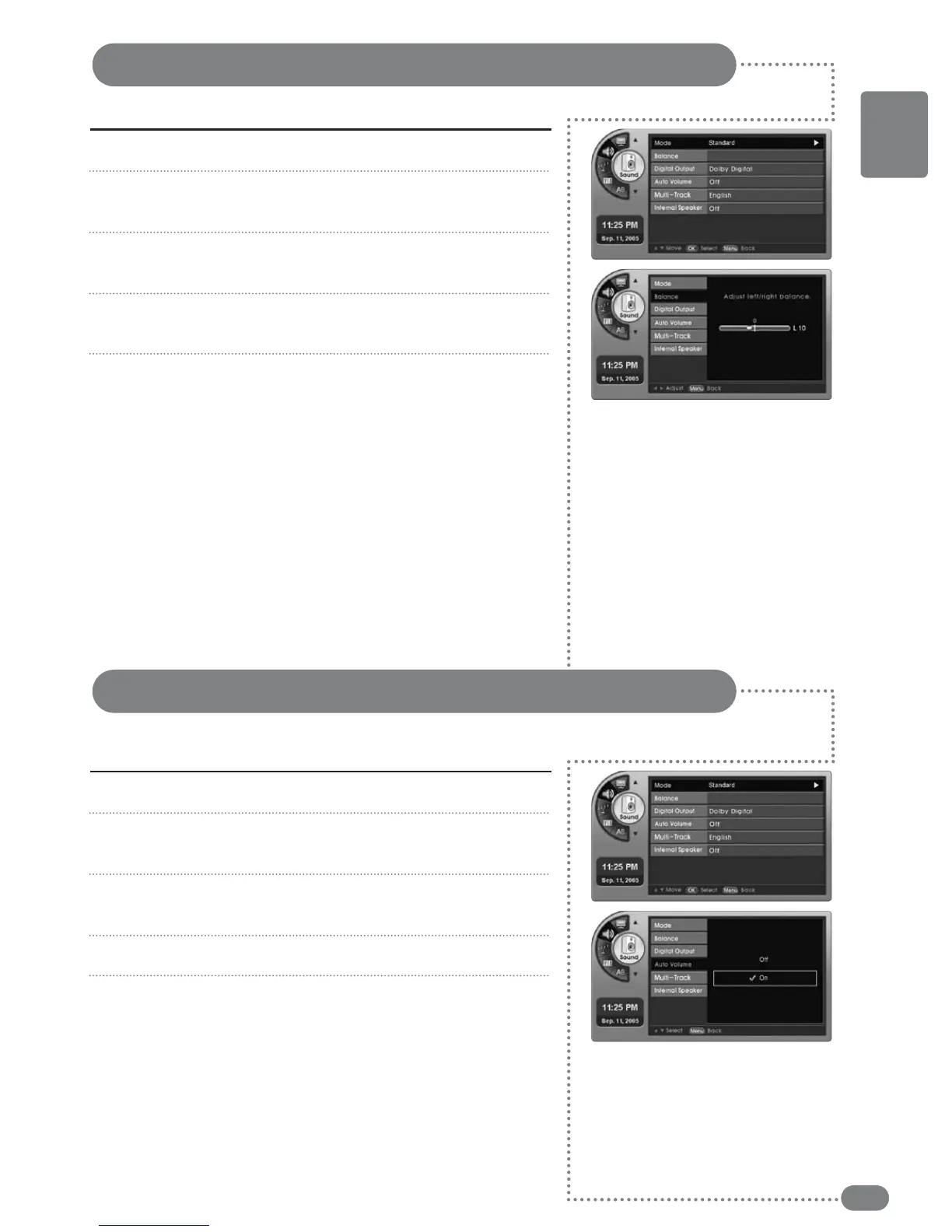
Press [MENU]. -The menu will appear.
Press [
] to move to <Sound>, then press [OK].
-The <Sound> Menu will appear.
Press [
] to move to <Balance>, then press [OK].
-The <Balance> Menu will appear.
Press [¥] to change the left/right output levels.
-You can adjust the output of the left/right speaker.
Press [EXIT] to exit the menu.
1
2
3
4
5
Sound Balance Settings
You can balance your speakers for better sound quality.
Press [MENU]. -The menu will appear.
Press [
] to move to <Sound>, then press [OK].
-The <Sound> Menu will appear.
Press [
] to move to <Auto Volume>, then press [OK].
-The <Auto Volume> Menu will appear.
Press [
] to move to <On> or <Off>, <then press [OK].
Press [EXIT] to exit the menu.
1
2
3
4
5
Automatic Volume Control Settings
You can automatically adjust the sound level of different channels to the proper volume level
to make each channel audibly distinct.



 To Next Page