32
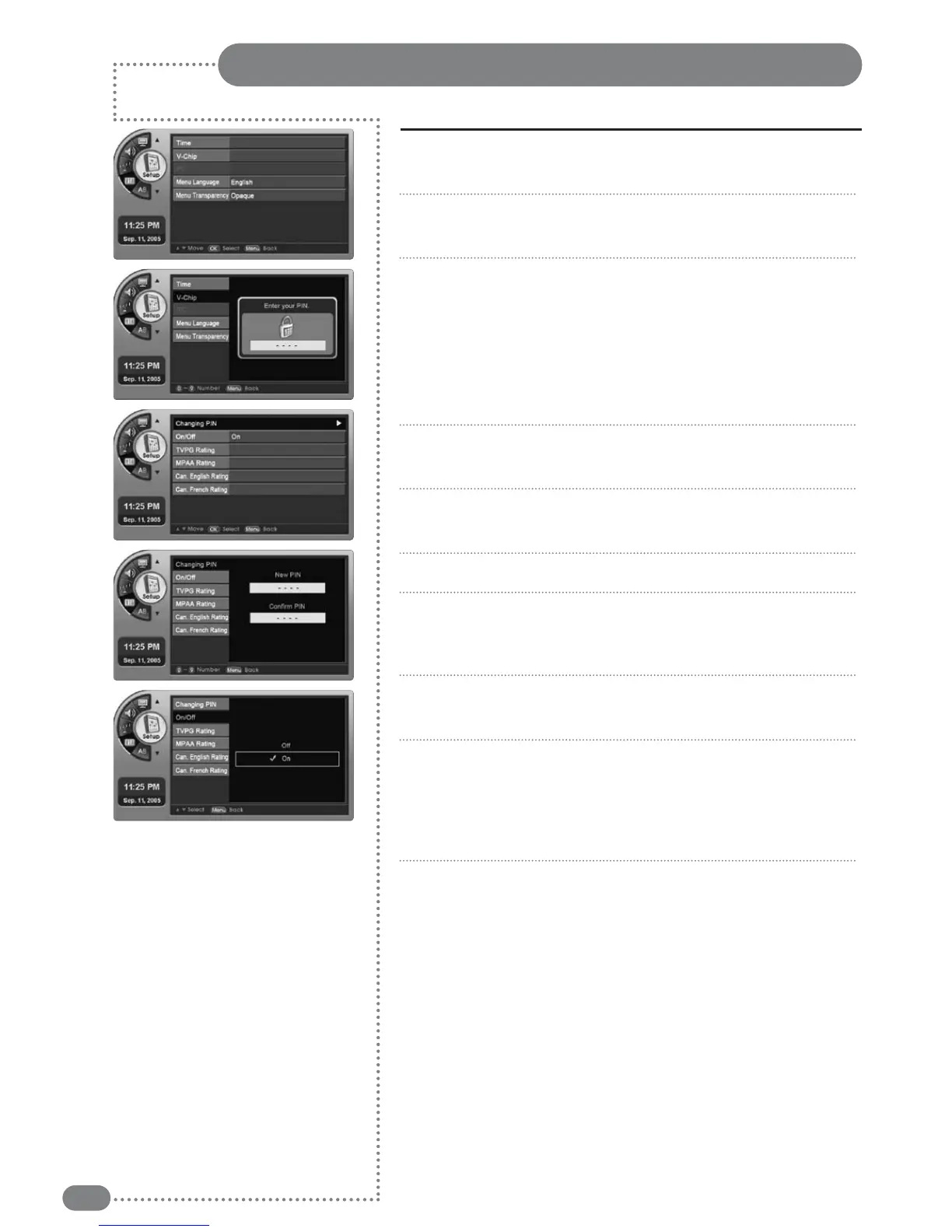
This option sets up or changes the password for blocking specific channels.
Entering a PIN
Press [MENU].
-The menu will appear.
Press [
] to move to <Setup>, then press [OK].
-The <Setup> Menu will appear.
Press [
] to move to <V-Chip>, then press [OK].
-The <Password Dialog Box> Menu will appear.
When first accessing the V-Chip menu, no password is set up.
When no password is set up, channels cannot be blocked.
You need to set the password of the <V-chip> then go to
<Changing PIN> and set it to <ON>. If a User loses the
password, the Master Password needs to be used.
Enter the 4-digit password (0~9) using the remote control.
-The <V-Chip> Menu will appear.
Press [
] to move to <Changing PIN>, then press [OK].
-The <Changing PIN> Menu will appear.
Use the keypad to set up the new password.
Please confirm your password by entering your 4-digit
password again using the remote control.
-The password is set or changed.
Press [
] to move to <On/Off>, then press [OK].
-The <On/Off> Menu will appear.
Press [
] to move to <On>, then press [OK].
-You can block specific channels or select:
<TVPG Rating>, <MPAA Rating>, <Can.English Rating>,
<Can.French Rating>.
Pressing <Off> will unblock the channels.
Press [EXIT] to exit the menu.
1
2
3
4
5
6
7
8
9
10



 To Next Page