5
Remote Control
Remote Control
Preparation
Remove thebattery compartment cover located on the rearof theremote control.Insert 2 x“AAA”•
batteries,makingsuretomatchtheirpolarities(+/-)to themarkingson theinsideofthecompartment.
Replacethecover.
Batteriesintheremotewilllastforapproximately6monthsunderthenormaluse.Replacethebatteriesif•
theremotecontroldoesnotwork.Donotmixoldwithnewbatteries,ordifferenttypesofbatteries.
Removethebatteriesfromtheremoteifitwillnotbeusedforalongperiodoftime.•
Warnings:
The battery used in this device may present a fire or chemical burn if mistreated. Do not recharge,
disassemble, incinerate, or heat the battery (~212ºF).
Keep batteries away from children.
Using the Remote Control
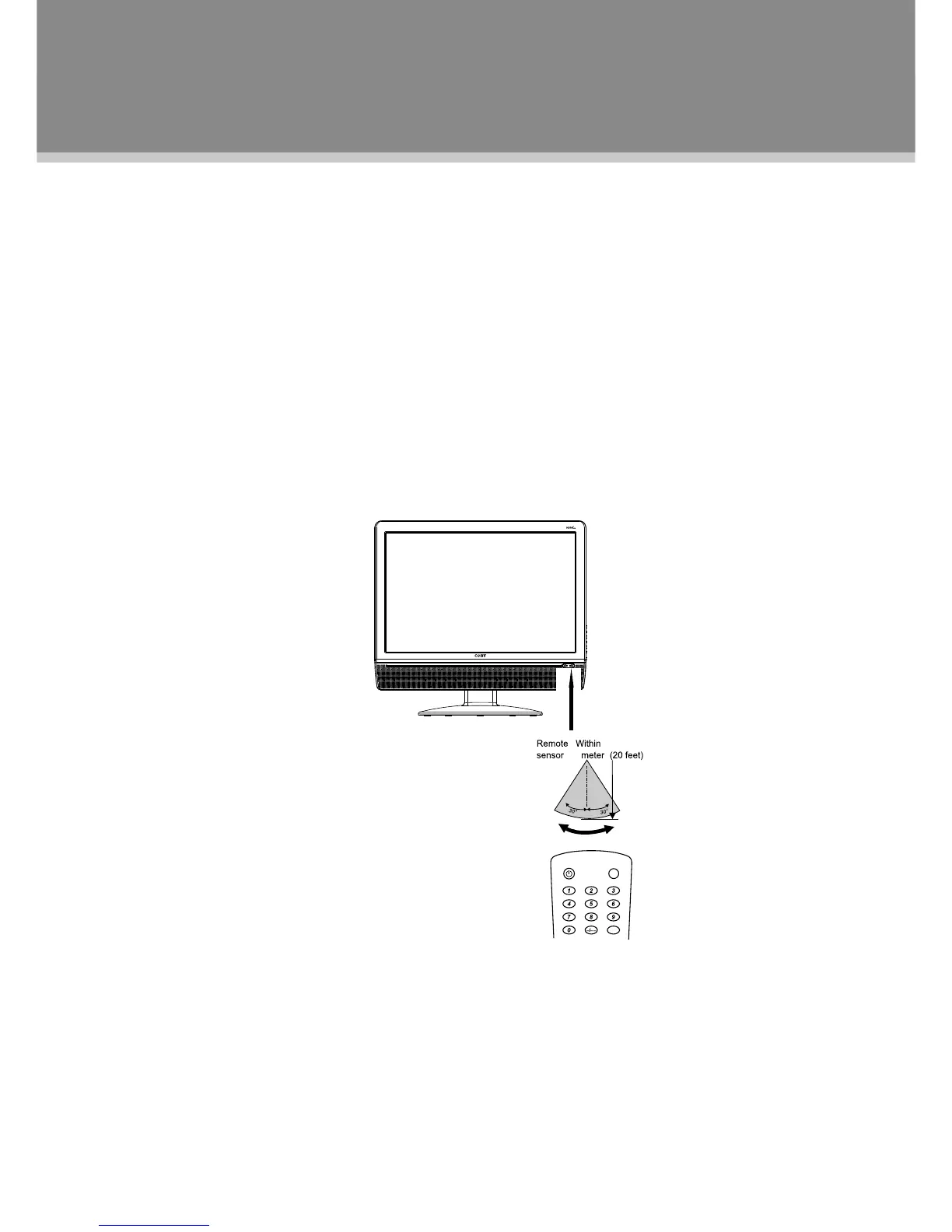
Tousetheremote,pointitattheremotesensoroftheplayer.Operatetheremotewithin20feetofthesensor
andatanangleof±30degrees.
Theoperatingdistancemayvarydependingonthebrightnessaround.
Notes:
Donotpointbrightlightsdirectlyattheremotecontrolsensor.1.
Donotplaceobjectsbetweentheremotecontrolunitandtheremotecontrolsensor.2.
Donotusethisremotecontrolunitwhilesimultaneouslyoperatingtheremotecontrolunitofanyother3.
equipment.


 To Next Page