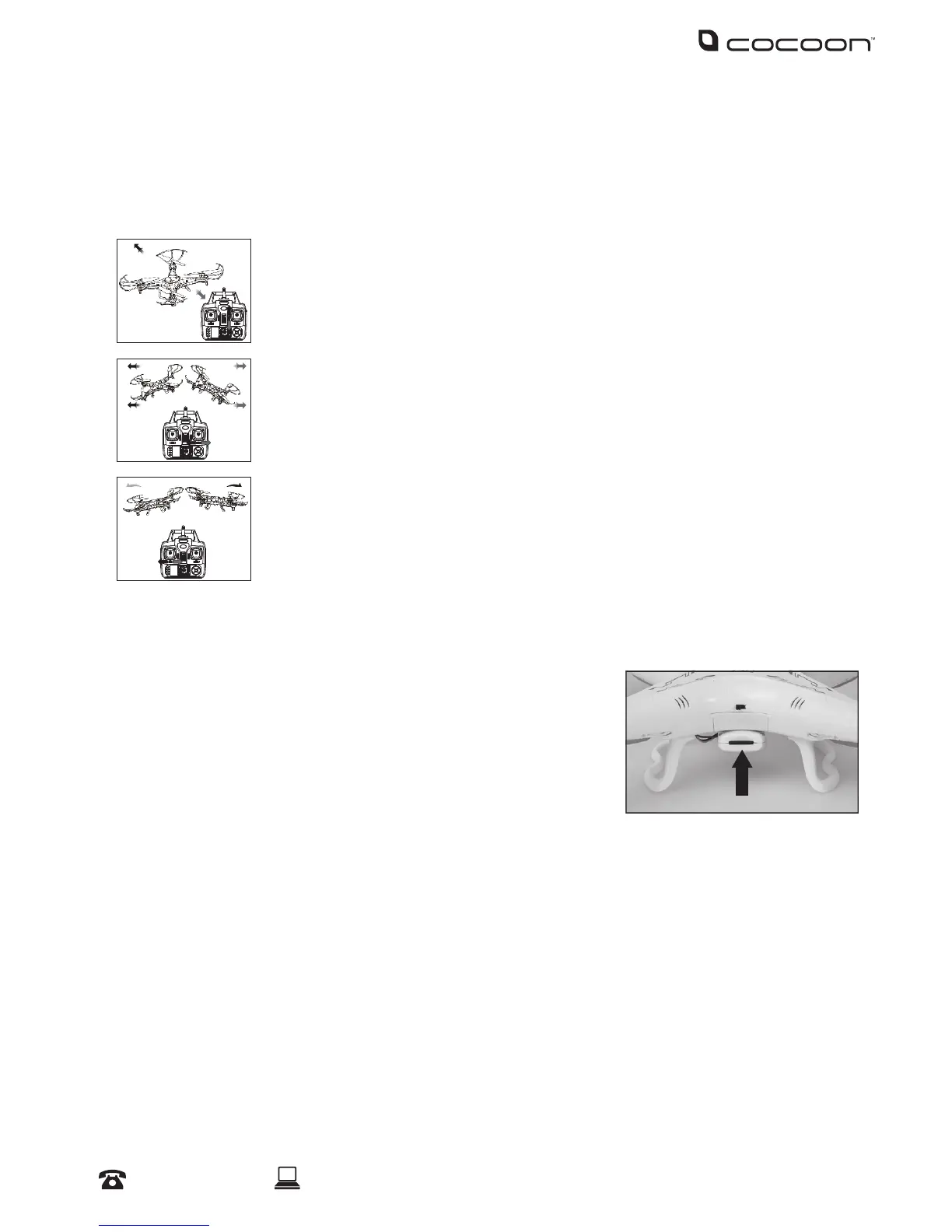
3.2 Fine Tuning
The Voyager Quadcopter should keep steady when using the left control stick only. At times however,
you may need to ne tune the control to keep the Voyager Quadcopter steady. Depending on the
issue, use the following buttons to ne tune the Voyager Quadcopter;
Flying forward/backwards:
Use the forward/back switch.
Flying left/right:
Use the mode switch.
Rotating left/right:
Use the left tuning switch.
Note: The amount of ne tuning is indicated on the remote control LCD display.
3.3 Using the Camera
1. Ensure a Micro SD card is securely inserted into the camera.
Note: The gold contacts should be facing down
2. Ensure the camera is connected to the Voyager Quadcopter
correctly, and that the green light indicator is on prior to ying.
3. Taking a Photo:
a. Press the Photo/Video switch on the remote control upwards to take a photo. The camera
LED will ash red to indicate that a photo has been taken.
4. Taking a Video:
a. Press the Photo/Video switch on the remote control downwards to start taking a video. The
camera LED will change to RED to indicate a video is being recorded.
b. Press the Photo/Video switch on the remote control downwards again to stop taking a
video. The Camera LED will change back to GREEN.
Operation


 To Next Page