3.4 Speed Control
This Voyager Quadcopter can be operated at low speed and high speed settings. These are indicated
by the ‘L’ and ‘H’ on the top right corner of the LCD display.
To change between low and high speed, press the ‘High/Low speed button’ on the top left corner of
the remote control.
3.5 Tricks
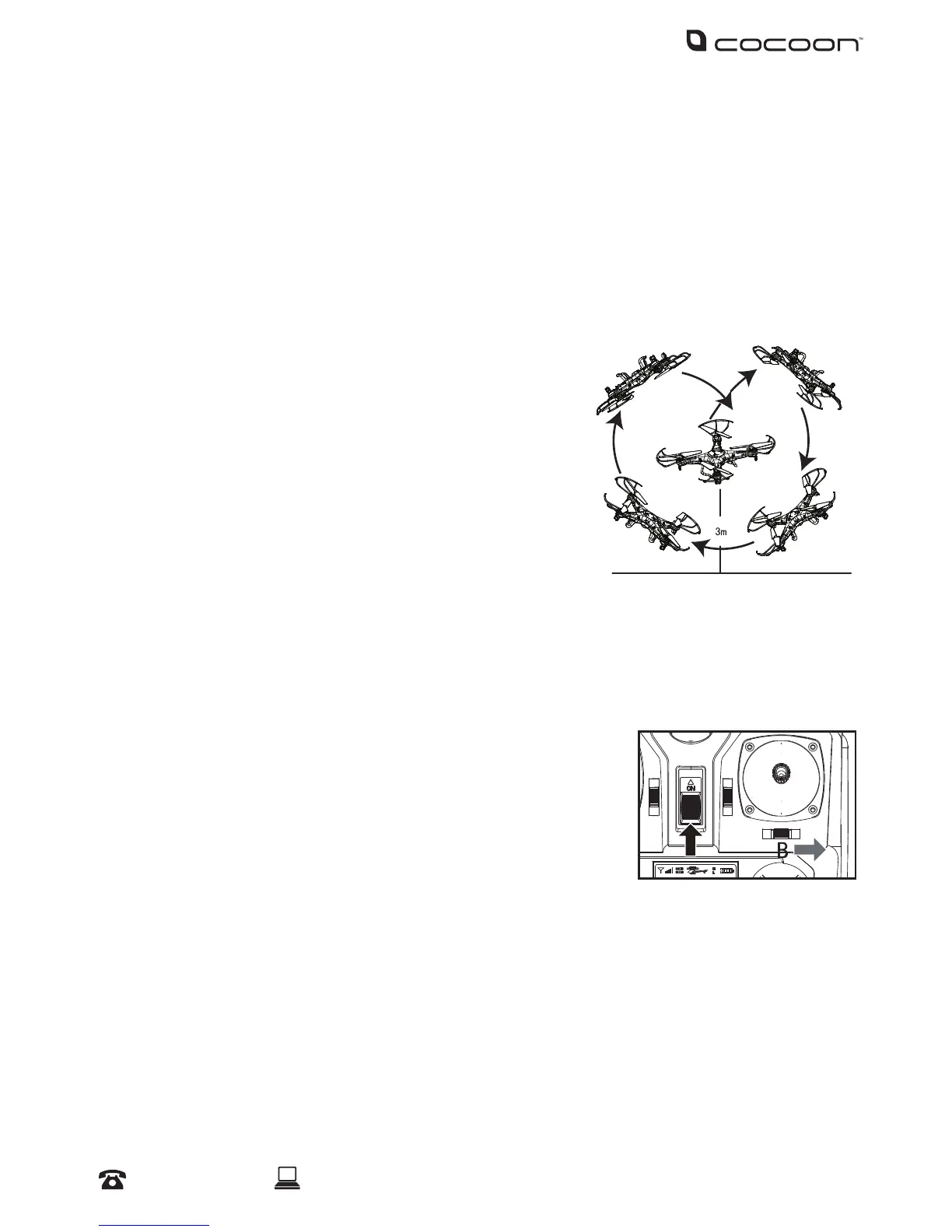
Once you are familiar with basic ight operations, you can
perform some impressive tricks.
1. Fly the Voyager Quadcopter to a height of more than 3
metres.
2. Hold down the Trick button on the top right side of the
remote control.
3. While still holding down the Trick button, push the right
control stick in any direction to perform a 360 degree ip.
3.6 Mid Air Start
Thanks to the 6-axis gyroscope, you can throw the Voyager Quadcopter and push the throttle
upwards. The Voyager Quadcopter will automatically level out and hover smoothly in the sky.
3.7 Changing to Mode 2
This Voyager Quadcopter allows you to swap the sideward control with
turn left/right control.
1. With the remote control turned o, hold the Mode Switch to the
right.
2. Turn on the remote control. A longer beep sound indicates the
mode has been changed. You will also notice that Mode 2 is now shown on the LCD display.
Note: To return to Mode 1, perform these steps again.
Operation


 To Next Page