Page 3 of 8
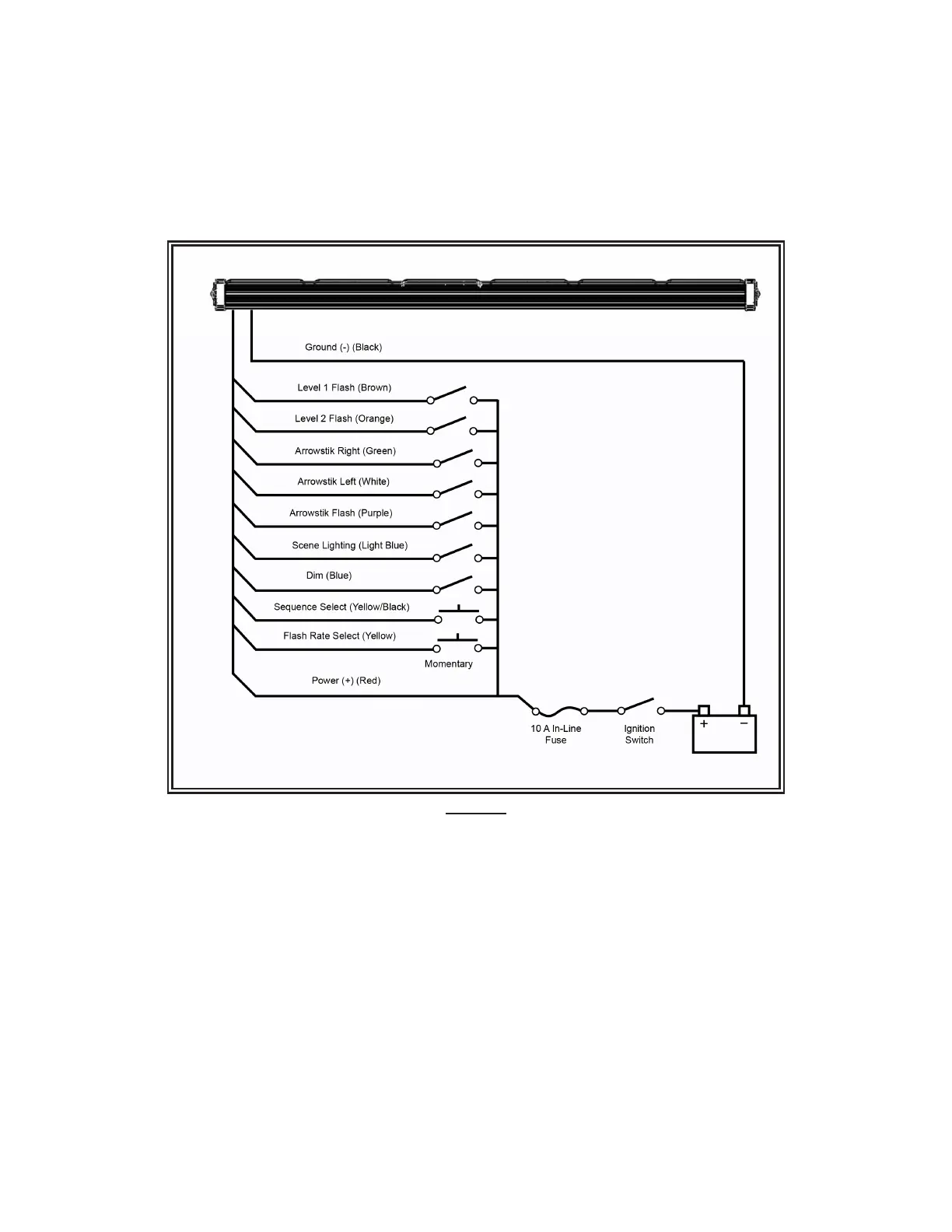
Figure 3
General Wiring Instructions:
Step 1. After the lightbar has been mounted, route the power cable’s red wire to a fused, ignition-switched power point as shown in
FIGURE 3. Use an in-line 10 amp slow blow fuse on the positive line. Connect the black wire directly to the negative battery terminal. A
minimum size of 18 AWG wire should be used on the power and ground lines.
Step 2. After the lightbar has been mounted, route the power cable’s red wire to a fused, ignition-switched power point as shown in
FIGURE 3. Use an in-line 10 amp slow blow fuse on the positive line. Connect the black wire directly to the negative battery terminal. A
minimum size of 18 AWG wire should be used on the power and ground lines.
Step 3. Use cable ties and grommets to secure and protect all cables and wires.
NOTE: Green and White together is ArrowStik center out. ArrowStik functions override all others. Brown and Orange together is Level 3
Flash. Scene Lighting overrides Levels 1, 2 and 3 Flash. ArrowStik functions in multicolor units ash the secondary color only.
The Mega Thin Stik functions can be congured to any combination of ash sequences and ash rates to achieve the desired ash pattern.
The unit must be powered through the black ground wire, the red power wire and the single function being programmed to allow ash
sequence and ash rate selection. Set the desired ash sequence (in the order below) by tapping the yellow/black wire to power (+V) as
described in the wiring diagram. Set the desired ash rate (in the order below) by tapping the yellow wire to power. Holding either wire (yellow
or yellow/black) to power for approximately 3 seconds will move to the prior sequence or rate. Holding either wire to power for approximately
5 seconds will move to default sequence or rate.
Flash Patterns:


 To Next Page