EasyManua.ls Logo

Code 3 XCEL Series - User Manual

Code 3 XCEL Series
12 pages
Print Icon
To Next Page IconTo Next Page
Loading...
1
Contents:
Introduction............................................................................2
Congurable Features.........................................................2-3
Standard Features................................................................3-5
Dip Switch Features................................................................6
Unpacking & Pre-installation..................................................7
Installation & Mounting............................................................7
Amplier Power Distribution.................................................8
Troubleshooting..................................................................9
Siren Wiring Diagram.............................................................10
Siren Specications..............................................................11
Lighting Specications........................................................11
Siren Control Head - Exploded View.......................................12
Siren Control Head - Parts List................................................13
Notes................................................................................14-15
Warranty................................................................................16
SIREN
PATENTED. See https://secure.code3pse.com/patents/
WARNING
Sirens produce loud sounds that may damage hearing
Wear hearing protection when testing
Use siren only for emergency response
Roll up windows when siren is operating
Avoid exposure to the siren sound outside of vehicle
Read all instruction and warnings before installing and using.
INSTALLER: This manual must be delivered to the end user of this equipment.
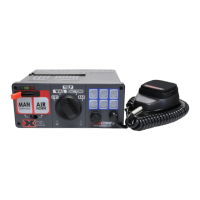
XCEL SERIES
IMPORTANT:
TM

Other manuals for Code 3 XCEL Series

Questions and Answers

  • C
    Cory AllenSep 2, 2025
    Why does my Code 3 Security System siren sound by itself?
    • K
      Kelly ConnerSep 2, 2025
      If your Code 3 Security System siren sounds by itself, the horn ring wiring from the terminal remote may be shorting to positive or to ground (earth). Check the wiring for any shorts.
  • K
    Kent BrewerAug 31, 2025
    Why does the external 20A fuse blow in my Code 3 Security System?
    • M
      Michael SteeleAug 31, 2025
      If the external 20A fuse keeps blowing in your Code 3 Security System, it could be due to: * Reversed polarity of the amplifier power wires. Check the polarity to ensure it's correct. * A faulty speaker. Consider replacing the speaker(s).
  • A
    Amber MurphyAug 29, 2025
    How to fix low or no P.A. volume on Code 3 Security System?
    • S
      Scott HurleyAug 30, 2025
      If the P.A. volume on your Code 3 Security System is low or completely absent, here are a few things to check: 1. Make sure that the P.A. volume is turned up. Refer to the setup and adjustment section for instructions. 2. Ensure the microphone is fully plugged in. 3. The microphone may be defective and require replacement. 4. The microphone may be incorrect. Contact Code 3 for a list of adaptable microphones.
  • W
    William DiazAug 28, 2025
    What to do if there is no siren output from my Code 3 Security System?
    • T
      Timothy WilliamsAug 28, 2025
      If your Code 3 Security System siren isn't producing any sound, there could be several reasons: * The park kill feature might be activated. Try shifting the vehicle out of park. * The SirenLock may be engaged. Ensure the proper SirenLock level is selected. * There might be a shorted speaker or speaker wires, which puts the siren in over current protection mode. In this case, check the connections.
  • D
    davidlopezAug 26, 2025
    What to do if Code 3 Automobile Accessories has no output from speaker, but tones are heard inside amplifier module?
    • J
      jamie30Aug 27, 2025
      If there is no output from the speaker of your Code 3 Automobile Accessories, but tones are audible inside the amplifier module and the SP indicator light is off, it could be due to the speaker not being connected, an open circuit in the speaker wiring, or defective speakers. Check the speaker wiring to ensure it is properly connected. If the wiring is intact, consider replacing the speaker(s).
  • E
    Eric GillespieAug 25, 2025
    Why do Code 3 Automobile Accessories speakers fail at a high rate?
    • B
      Blake KellyAug 25, 2025
      A high rate of speaker failure in your Code 3 Automobile Accessories may be due to high voltage to the siren or using an incorrect speaker wattage. Check the vehicle charging system to ensure it is functioning correctly. If you are using a 58-watt speaker connected to a 100-watt tap, replace it with the correct speaker.
  • M
    murraywalterAug 22, 2025
    Why are Code 3 Automobile Accessories siren tones volume too low or garbled?
    • V
      Victoria MorganAug 22, 2025
      If the siren tones from your Code 3 Automobile Accessories are too low or sound garbled, the issue could stem from low voltage to the siren amplifier or high resistance in the wiring, or a defective speaker. Check the wiring for bad connections and inspect the vehicle's charging system. Also, examine the speaker wiring and consider replacing the speaker(s) if necessary.

Summary

XCEL SERIES SIREN

General Safety Warnings

Sirens produce loud sounds that may damage hearing; wear hearing protection.

Standard Features

3-Level Switch Operation

Explains the function of the 3-level switch for changing warning modes.

Auxiliary Button Configuration

Details on configuring auxiliary buttons, park kill, horn ring, and alerts.

MANUAL Push-Button Operation

Describes the Manual Wail tone and Hit-N-Go mode.

AIR HORN Push-Button Operation

Details the Air Horn tone and its interaction with other features.

Auxiliary A-F Push-Buttons

Explains the function and control of six auxiliary push-buttons.

Hit-N-Go Feature

Explains the Hit-N-Go feature activated by horn ring or manual button.

Scroll Feature

Describes how the horn ring scrolls through siren tones.

Configurable Features (L6 Models)

Configurable Features (Non-Light Control)

Installation and Mounting

Amplifier Power Distribution

Troubleshooting

XCEL Siren Wiring Diagram

Siren Specifications

Lighting Specifications

Code 3 XCEL Series Specifications

General IconGeneral
BrandCode 3
ModelXCEL Series
CategorySecurity System
LanguageEnglish

Related product manuals