Code Blue
•
259 Hedcor Street
•
Holland, MI 49423 USA
•
800.205.7186
•
www.codeblue.com
GU-137-Bpage 11 of 40
IP1500/2500
User Guide
5.3 Configuring VoIP Settings
TheIP1500/2500speakerphoneisanadvancedVoIPdevicecapableofconnectivitytoVoIPsys-
temsviaSIPandIAX2protocols.Built-incodecsprovidemultipleoptionsforcommunicatingwith
yourVoIPsystemorCodeBlue’sToolVoxMediaGateway.STUNservercapabilitiesarealsobuiltin
forhelpingtraverserewallswhenconnectingtheunitoutsideofthehostingnetwork.
ConguringVoIPAccounts
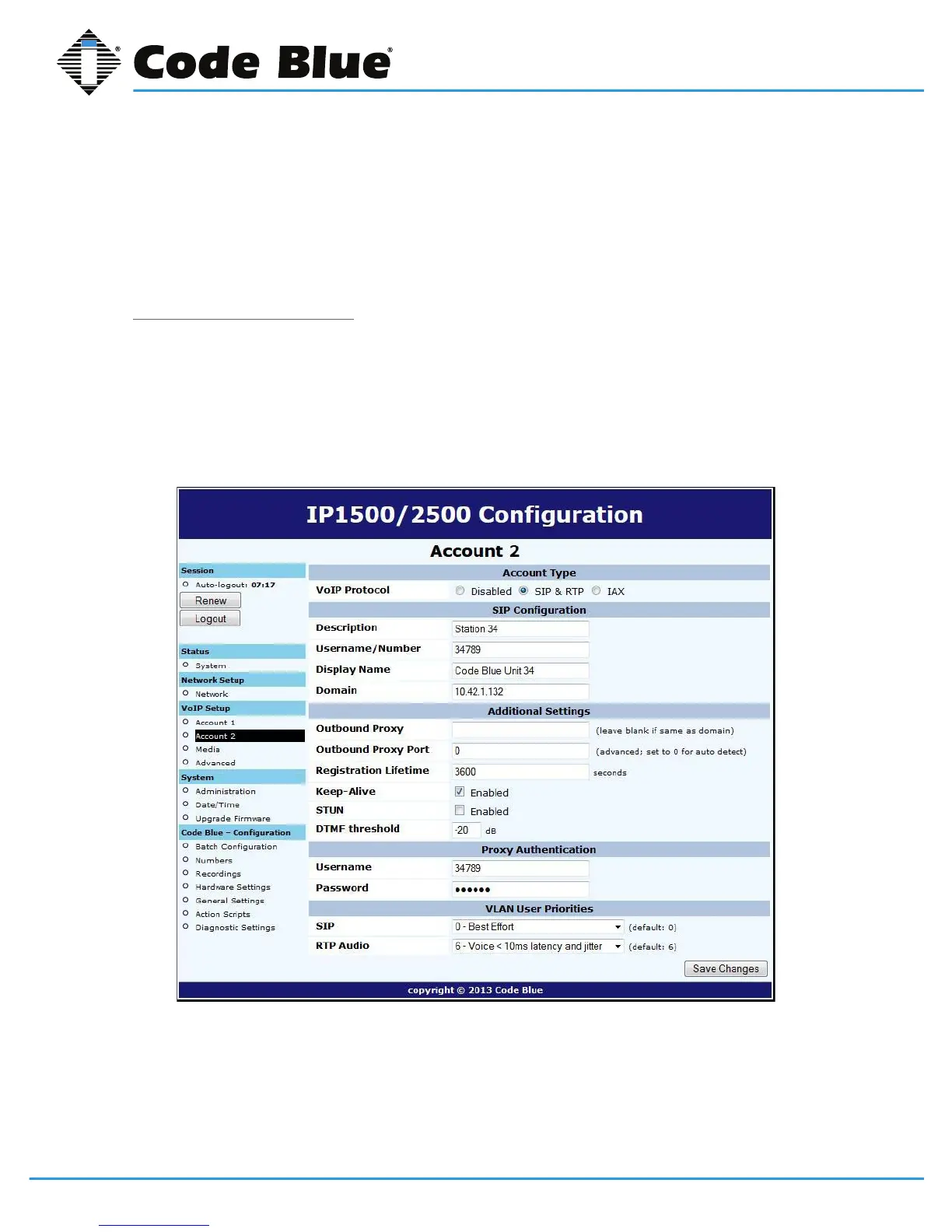
TheIP1500/2500speakerphonecanregistertoVoIPsystemsusingeithertheSIPorIAXprotocols,
andhastheabilitytoregistertotwoseparateVoIPsystemssimultaneouslytoprovideredundancy.
EachoftheIP1500/2500’stwoaccounts,availableunderVoIPSetupasAccount1andAccount2,
canbeconguredaseitherSIPorIAX,subjecttothelimitationthatyoucanonlyhaveoneofthe
twoaccountsconguredasIAX.Ifyouwishtouseonlyoneaccount,setAccount2toDisabled.



 To Next Page