Code Blue
•
259 Hedcor Street
•
Holland, MI 49423 USA
•
800.205.7186
•
www.codeblue.com
GU-137-Bpage 20 of 40
IP1500/2500
User Guide
5.5 Configuring System Options and Scripts
TheIP1500/2500speakerphonehasadvancedcongurationsettings,whichallowforcomplete
controlofthehardwareandhowthesystemperforms.Amemorycapacityof1MBprovidesformul-
tiplephonenumberandrecordedmessagecapabilities.Incomingcallrouting,SNMPandadvanced
diagnosticsenhancedwithadvancedscriptingcapabilitiesprovideforexiblecongurations.
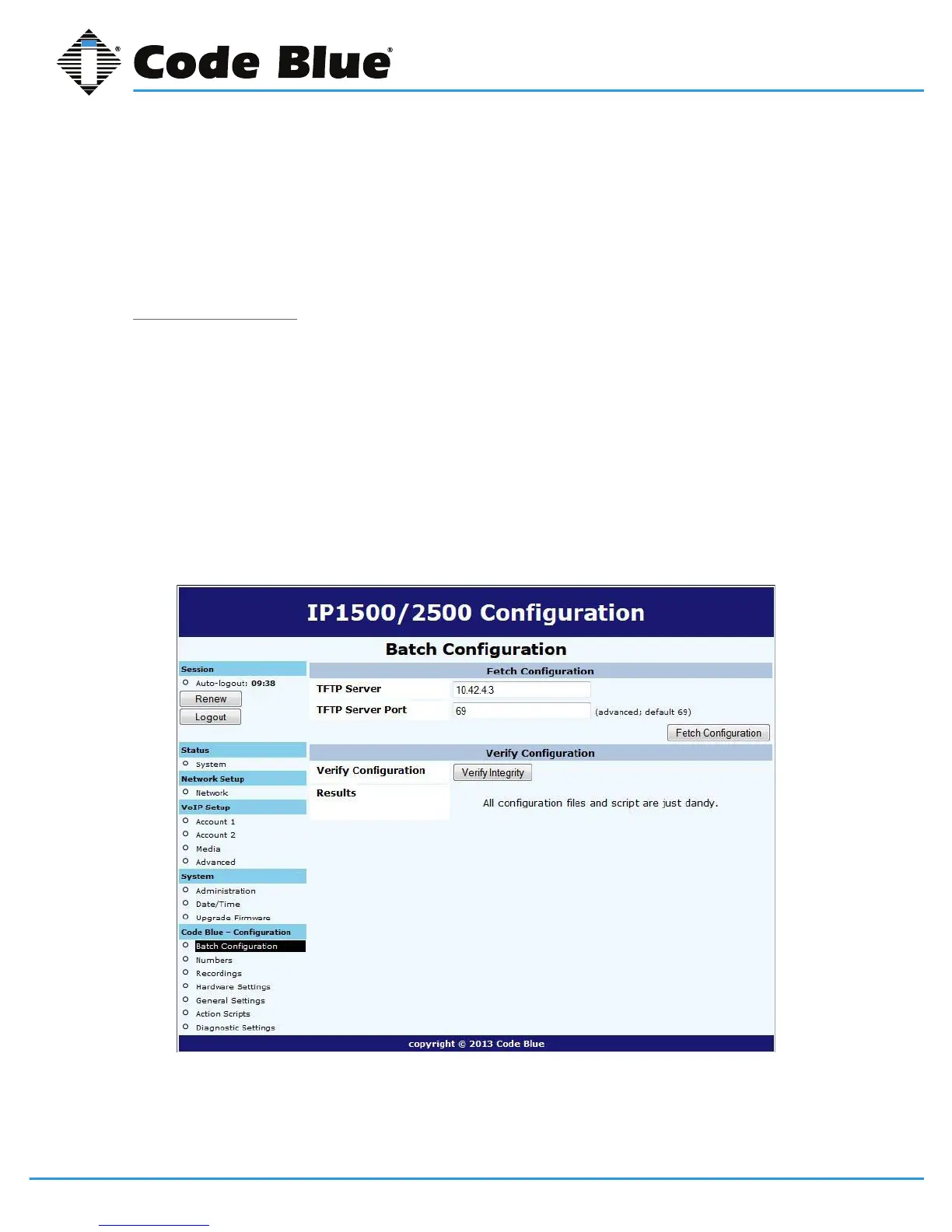
BatchConguration
TheIP1500/2500speakerphonecanbeconguredfromaTFTPserver,e.g.UPD.
1. ClickonBatch Congurationunder Code Blue(seefarleft-handcolumn).
2. EntertheTFTP ServerIPaddressand TFTP Server Port.
3. ClickonFetch CongurationtopullthecongurationlesfromyourTFTPserver.
4. Clickon Verify Integritytovalidatethecongurationlesaresuitableforuse.
ThisfunctionalitycanbeusedinlieuofUPD’sprogramfunctionalitytohavetheIP1500/2500pullits
congurationinsteadofhavingitpushedfromUPD.



 To Next Page