Code Blue
•
259 Hedcor Street
•
Holland, MI 49423 USA
•
800.205.7186
•
www.codeblue.com
GU-137-Bpage 35 of 40
IP1500/2500
User Guide
8 Factory Reset
Thesystemcanberesetviatwodifferentmethods.
1st Method:
TheIP1500/2500speakerphonecanberesetbyfollowingthestepsbelow:
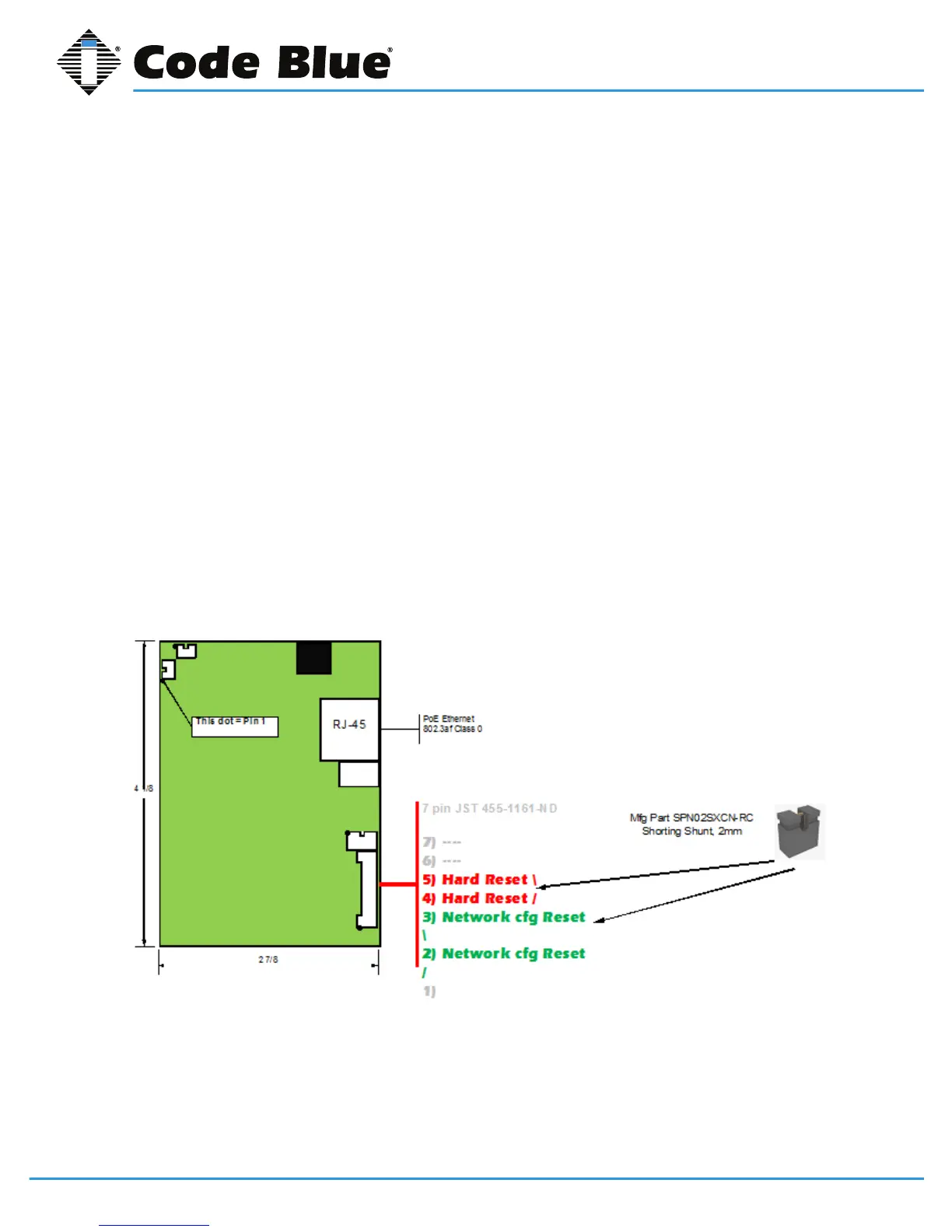
Usethe7pinresetplug(sentwithyourorder)inordertoperformafullreset.
4&5LongReset=HardReset,setseverythingbacktodefault
2&3ShortReset=Resetsnetworkconguration
• UnplugtheRJ45fromthePoEswitchport
• UnplugbuttonanddisconnecttheLEDharness
• Shorttheappropriate2pinstogetherforshortorlongreset(seepicbelow)
• PlugtheRJ45backintothePoEswitchport
• Uponhearingtwoshortbeeps,unithasbeenreset
• Wait10secondsforphonetoreboot
• Unplugpowersource
• Removethejumperandreconnectthebuttons
• Reconnect7pinharness
• ReconnectPoE
TheResetisnowcomplete.
(Continued on next page)



 To Next Page