Code Blue
•
259 Hedcor Street
•
Holland, MI 49423 USA
•
800.205.7186
•
www.codeblue.com
GU-137-Bpage 17 of 40
IP1500/2500
User Guide
SystemAdministrationSettings
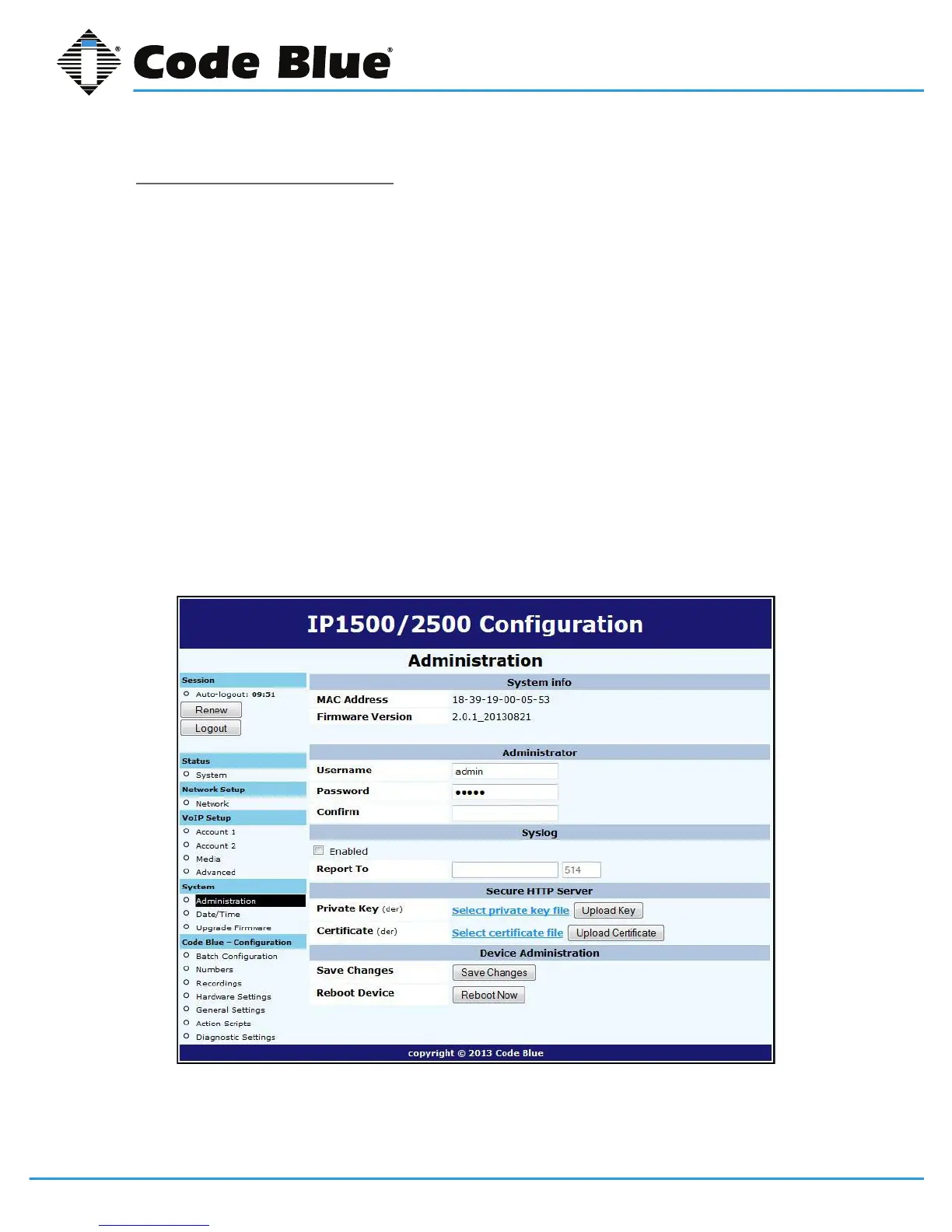
TheAdministrationpageunderSystemcontainsseveralsystemsettings:
• The System InfosectiondisplaystheMACaddressandrmwareversionrunningonthe
IP1500/2500.
• The Administratorsectionallowschangingoftheadministratorusernameandpassword.Enter
anewUsername,ifdesired,andenterthenewPasswordandagainintheConrmboxto
changetheseparameters.
• TheIP1500/2500cansendRFC5424SyslogmessagestoaSyslogserverbyspecifyingitin
theSyslogsection.
NotethatSyslogmessagesareonlyusefulforadvancedtroubleshootingandarenotintended
forgeneralmonitoring.
• AnewprivatekeyandcerticatecanbeuploadedtotheIP1500/2500’sSecure HTTP Server
ifyoudonotwishtousethesystem’sbuilt-inkeyandcerticate.ThekeyshouldbePKCS#8,
DER-formattedandthecerticateX.509,DER-formatted.
Whenyouarenishedmakingchanges,clickSave Changes.Youcanalsorebootthedevicedirect-
lyfromthispagebyclickingReboot Now.



 To Next Page