Code Blue
•
259 Hedcor Street
•
Holland, MI 49423 USA
•
800.205.7186
•
www.codeblue.com
GU-137-Bpage 7 of 40
IP1500/2500
User Guide
LoggingIntoTheSystem
1. Loginusingawebbrowser.
A. PlacetheIPAddressofyourIP1500/2500intotheURLaddressbarandpress
ENTER.
B. Dependingonthebrowserbeingused,acerticatewarningmaypopup.Goahead
andapproveinordertoloadupthelogindialogbox.
C. Enterusername“admin”andpassword“admin”andpressENTER.
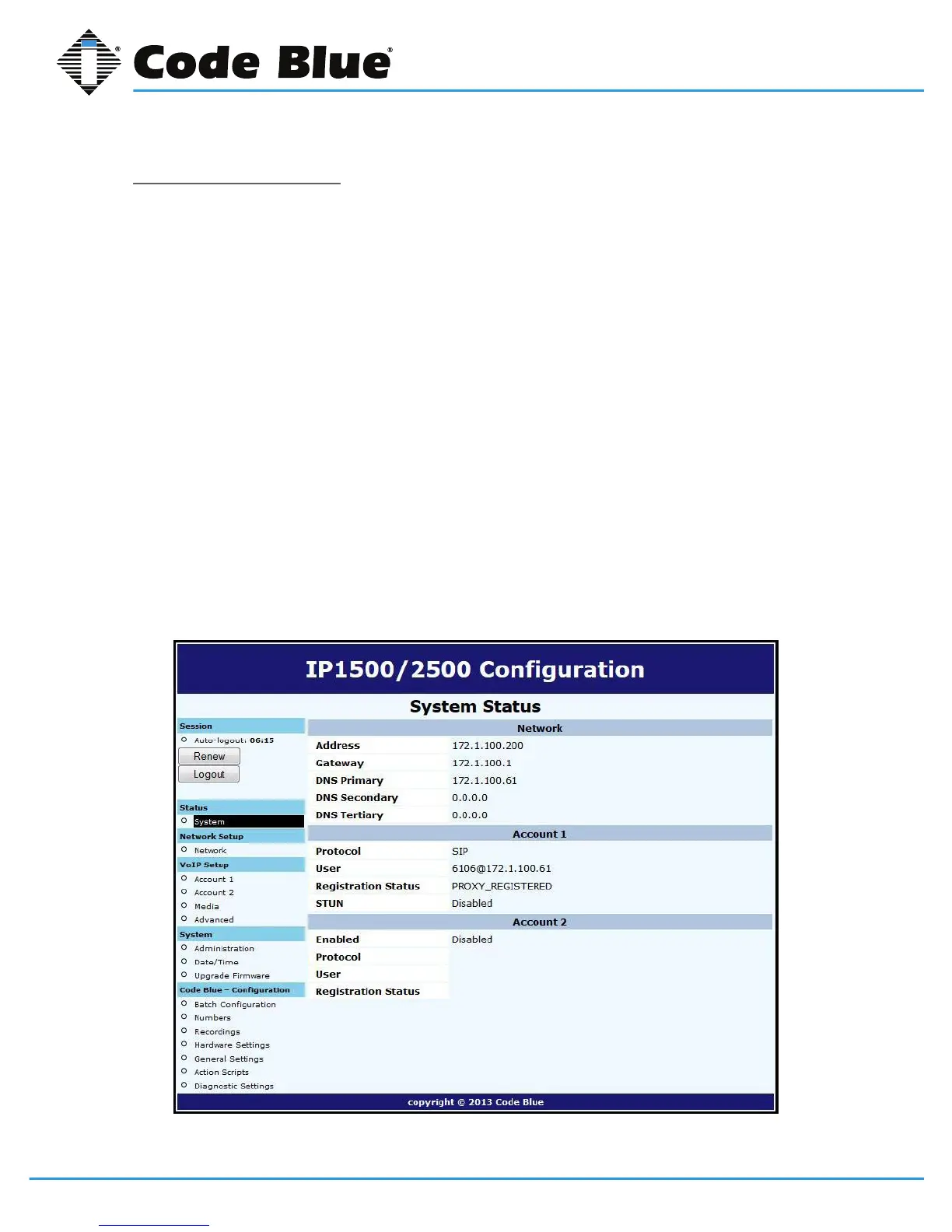
2. SystemStatusScreen.
A. CurrentsessiontimebeforeAuto-Logoutisexecuted.
B. ClickingRenewwillrestartthetimerto10minutes,effectivelykeepingyoulogged
in.Thisstatehelpspreventothersfromlogginginandtakingoverthesession,
therefore
erasinganyunsavedchangesmade.
C. ClickingLogoutwilllogyououtoftheGUI.
D. Network:DisplayscurrentIPaddress,DNSaddress,DNSTertiaryaddress,Account
1’scurrentstatusandAccount2’scurrentstatus.



 To Next Page